COBBLESTONE SOFTWARE
Contract Insight — User Guide
Task Productivity Analysis
03. Admin User Manual › Searching & Reporting › Task Productivity Analysis
Note: Each procedure in this guide begins at the Contract Insight homepage, so any section can be followed on its own. Custom fields are configurable, so the exact field list on a contract category record may vary between environments.
1. Overview
Task productivity can be measured in two places. The saved Task Performance Report ("A report displaying information about completed tasks") under Reports and Insights → Reports lists every completed task with its start, due, and completion dates and how long it took. The Contract Insights dashboards provide the live-analytics counterpart — chiefly the Operations & Activity board ("Throughput & changes") and the Cycle Time board ("How fast we answer"). A set of narrower saved task reports (Tasks Complete, Tasks Due, Tasks Overdue, and others) covers specific slices of the same data.
2. Key Elements
- Reports and Insights → Reports → Task Performance Report: a saved Ad-Hoc report over completed tasks showing the assignee, start date, end/due date, completion date, and days to complete.
- The folder the report is filed under can vary by environment (for example, CSS Standard Reports or Unfiled), so searching the Reports grid by name is the fastest way to find it.
- Reports and Insights → Contract Insights → Operations & Activity: new contracts over the last 12 months, contracts by department, recent status changes, and the status pipeline.
- Reports and Insights → Contract Insights → Cycle Time: how quickly workflow steps are answered — steps answered, median and slow-end answer times, and the slowest responders.
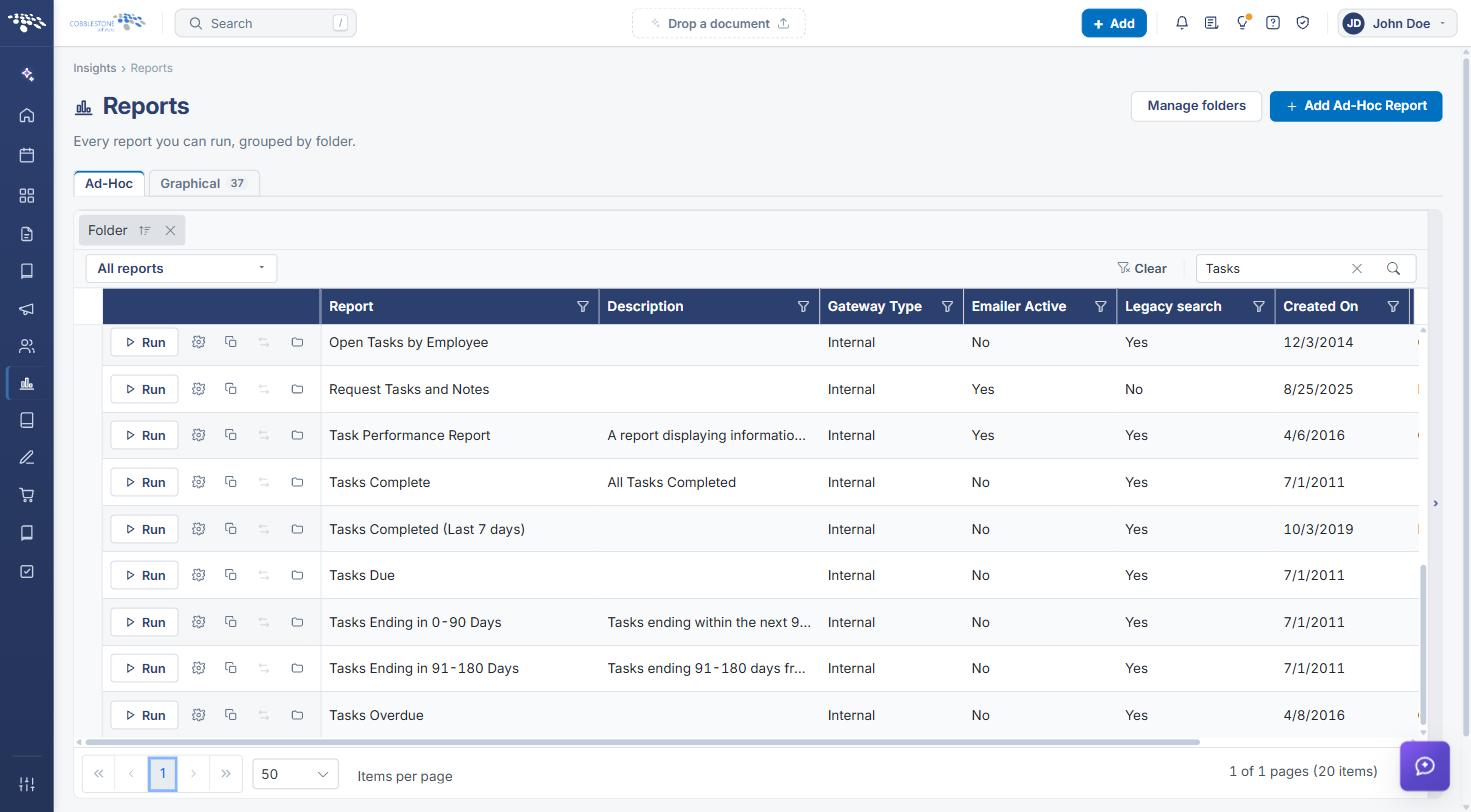
- Narrower task reports include Tasks Complete, Tasks Completed (Last 7 days), Tasks Due, Tasks Overdue, Tasks Ending in 0-90 Days / 91-180 Days, and Open Tasks by Employee.
3. Finding and Running the Task Performance Report
- In the left navigation, click the Reports and Insights icon (bar chart) and select Reports.
- On the Ad-Hoc tab, type Task Performance in the Search box and press Enter.
- Click Run next to Task Performance Report.
4. Reading the Task Performance Report
The report opens in Table view with one row per completed task. Columns include Contract ID, Task Name, First Name, Last Name, Start Date, End/Due Date, Task Complete Date, Days To Complete, Working Days To Complete, Total Task Time (Days), and Total Completion Days.
- Use Group by to roll results up (for example, by assignee or task name).
- Click Chart for a visual summary of the same data.
- Use Export to download the results, or the printer icon to print them.
- Click Manage this report to change its columns or criteria.
.jpg)
5. Viewing Throughput on the Operations & Activity Board
- In the left navigation, click the Reports and Insights icon and select Contract Insights.
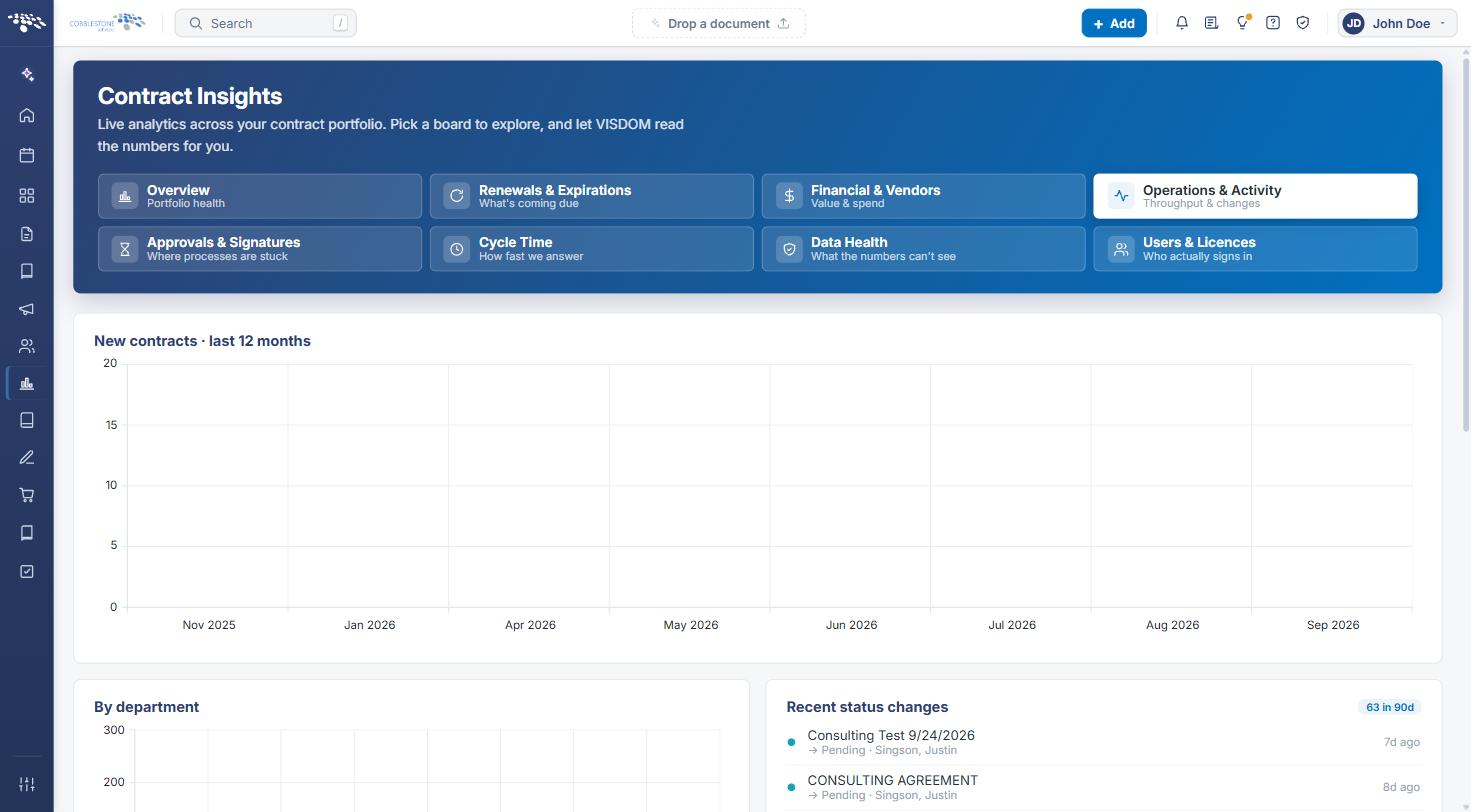
- Click the Operations & Activity tile (Throughput & changes).
The board shows New contracts · last 12 months, contracts By department, Recent status changes (with a count for the last 90 days), and the Status pipeline. Click Summarize this board in the VISDOM briefing panel for an AI-generated summary of risks and next actions.
.jpg)
6. Measuring Response Time on the Cycle Time Board
- In the left navigation, click the Reports and Insights icon and select Contract Insights.
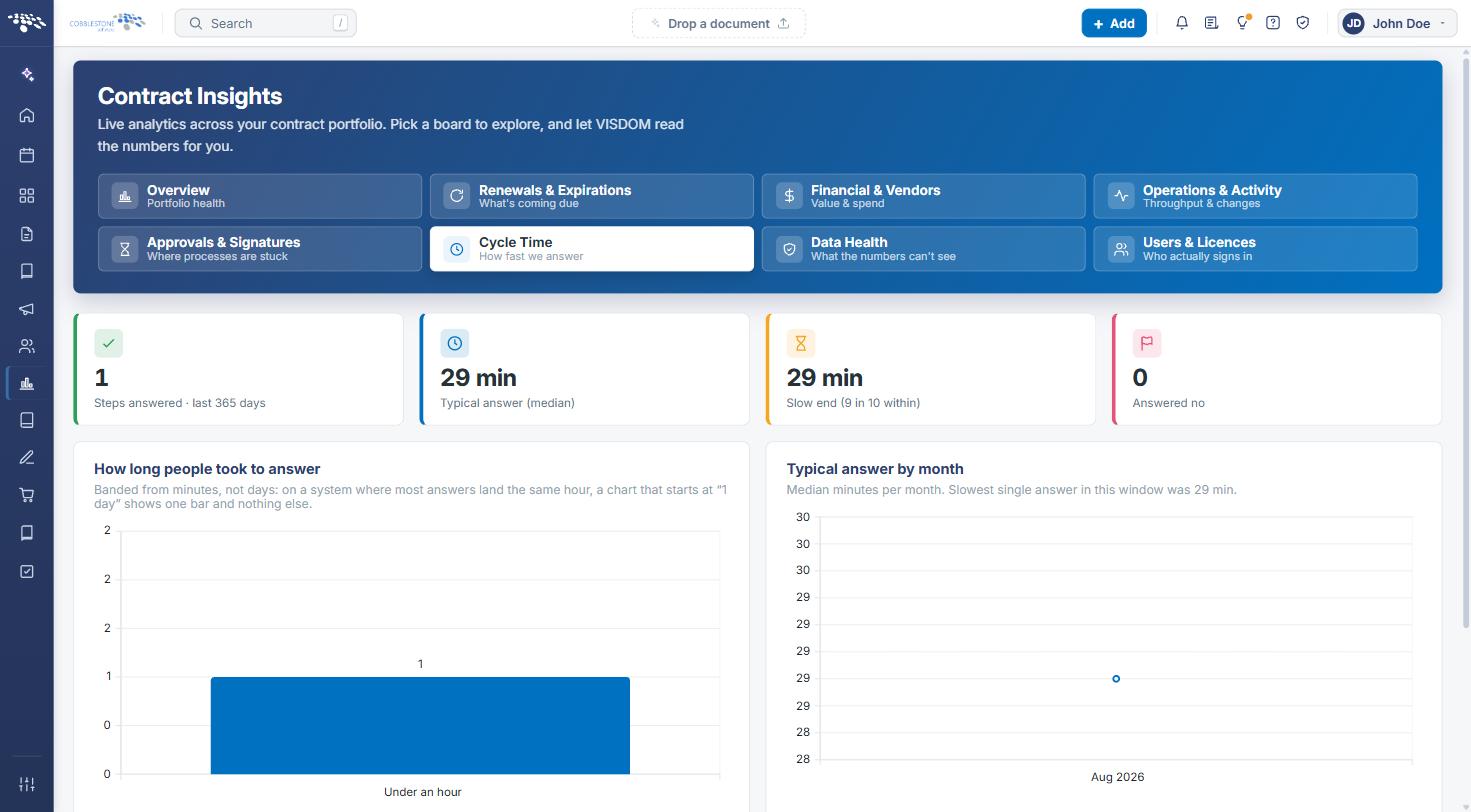
- Click the Cycle Time tile (How fast we answer).
Summary cards show Steps answered (last 365 days), Typical answer (median), Slow end (the time within which 9 in 10 answers land), and Answered no. Below them, How long people took to answer and Typical answer by month chart response times, and Slowest to answer ranks people by their own median (only people with three or more answers are ranked).
7. Running Related Task Reports
- In the left navigation, click the Reports and Insights icon and select Reports.
- On the Ad-Hoc tab, type Tasks in the Search box and press Enter.
- Click Run next to the report you need — for example, Tasks Complete, Tasks Completed (Last 7 days), Tasks Due, Tasks Overdue, or Tasks Ending in 0-90 Days.
8. Quick Reference Summary
| Task | How to Complete It |
|---|---|
| Run the Task Performance Report | Reports and Insights → Reports → search "Task Performance" → Run. |
| Group, chart, or export completed-task results | Open the Task Performance Report → Group by, Chart, or Export. |
| View contract throughput and recent status changes | Reports and Insights → Contract Insights → Operations & Activity. |
| See how quickly workflow steps are answered | Reports and Insights → Contract Insights → Cycle Time. |
| Run a narrower task report (complete, due, overdue, ending) | Reports and Insights → Reports → search "Tasks" → Run the report you need. |