COBBLESTONE SOFTWARE
Contract Insight — User Guide
Tab Content
03. Admin User Manual › Record Details Tab Setup › Tab Content
Note: Each procedure in this guide begins at the Contract Insight homepage, so any section can be followed on its own. Custom fields are configurable, so the exact field list on a contract category record may vary between environments.
1. Overview
Within Tab Details Setup, each tab's content is a set of "docks": the panels and field groups that actually populate the tab on a record page. For example, the Record Details tab holds a single dock, while the Linked Records tab holds several. Tabs are listed in the order they appear on the record, can be reordered by dragging, and are expanded one at a time to add, edit, reorder, or remove the docks inside them. Layouts are set per Area and Record type.
2. Key Elements
- Area and Record type: choose which layout you are editing. Record types that have no layout of their own show "uses Default". Reset to default returns the selected record type to the default layout.
- New tab name, the tab type (Docks tab or Report Designer tab), and Add tab: create a new tab.
- Each tab row shows its type badge and dock count (for example, Subtables, Docks, 5 docks), plus a drag handle (⠿), an expand arrow (▸), Rename / edit (pencil), and Remove (✕).
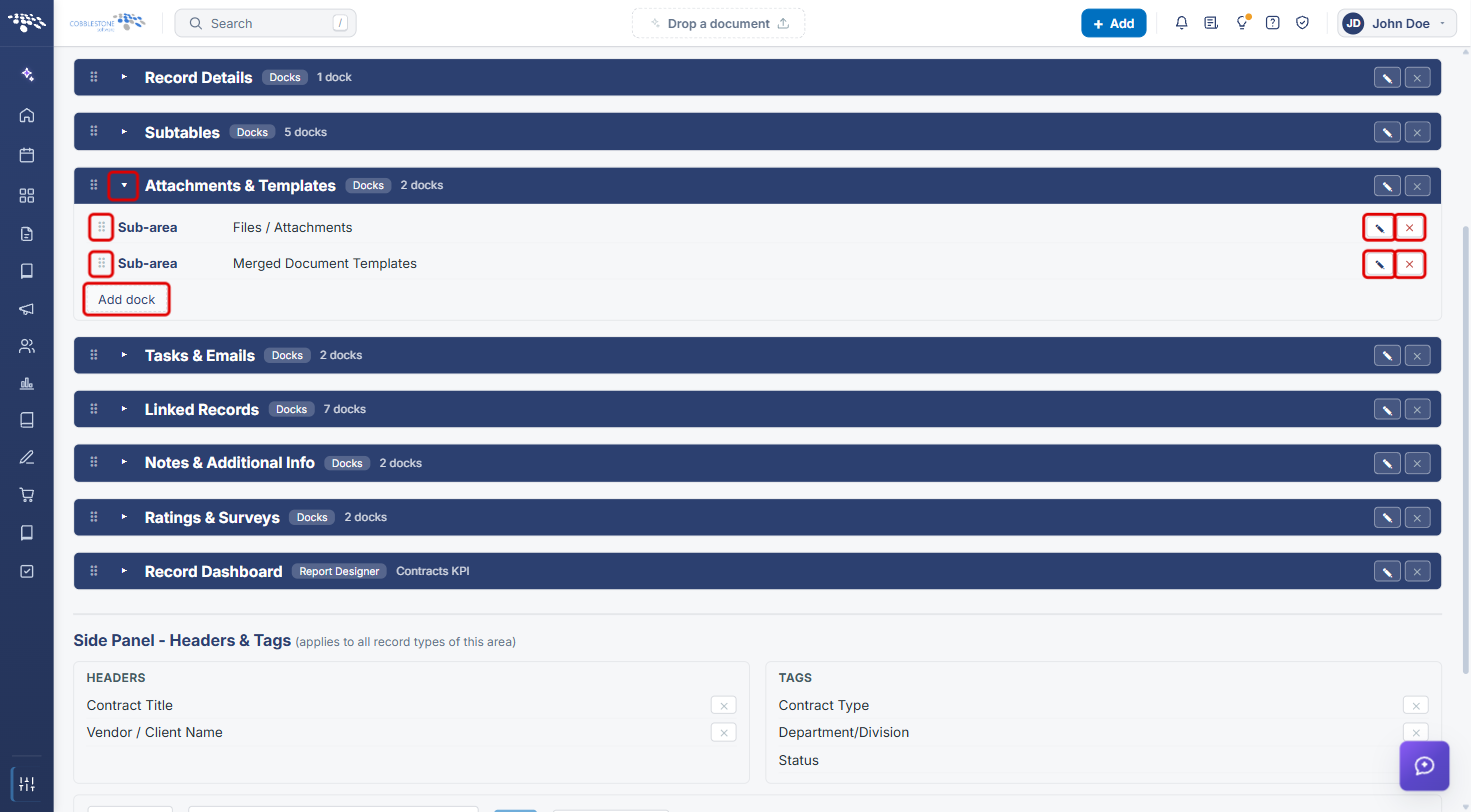
- An expanded tab lists its docks, each with a drag handle, Edit (pencil), and Delete dock (✕), plus an Add dock button.
- Dock types: All Fields, Specific Field Group, All Subtables, Sub-area, Static Text, and Record Notifications.
3. Navigating to Tab Details Setup
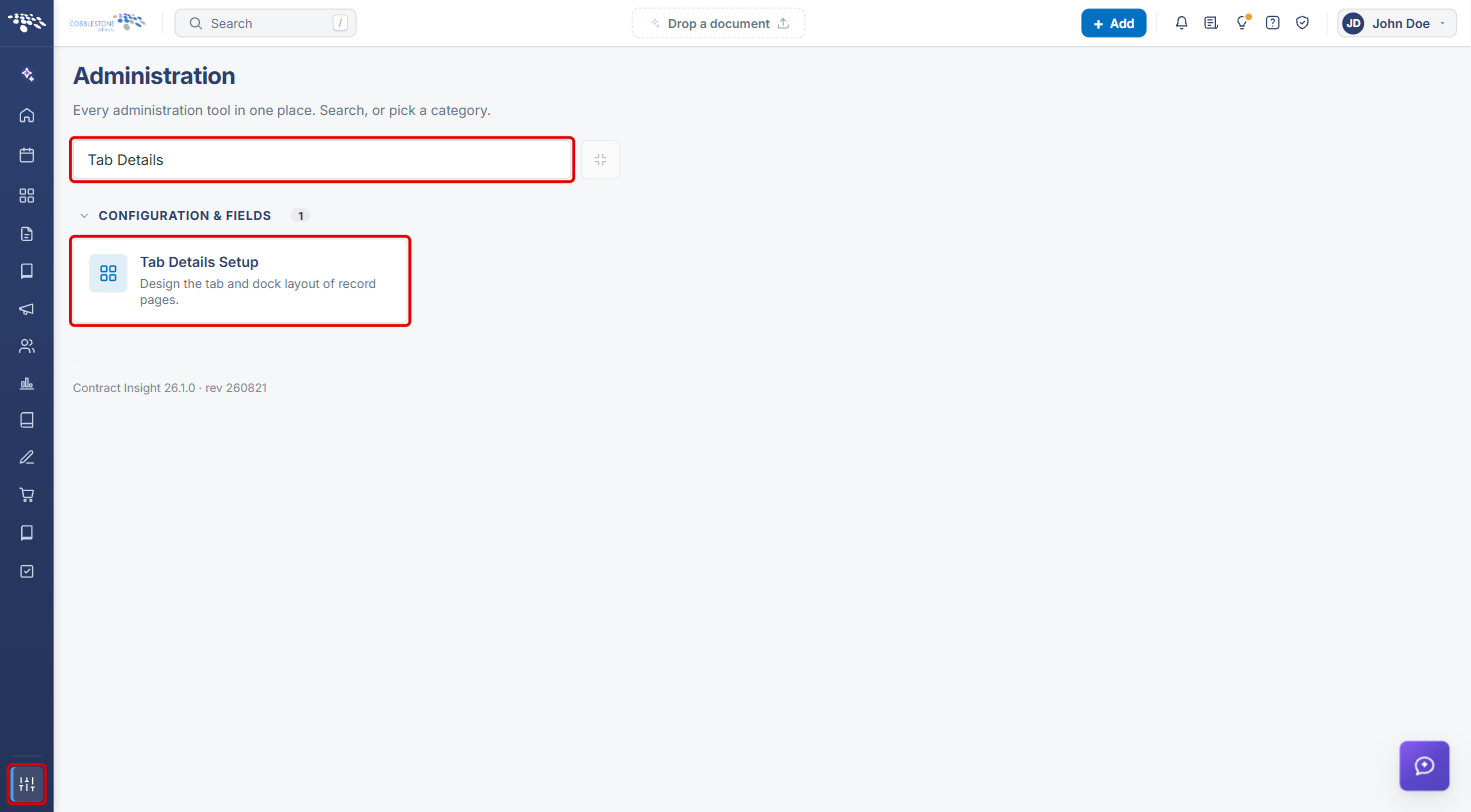
- From the Contract Insight homepage, click the Administration icon at the bottom of the left navigation bar.
- In the Search administration box, type Tab Details (or scroll to the Configuration & Fields category).
- Click the Tab Details Setup tile.
4. Selecting the Area and Record Type
- On the Tab Details Setup page, select an Area (Contracts, Requests, Solicitations, Purchase Orders, Vendors / Customers, or Employees).
- Select a Record type. Default (0) is the layout every record type uses unless it has its own; record types marked "uses Default" inherit it.
- The tabs for that layout are listed below, in the order they appear on the record.
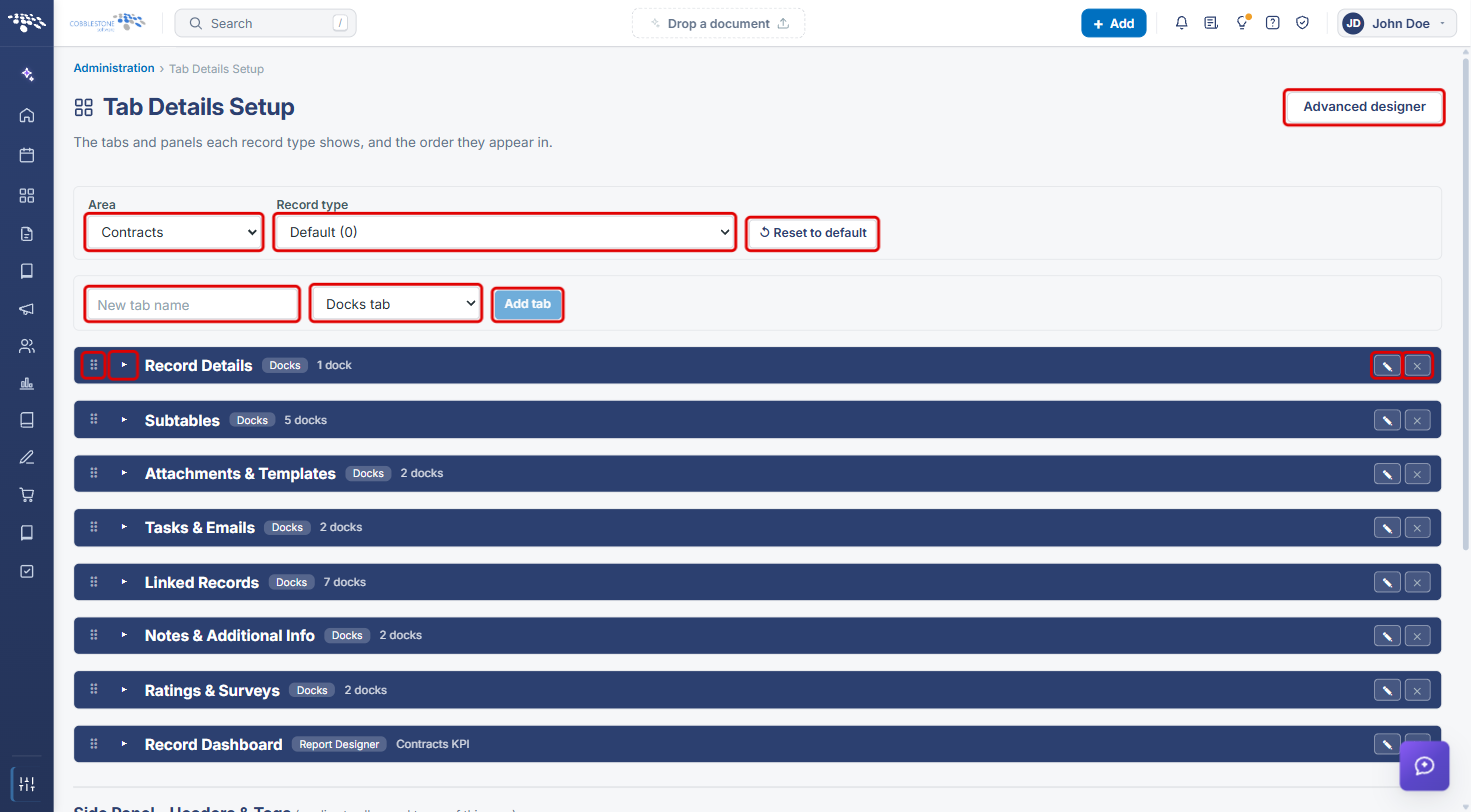
Note: Reset to default returns the selected record type to the default layout, so use it only when you want to undo that record type's customizations. The Advanced designer button (top right) opens the advanced layout designer.
5. Adding a Tab
- Select the Area and Record type (see Section 4).
- Enter a name in New tab name.
- Choose the tab type: Docks tab (holds docks you add) or Report Designer tab (shows a single dashboard; see Section 8).
- Click Add tab. The new tab appears in the list, ready for docks to be added (see Section 6b).
The tab-creation controls are shown in the screenshot in Section 4.
6. Managing a Tab's Docks
6a. Viewing a Tab's Docks
- Click the expand arrow (▸) on a tab row to open its dock list.
- Each dock shows its type (for example, Sub-area) and what it displays (for example, Files / Attachments).
6b. Adding a Dock
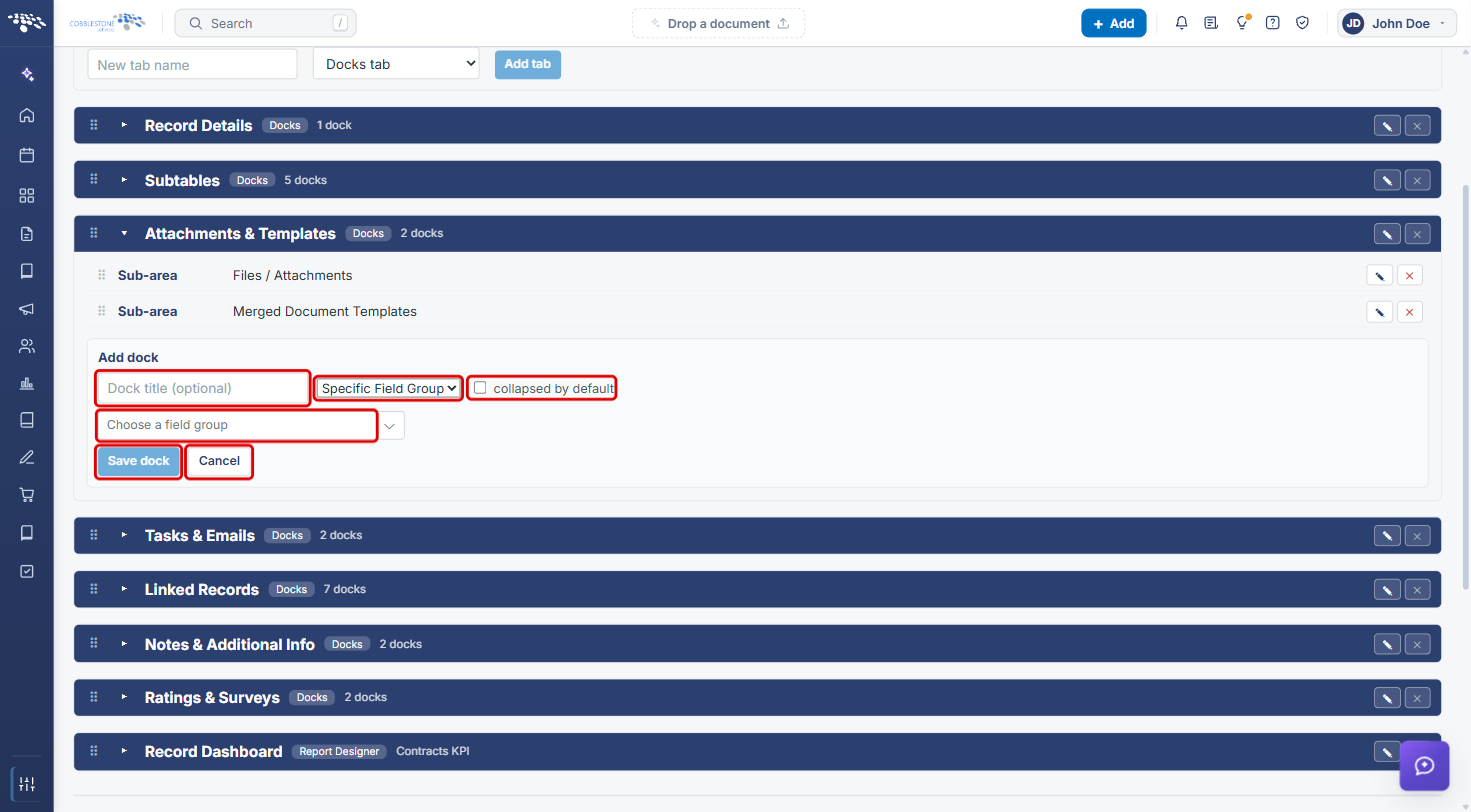
- Expand the tab and click Add dock.
- Optionally, enter a Dock title.
- Select the dock type: All Fields, Specific Field Group, All Subtables, Sub-area, Static Text, or Record Notifications.
- Complete the field that appears for the chosen type. For example, Specific Field Group shows Choose a field group, and Sub-area shows Choose a panel or list.
- Check collapsed by default if the dock should start collapsed on the record.
- Click Save dock, or Cancel to discard it.
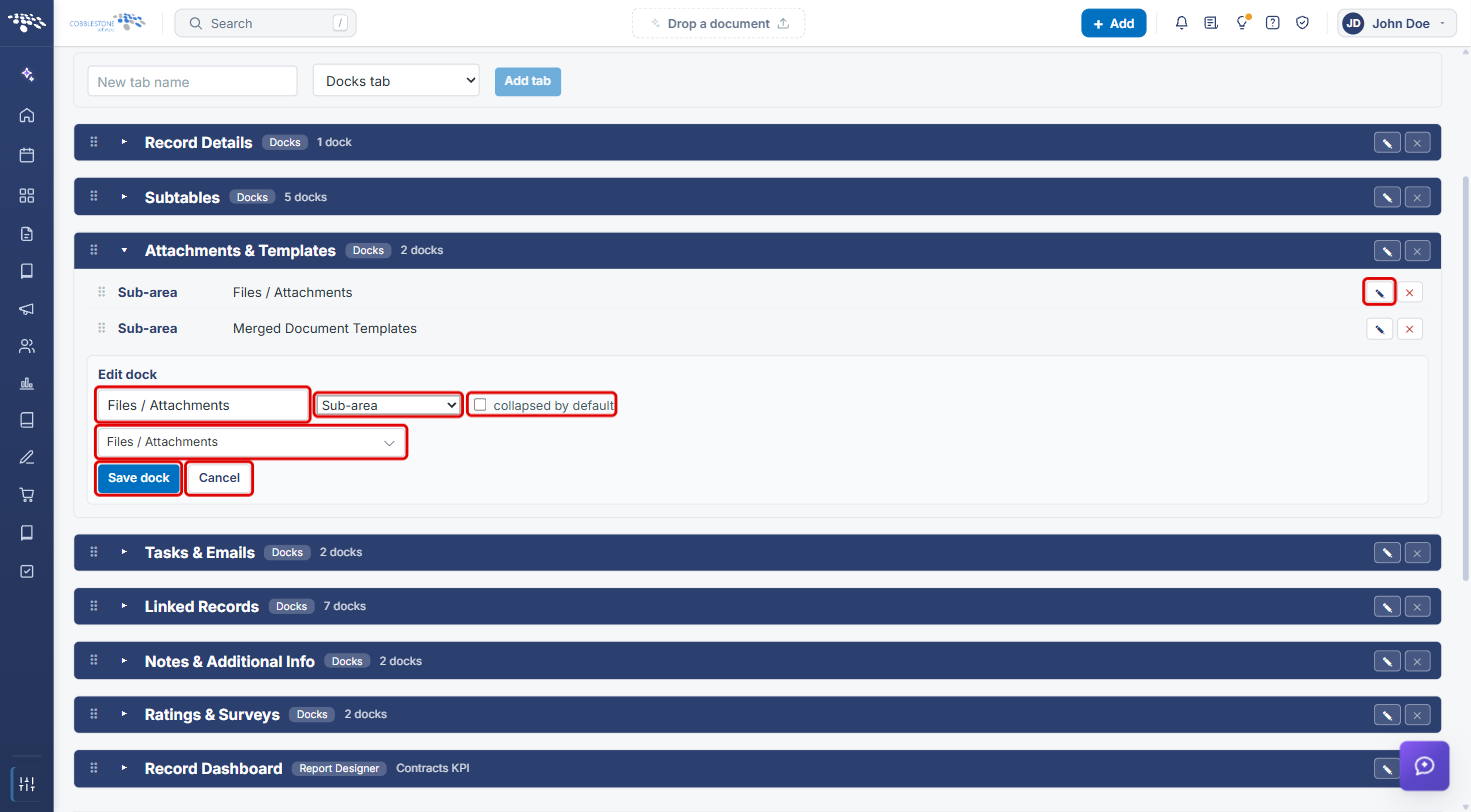
6c. Editing a Dock
- Expand the tab and click the Edit (pencil) icon on the dock's row.
- In the Edit dock form, change the title, dock type, panel or field group, or collapsed by default setting.
- Click Save dock, or Cancel to leave the dock unchanged.
6d. Reordering and Removing Docks
- To reorder docks within a tab, drag a dock by its drag handle (⠿), or focus the handle and use the arrow keys.
- To remove a dock, click its Delete dock (✕) icon.
These controls are shown in the screenshot in Section 6a.
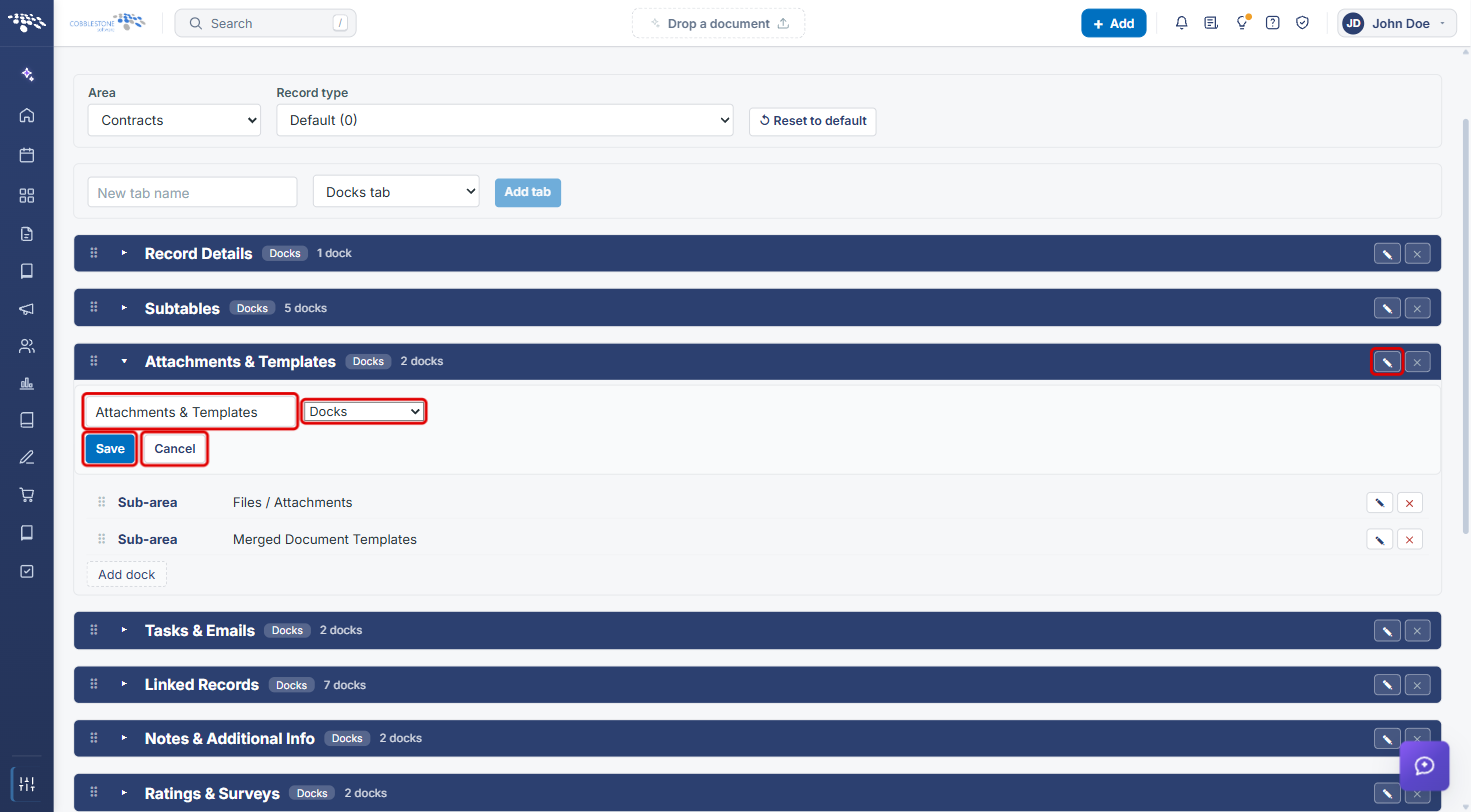
7. Renaming or Changing a Tab
- Click the Rename / edit (pencil) icon on the tab row.
- Edit the Tab name and, if needed, change the tab type (Docks or Report Designer).
- Click Save, or Cancel to keep the tab as it was.
To change the order of tabs on the record, drag a tab row by its drag handle (⠿), or focus the handle and use the arrow keys.
8. Report Designer Tabs
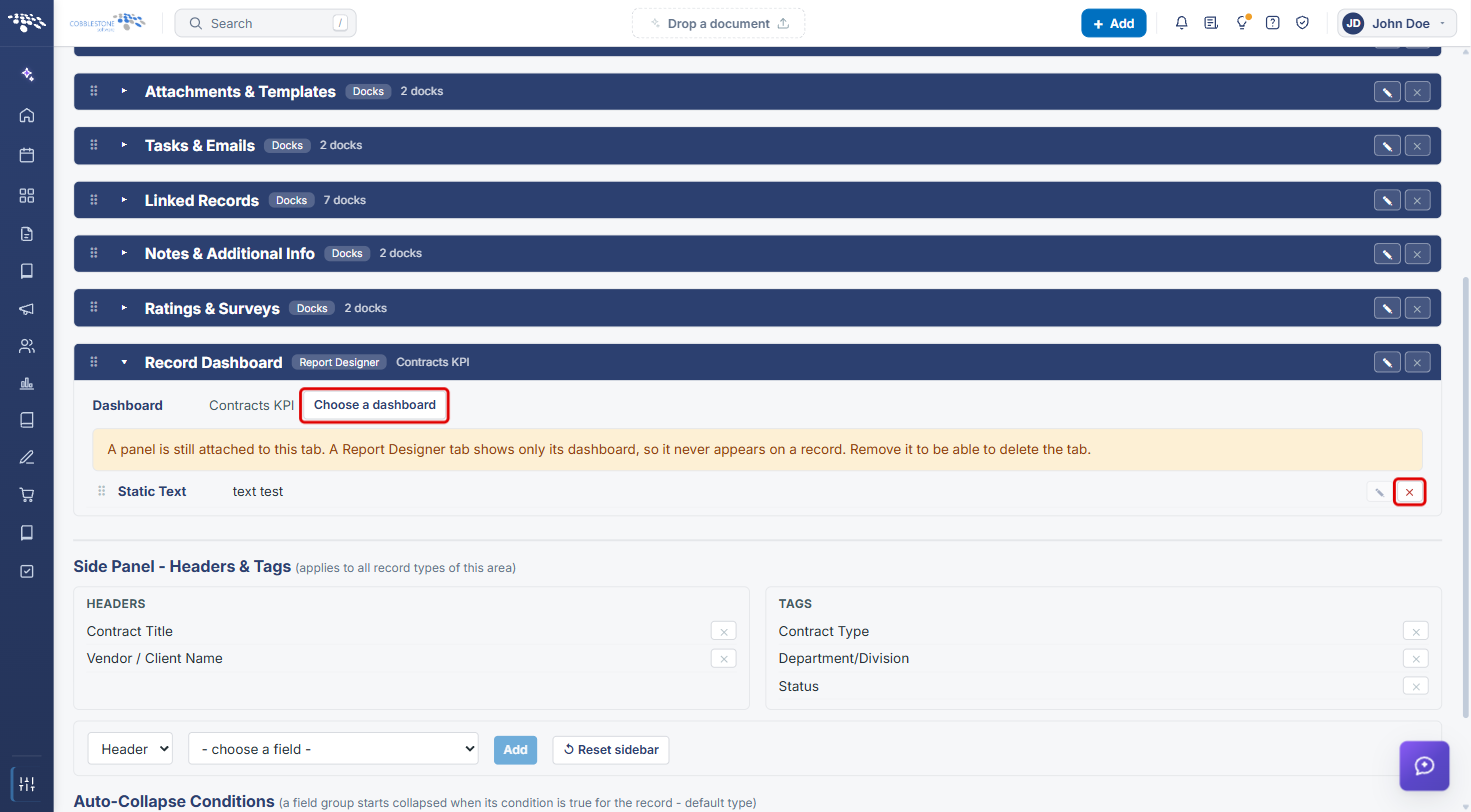
A Report Designer tab (for example, Record Dashboard) shows a single dashboard instead of docks.
- Expand the tab and click Choose a dashboard to select the dashboard it shows.
- If the tab still has a dock attached, a warning explains that the dock never appears on a record. Click the dock's Delete dock (✕) icon to remove it.
9. Removing a Tab
- Expand the tab and delete each of its docks (see Section 6d).
- Click the tab's Remove (✕) icon.
Note: A tab's Remove icon is unavailable while the tab still has docks; hovering over it shows "Remove its docks first."
10. Quick Reference Summary
| Task | How to Complete It |
|---|---|
| Open Tab Details Setup | Administration icon → search Tab Details → Tab Details Setup. |
| Choose a layout to edit | Select the Area and Record type. |
| Add a tab | Enter a New tab name → choose Docks tab or Report Designer tab → Add tab. |
| See a tab's docks | Click the tab's expand arrow (▸). |
| Add a dock | Expand the tab → Add dock → choose type and content → Save dock. |
| Edit a dock | Dock's pencil icon → update → Save dock. |
| Reorder tabs or docks | Drag by the ⠿ handle, or focus it and use the arrow keys. |
| Rename a tab | Tab's pencil icon (Rename / edit) → edit name → Save. |
| Set a dashboard tab's content | Expand the Report Designer tab → Choose a dashboard. |
| Remove a tab | Delete all its docks → tab's ✕ icon. |
| Return a record type to the default layout | Reset to default. |