COBBLESTONE SOFTWARE
Contract Insight — User Guide
Record Details Tab Configuration Overview
03. Admin User Manual › Record Details Tab Setup › Record Details Tab Configuration Overview
Note: Each procedure in this guide begins at the Contract Insight homepage, so any section can be followed on its own. Custom fields are configurable, so the exact field list on a contract category record may vary between environments.
1. Overview
Tab Details Setup (“Design the tab and dock layout of record pages”) controls the tabs and panels each record type shows, and the order they appear in. For a chosen Area and Record type, it lists every tab on the record page (for example Record Details, Subtables, Attachments & Templates, Tasks & Emails, Linked Records, Notes & Additional Info, Ratings & Surveys, and Record Dashboard). Each tab holds one or more docks that group related fields and widgets.
The page also manages the record's Side Panel headers and tags and any Auto-Collapse Conditions. An Advanced designer offers a visual, drag-and-drop view of the same layout.
2. Key Elements
- Area and Record type selectors: choose which layout you are editing. Record types marked “uses Default” have no layout of their own and follow the Default layout.
- Reset to default: restores the shipped (out-of-the-box) layout for the selected area and record type.
- New tab name, tab type (Docks tab or Report Designer tab), and Add tab: create a new tab.
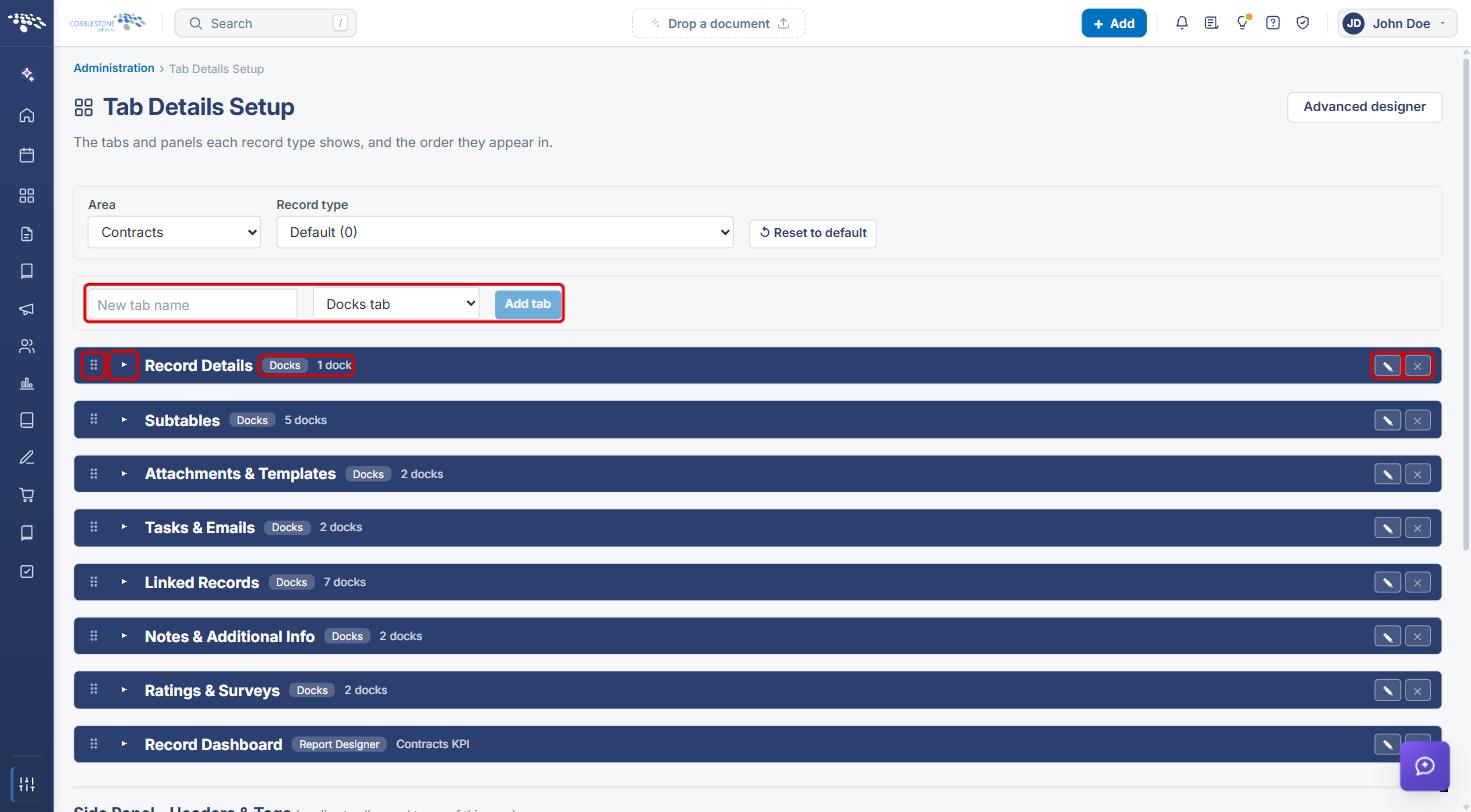
- Each tab row shows a drag handle to reorder it, an expand arrow, its type badge and dock count, and Rename / edit and remove buttons. A tab can be removed only after its docks are removed.
- Inside an expanded tab, each dock can be reordered, edited with Edit, or removed with Delete dock. Add dock adds a new one.
- Side Panel – Headers & Tags applies to all record types in the area. Auto-Collapse Conditions start a field group collapsed when a condition is true.
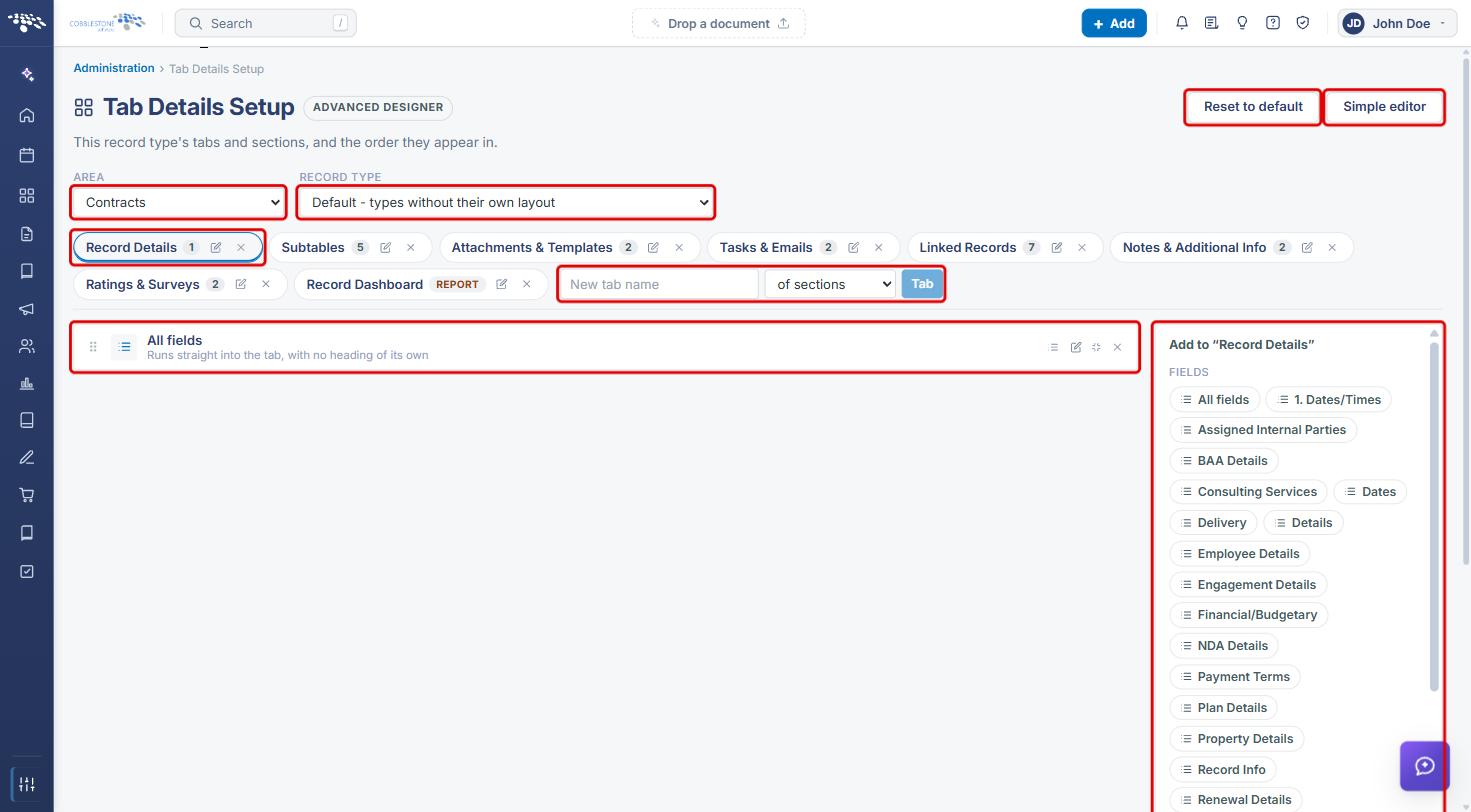
- Advanced designer: a visual editor for tabs and sections. Click Simple editor to return.
3. Navigating to Tab Details Setup
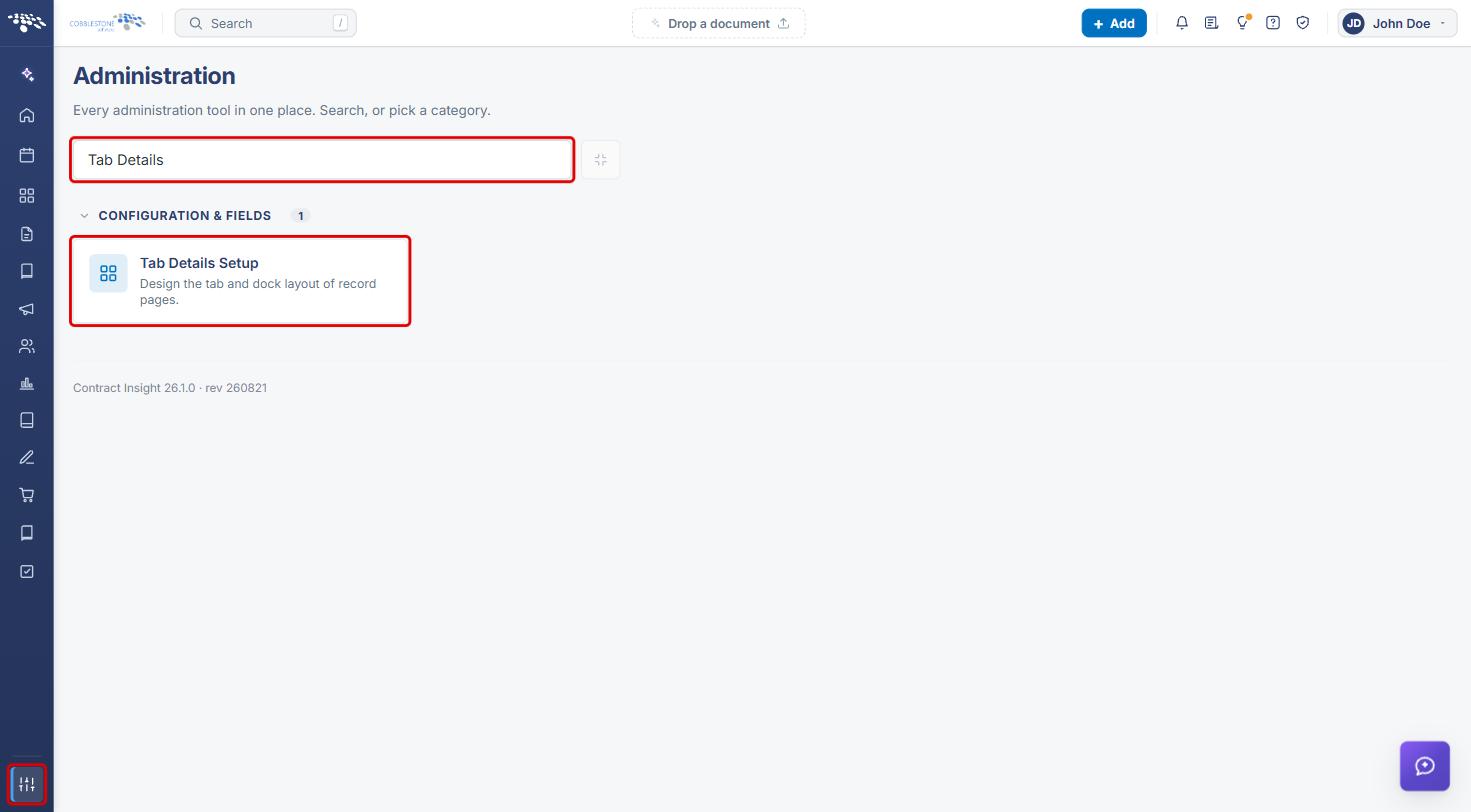
- From the Contract Insight homepage, click the Administration icon at the bottom of the left navigation bar.
- In the Search administration box, type Tab Details (or scroll to the Configuration & Fields category).
- Click Tab Details Setup.
4. Selecting the Layout to Edit
- Select the Area: Contracts, Requests, Solicitations, Purchase Orders, Vendors / Customers, or Employees.
- Select the Record type. Choose Default to edit the layout shared by every type that doesn't have its own, or pick a specific type.
- The tabs for that layout load below. To undo all customizations for this area and record type, click Reset to default.
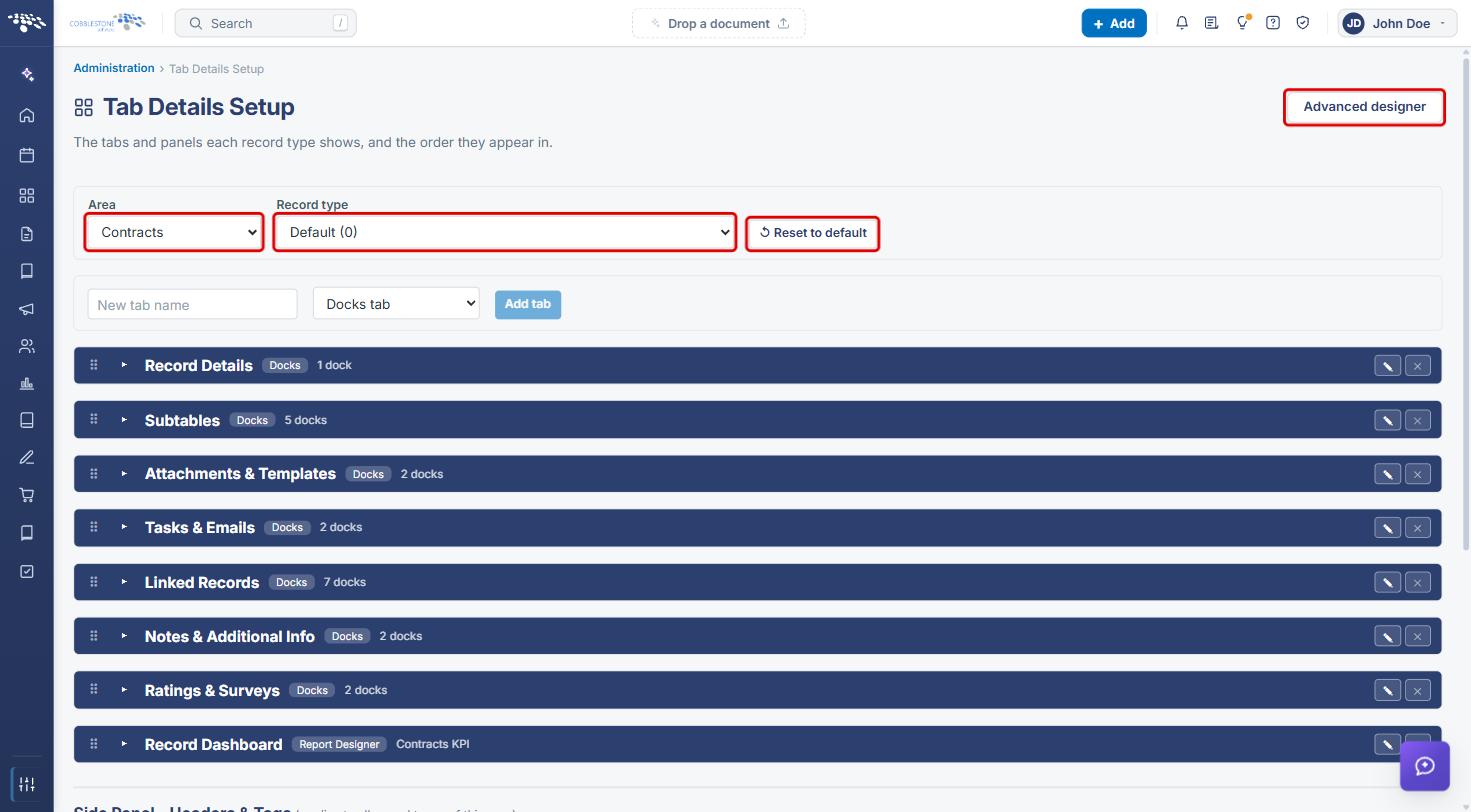
Note: Changes made to the Default record type affect every record type marked “uses Default.”
5. Working with Tabs
5a. Adding a Tab
- Enter a name in New tab name.
- Choose the tab type: Docks tab (holds docks of fields and widgets) or Report Designer tab (shows a record-level dashboard; see the Record Level Dashboards article).
- Click Add tab.
5b. Reordering, Expanding, and Removing Tabs
- Drag a tab by its handle (⠿) to change its position on the record page. You can also focus the handle and use the arrow keys.
- Click the arrow (▸) to expand a tab and see its docks. The badge shows the tab type and the number of docks.
- Click the × button to remove a tab. A tab must have no docks before it can be removed.
5c. Renaming a Tab
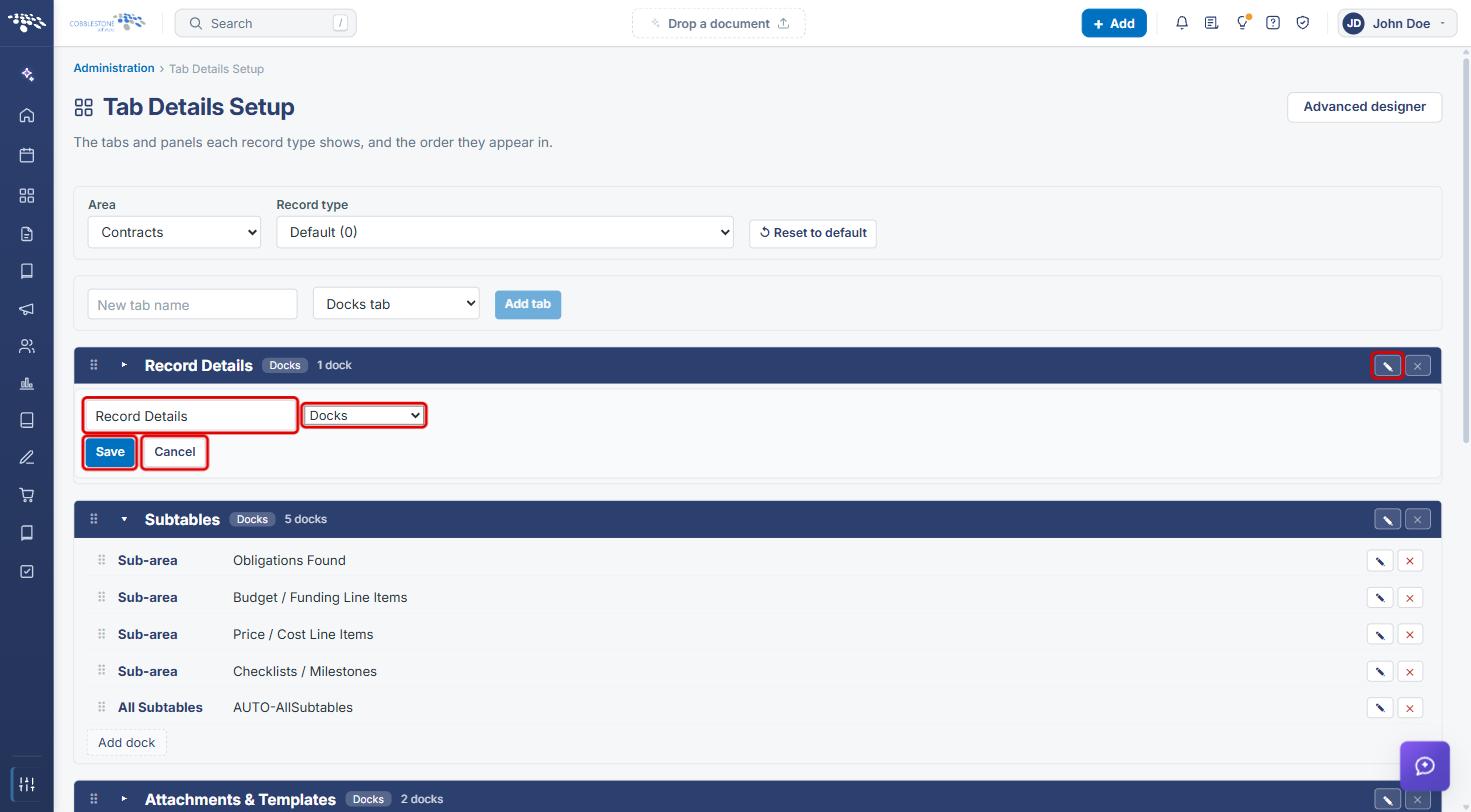
- Click the Rename / edit (pencil) button on the tab row.
- Update the tab name and, if needed, the tab type.
- Click Save, or click Cancel to discard the change.
6. Working with Docks
- Click the arrow (▸) on a tab to expand it. Each dock shows its type (for example Sub-area or All Subtables) and name.
- Drag a dock by its handle to reorder it within the tab.
- Click Edit (pencil) to change a dock, or Delete dock (red ×) to remove it.
- Click Add dock to add a new dock to the tab.
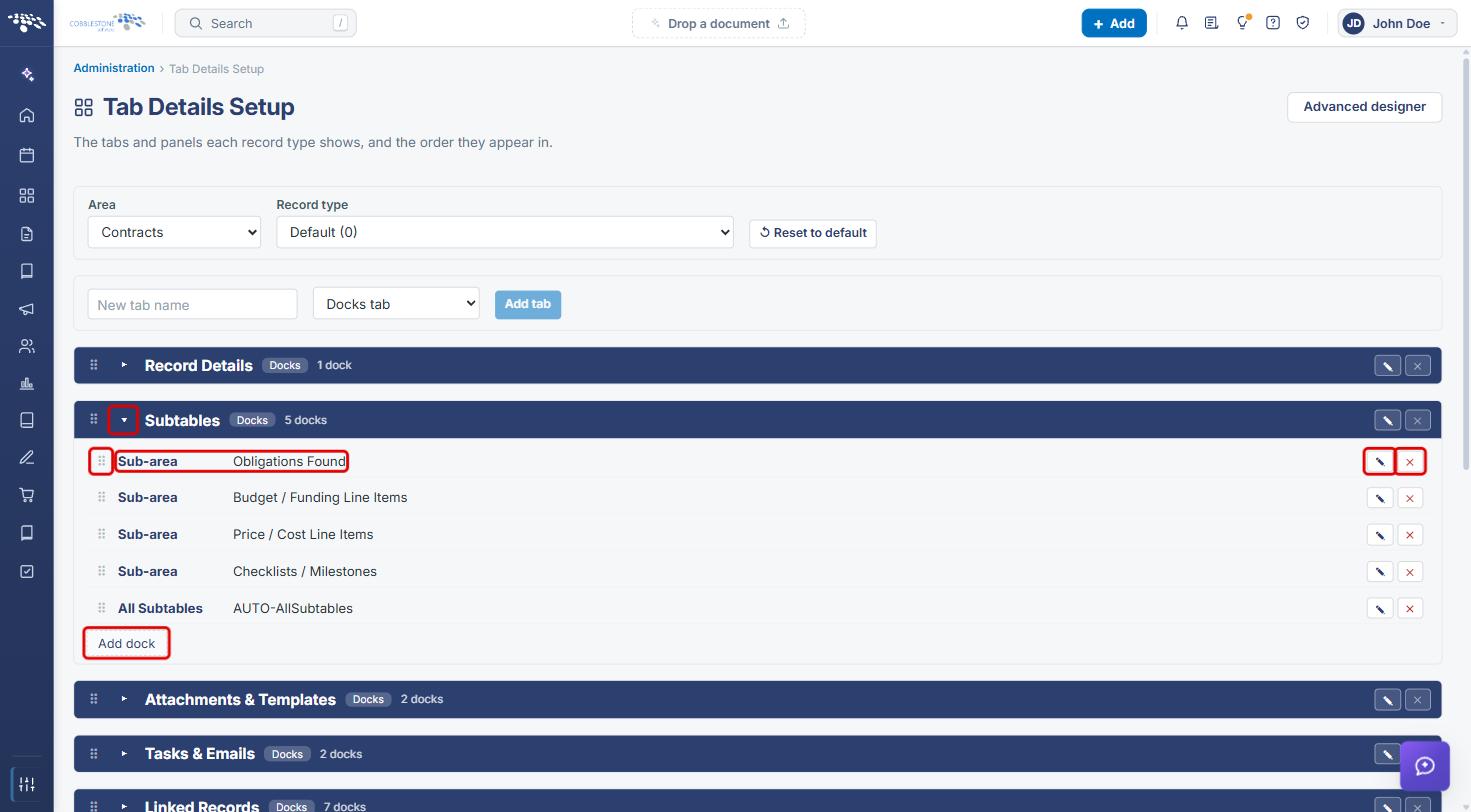
See the Tab Content article for details on what each dock type can contain.
7. Side Panel and Auto-Collapse Conditions
Scroll below the tab list to configure these settings.
- Side Panel – Headers & Tags applies to all record types in the area. The Headers and Tags lists show the fields currently displayed; click × to remove one.
- To add one, choose Header or Tag, choose a field, and click Add. Click Reset sidebar to restore the default side panel.
- Under Auto-Collapse Conditions, choose a field group, a field, an operator (equals, not equals, contains, greater than, less than, is empty, is null, is not null), and a value, then click Add rule. The field group starts collapsed on records where the condition is true.
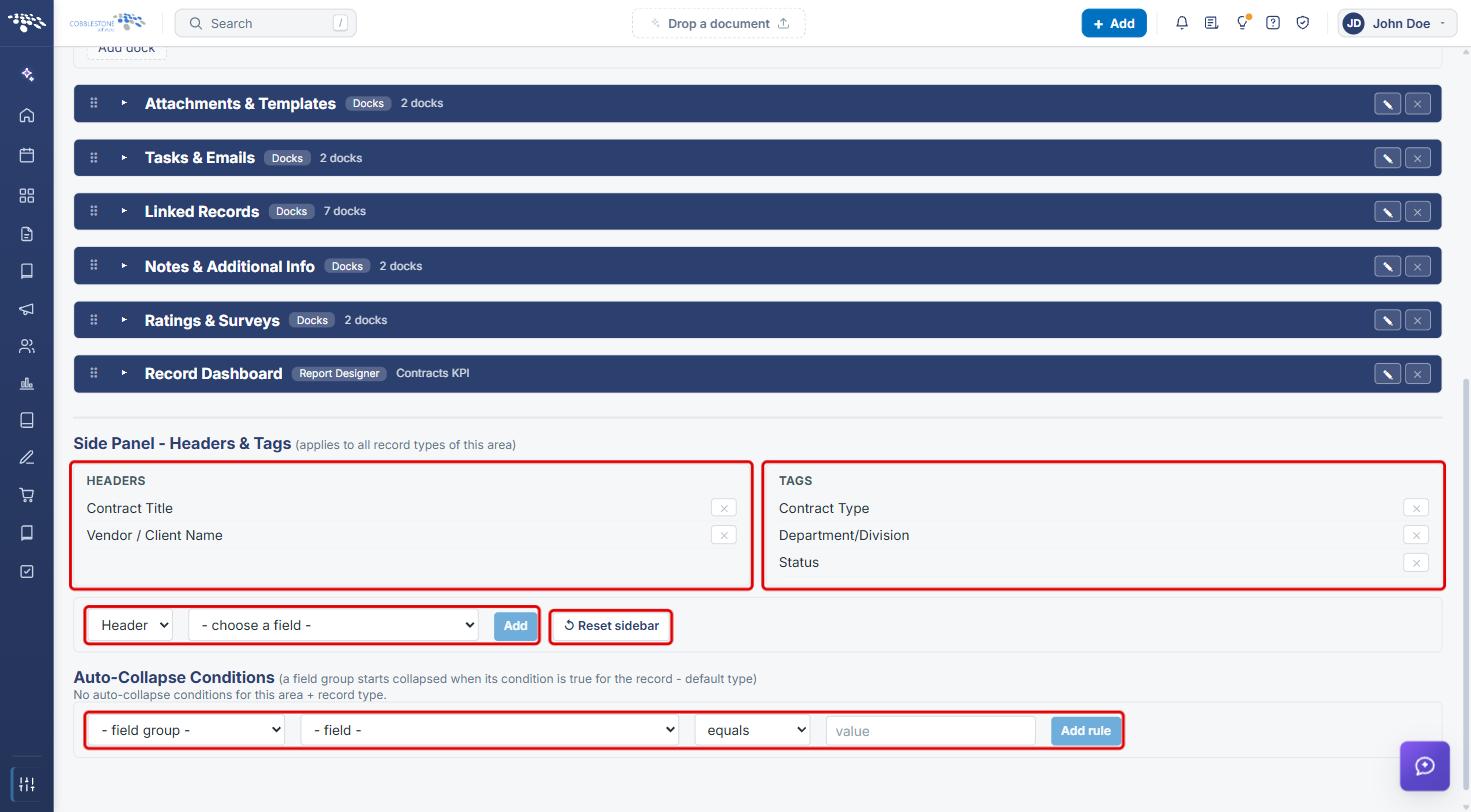
See the Side Panel Info article for more on side panel configuration.
8. Using the Advanced Designer
- On Tab Details Setup, click Advanced designer (top right).
- Confirm the Area and Record type.
- Click a tab chip (for example Record Details) to select it. Each chip shows its section count and has edit and remove icons. To add a tab, enter a New tab name, choose its type, and click Tab.
- The selected tab's sections appear in the center. Drag them to reorder, and use each section's icons to manage its fields, set it to start collapsed, or remove it.
- Use the Add to “[tab name]” panel on the right to add Fields, Lists, Panels, and Other items (such as Notifications or a Text block) to the selected tab.
- Click Simple editor to return to the list view, or Reset to default to restore the shipped layout.
9. Quick Reference Summary
| Task | How to Complete It |
|---|---|
| Open Tab Details Setup | Administration → search “Tab Details” → Tab Details Setup. |
| Choose a layout | Select the Area and Record type (Default applies to all types without their own layout). |
| Add a tab | New tab name → Docks tab or Report Designer tab → Add tab. |
| Reorder tabs or docks | Drag the ⠿ handle (or focus it and use the arrow keys). |
| Rename a tab | Pencil icon on the tab row → edit name → Save. |
| Remove a tab | Remove its docks first → × on the tab row. |
| Add, edit, or delete a dock | Expand the tab (▸) → Add dock, Edit (pencil), or Delete dock (×). |
| Change side panel headers/tags | Side Panel – Headers & Tags → Header/Tag → field → Add. |
| Collapse a field group by condition | Auto-Collapse Conditions → field group, field, operator, value → Add rule. |
| Design visually | Advanced designer → select a tab → add or arrange sections → Simple editor to return. |
| Restore the shipped layout | Reset to default. |