COBBLESTONE SOFTWARE
Contract Insight — User Guide
Side Panel Info
03. Admin User Manual › Record Details Tab Setup › Side Panel Info
Note: Each procedure in this guide begins at the Contract Insight homepage, so any section can be followed on its own. Custom fields are configurable, so the exact field list on a contract category record may vary between environments.
1. Overview
The right-hand side panel shown on every record is configured from Administration › Record Sidebar Widgets, which lets an administrator "choose which widgets show in the right-hand panel of a record, and whether each one appears always or only when it has something to show." Widgets are set per Record type (Contracts, Requests, Solicitations, Purchase Orders, Vendors / Customers or Employees) and Applies to scope (for example, All Contracts types or a single contract type). Each widget can be set to Always, When it has content or Hidden, and dragged to change its order.
The available widgets are Record summary (the record's headline fields), Notices and alerts (workflow alerts, validation warnings and open tasks), Current record stage, Risk register, Related records, Status history and Sections (a jump list of the record's field groups and sub-tables). The fields shown in the Record summary, its Headers and Tags, are set in Administration › Tab Details Setup.
2. Key Elements
- Record Sidebar Widgets (Administration): Record type and Applies to drop-downs, a list of widgets with drag handles (⠿), an Always / When it has content / Hidden setting for each widget, and Reset to defaults.
- Record summary: the record's headline fields, using the Headers and Tags configured under Tab Details Setup. On a contract it appears as Contract summary.
- Notices and alerts: counts for Record, Budget, Workflow and Task alerts on the record.
- Current record stage: where the record sits in its configured stage pipeline.
- Risk register: risk warnings and risk entries for the record, with + Add risk.
- Related records: links to the company, request or other records connected to this one.
- Status history: every status the record has moved through, newest first, with History and Time in status views.
- Sections: a jump list of the record's field groups and sub-tables, with a Filter sections box.
- Tab Details Setup › Side Panel - Headers & Tags: chooses the Headers and Tags shown in the Record summary for every record type in an area.
3. Navigating to Record Sidebar Widgets
- From the Contract Insight homepage, click the Administration icon at the bottom of the left navigation bar.
.jpg)
- On the Administration page, under Configuration & Fields, click Record Sidebar Widgets.
.jpg)
4. Configuring Side Panel Widgets
- From Record type, choose the area to configure: Contracts, Requests, Solicitations, Purchase Orders, Vendors / Customers or Employees.
- From Applies to, choose whether the settings apply to all types in that area (for example, All Contracts types) or to one specific type.
- For each widget, click Always, When it has content or Hidden.
- To change the order of the widgets in the side panel, drag a widget by its handle (⠿) to a new position.
- To undo your customizations, click Reset to defaults.
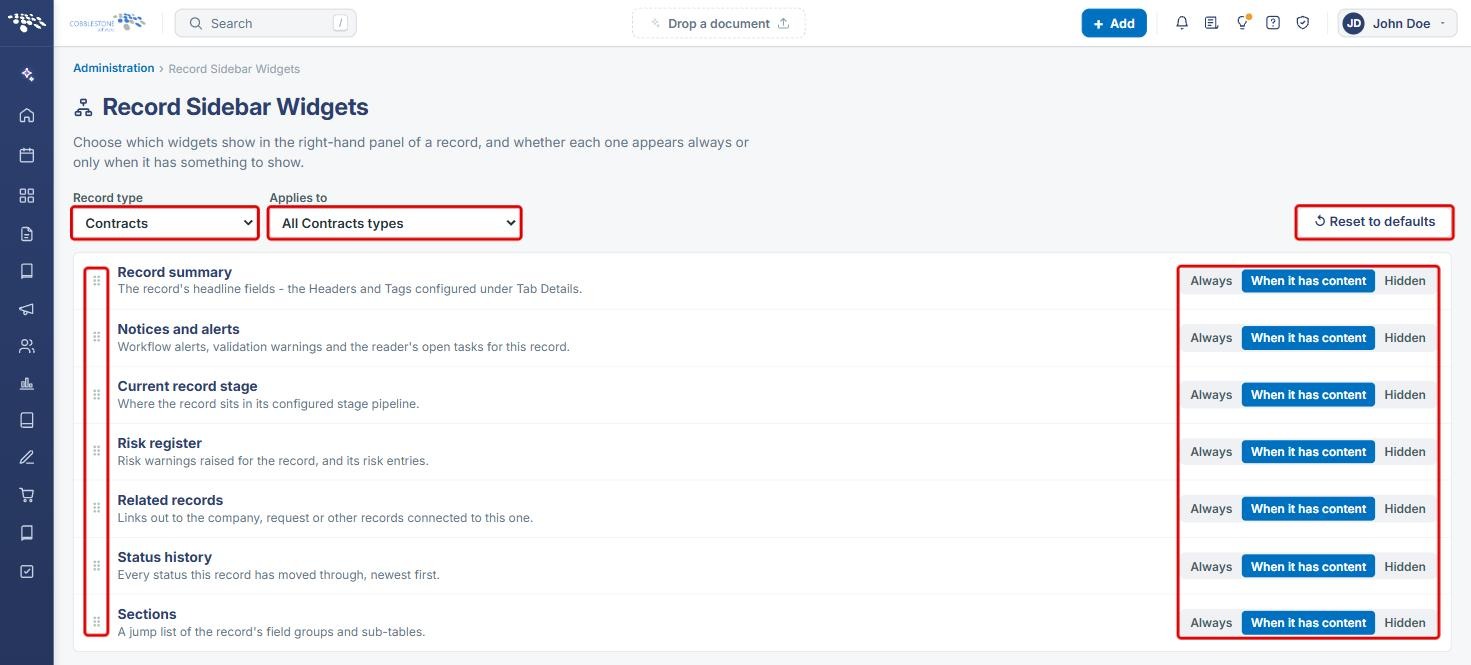
Note: This screen has no separate save button. Check the record's side panel after making changes to confirm the result.
5. Configuring Side Panel Headers and Tags
- On the Administration page, under Configuration & Fields, click Tab Details Setup (shown in the screenshot in Section 3).
- Choose the Area (for example, Contracts) and scroll to Side Panel - Headers & Tags. These settings apply to all record types in the area.
- Review the current Headers and Tags. Click the x next to a field to remove it.
- To add a field, choose Header or Tag from the first drop-down, choose a field from - choose a field -, and click Add.
- To return to the default fields, click Reset sidebar.

6. Viewing the Side Panel on a Record
- Open a record (for example, a contract from Requests/Contracts › Contracts › Manage). The side panel appears on the right.
- Review the Contract summary (the Headers and Tags set in Section 5), Notices and alerts and Risk register widgets. Click the arrow on a widget's header to collapse or expand it.
- To hide or show the whole side panel, click the Hide details panel button next to Edit All.
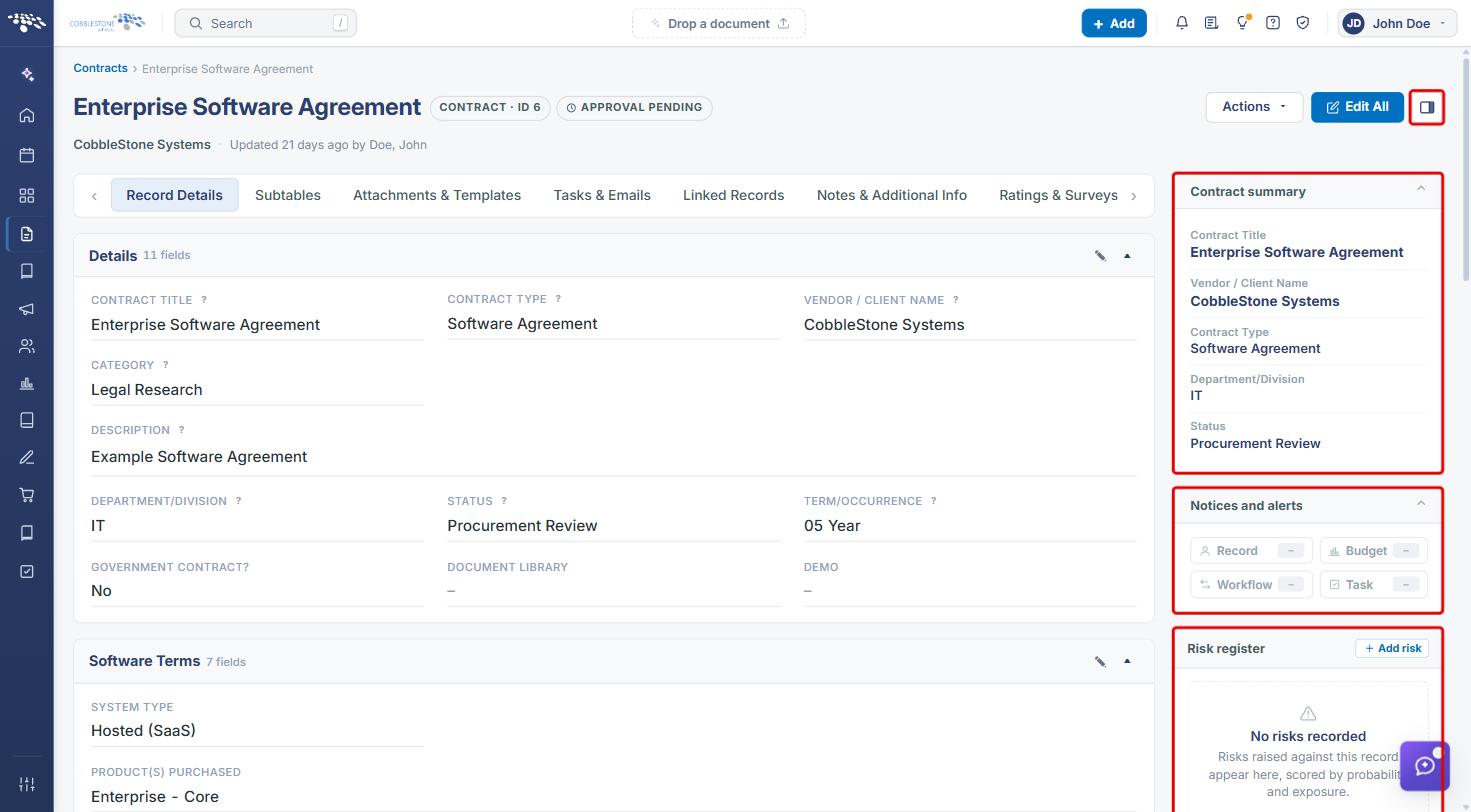
- Scroll down the side panel to see Status history. Switch between History and Time in status to see the record's status changes.
- Use Sections to jump to a field group or sub-table. Type in Filter sections to narrow the list.
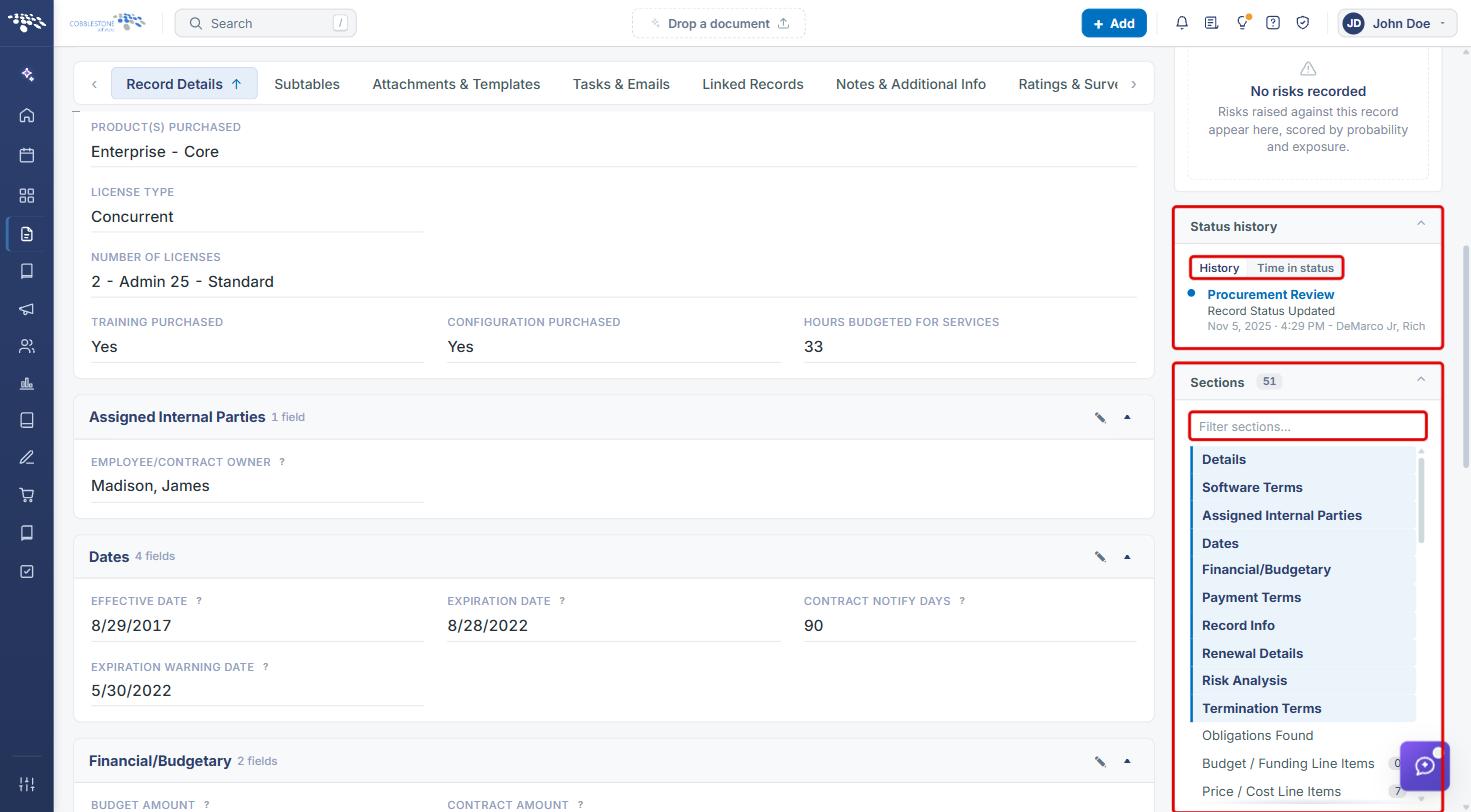
Note: Widgets set to When it has content appear only when the record has something to show, so the widgets you see can differ from record to record.
7. Quick Reference Summary
| Task | Where / How |
|---|---|
| Choose which widgets appear | Administration › Record Sidebar Widgets › Record type / Applies to › Always, When it has content or Hidden |
| Reorder widgets | Record Sidebar Widgets › drag the handle (⠿) |
| Restore default widgets | Record Sidebar Widgets › Reset to defaults |
| Change summary headers and tags | Administration › Tab Details Setup › Side Panel - Headers & Tags › Add |
| Restore default headers and tags | Tab Details Setup › Reset sidebar |
| Hide or show the side panel on a record | Record page › Hide details panel button |