COBBLESTONE SOFTWARE
Contract Insight — User Guide
Record Level Dashboards
03. Admin User Manual › Record Details Tab Setup › Record Level Dashboards
Note: Each procedure in this guide begins at the Contract Insight homepage, so any section can be followed on its own. Custom fields are configurable, so the exact field list on a contract category record may vary between environments.
1. Overview
A record level dashboard is a tab on a record's page that displays a dashboard (KPI tiles and charts) built in the Report Designer. Dashboard tabs are added in Administration → Tab Details Setup as a Report Designer tab, and each one is linked to a single dashboard, such as Contracts KPI.
For example, the Contracts → Default layout includes a Record Dashboard tab linked to Contracts KPI. It appears on contract records after the standard tabs (Record Details, Subtables, Attachments & Templates, and so on).
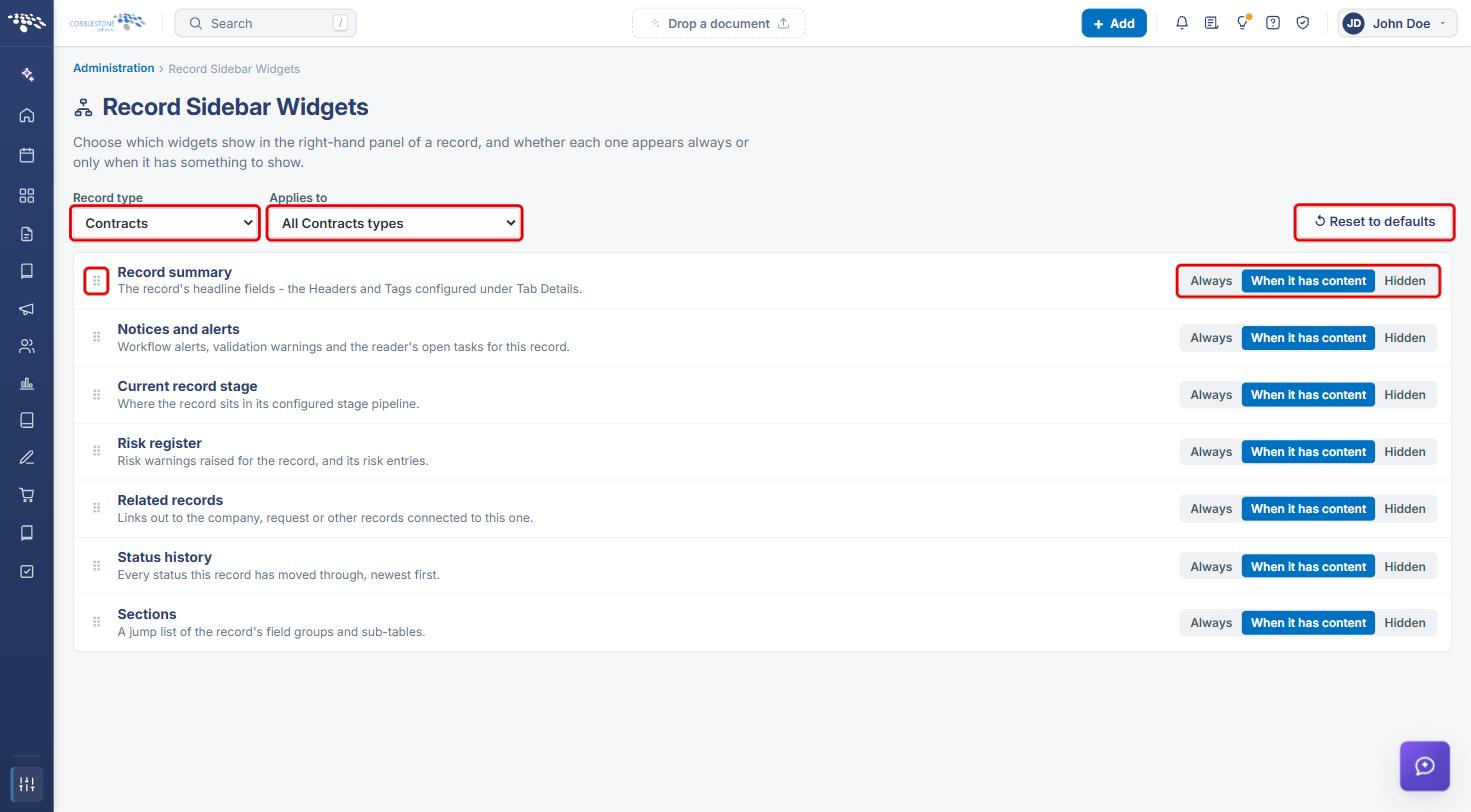
Record-scoped summary panels, such as the current stage, risk register, and status history, are configured separately in Administration → Record Sidebar Widgets (see Section 7).
2. Key Elements
- Tab Details Setup: the tab type list offers Docks tab and Report Designer tab. Report Designer tabs show a Report Designer badge and the name of the linked dashboard instead of a dock count.
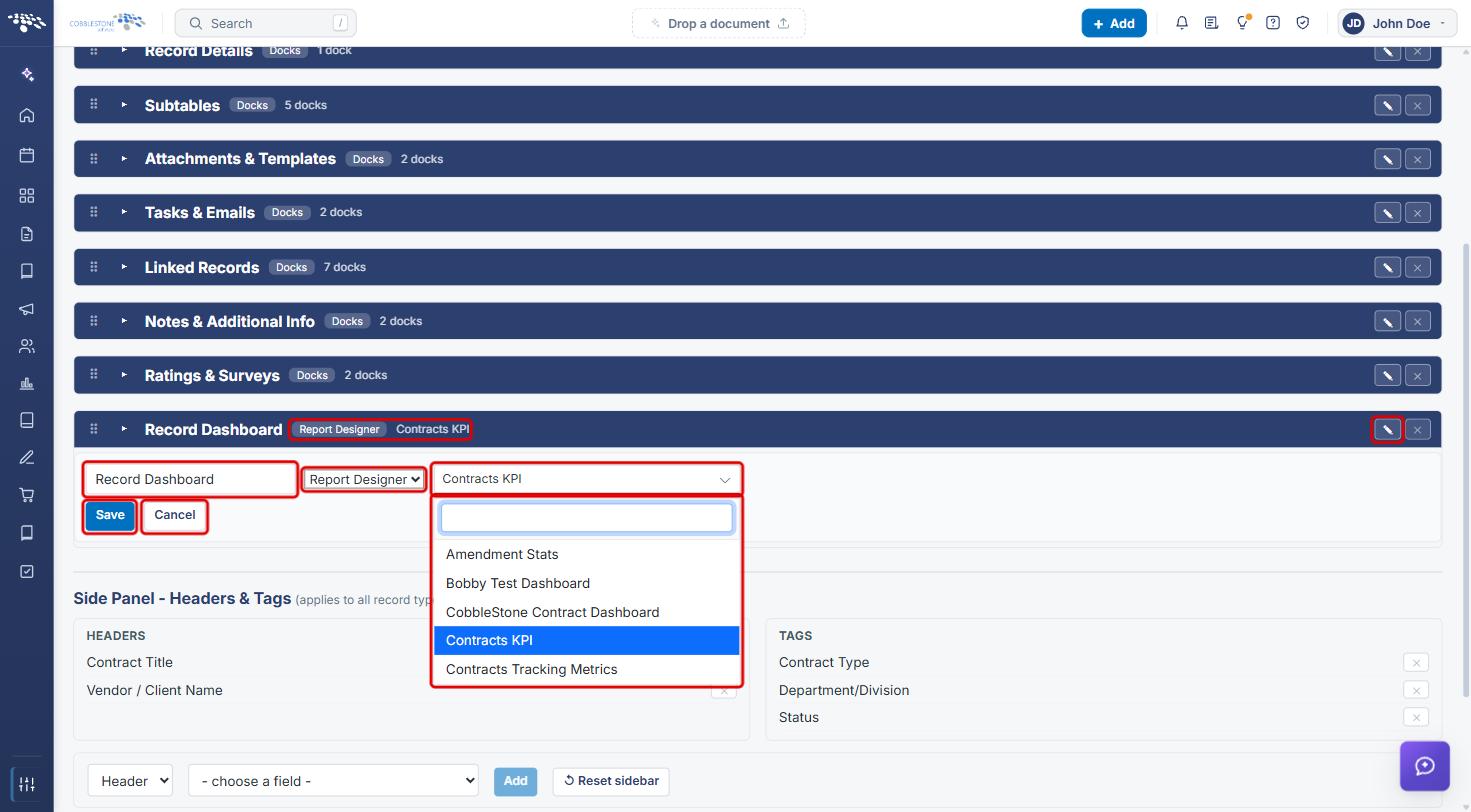
- Rename / edit (pencil): sets the tab name, type, and which dashboard it shows (for example Amendment Stats, CobbleStone Contract Dashboard, Contracts KPI, or Contracts Tracking Metrics).
- The dashboard tab appears on every record that uses the layout. Record types marked “uses Default” inherit it from the Default layout.
- Record Sidebar Widgets: controls the record-scoped panels in the right-hand sidebar (Record summary, Notices and alerts, Current record stage, Risk register, Related records, Status history, and Sections).
3. Navigating to Tab Details Setup
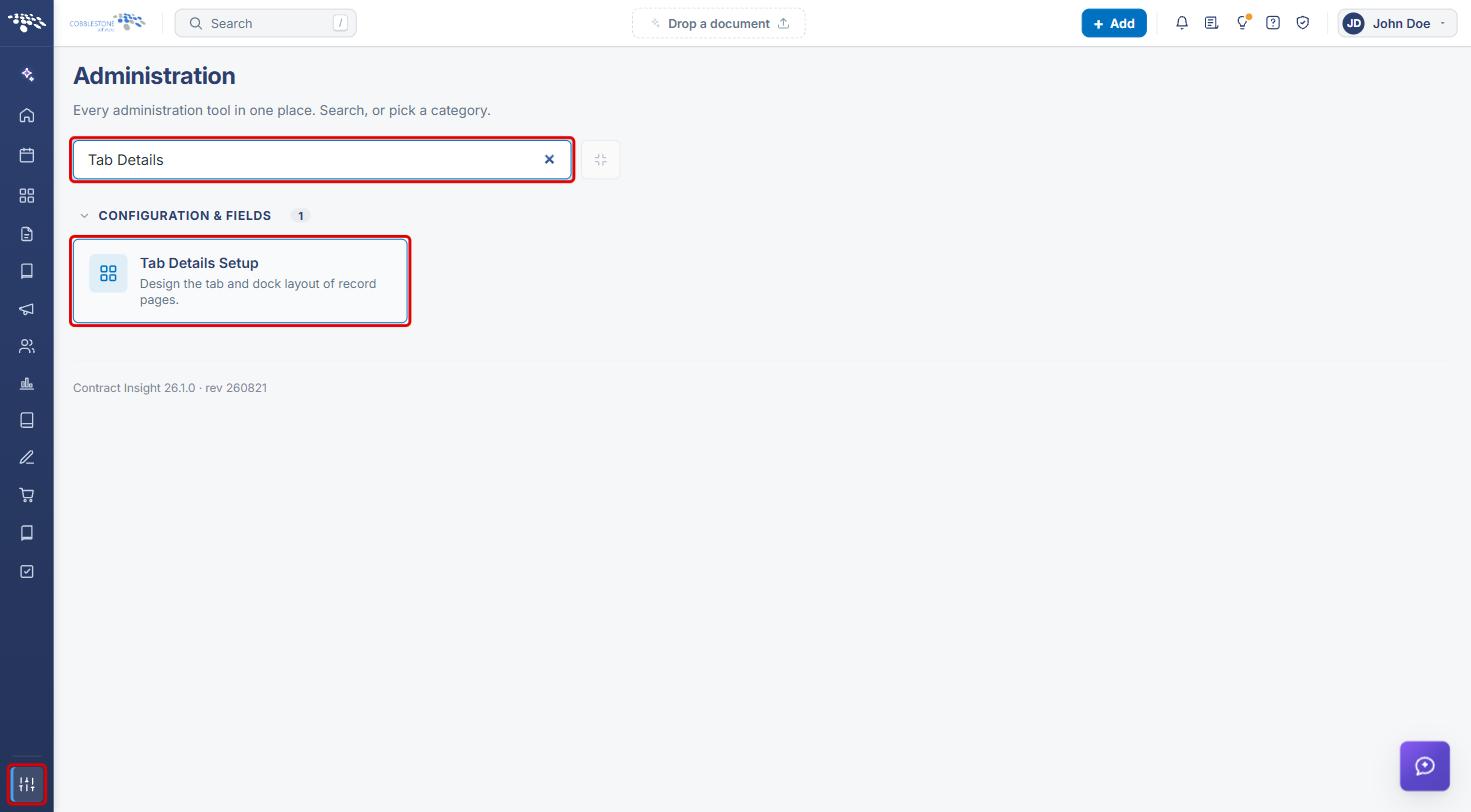
- From the Contract Insight homepage, click the Administration icon at the bottom of the left navigation bar.
- In the Search administration box, type Tab Details.
- Click Tab Details Setup.
4. Adding a Record Level Dashboard Tab
- In Tab Details Setup, select the Area (for example Contracts) and the Record type. Choose Default to add the dashboard to every type that uses the default layout.
- Enter a name in New tab name (for example Contract KPIs).
- Change the tab type from Docks tab to Report Designer tab.
- Click Add tab. The new tab appears in the list with a Report Designer badge.
- Choose which dashboard the tab shows (see Section 5).
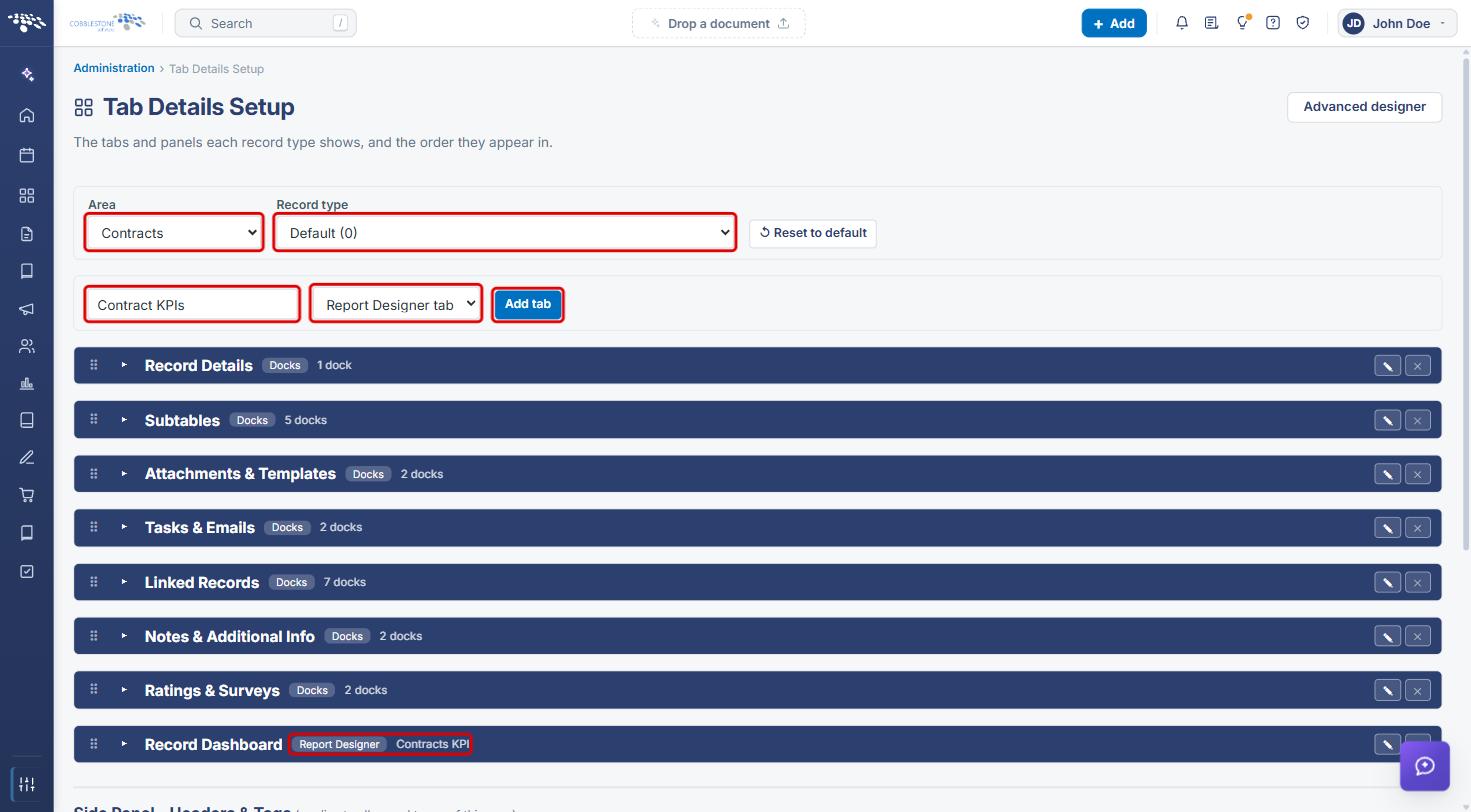
Note: Drag the tab by its handle (⠿) to change where it appears among the record's tabs.
5. Choosing or Changing the Dashboard
- On the dashboard tab's row, click the Rename / edit (pencil) button.
- Update the tab name if needed, and confirm the type is Report Designer.
- Click the dashboard drop-down and select the dashboard to display. Type in the search box to filter the list.
- Click Save, or click Cancel to discard the change.
6. Viewing the Dashboard on a Record
- Open a record in the area (for example, a contract from the Contracts list).
- Click the dashboard tab (for example Record Dashboard). Use the arrows at either end of the tab bar if the tab is scrolled out of view.
- The linked dashboard's tiles and charts load in the tab.
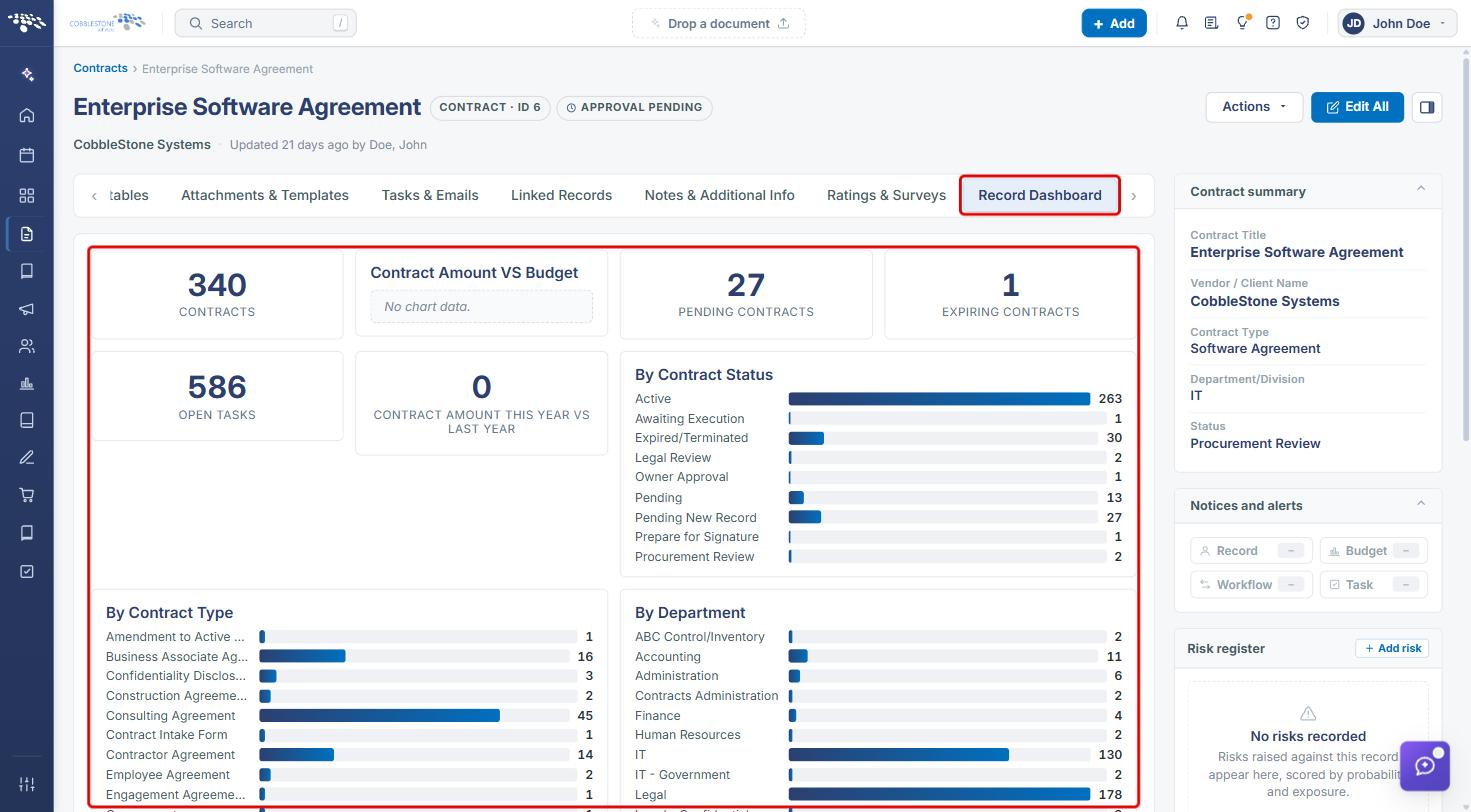
Note: The tab shows whatever the linked dashboard calculates. In the example above, the Contracts KPI widgets show system-wide totals (all contracts), not just the open record. To show record-specific figures, link the tab to a dashboard whose widgets are filtered accordingly.
7. Record Sidebar Widgets (Related Setting)
- From the Contract Insight homepage, click Administration and open Record Sidebar Widgets.
- Select the Record type (area) and choose what it Applies to (all types, or a specific type).
- For each widget, choose Always, When it has content, or Hidden. Drag widgets by their handle to change their order in the sidebar.
- Click Reset to defaults to restore the default widgets.
8. Quick Reference Summary
| Task | How to Complete It |
|---|---|
| Open Tab Details Setup | Administration → search “Tab Details” → Tab Details Setup. |
| Add a dashboard tab | Select Area and Record type → New tab name → Report Designer tab → Add tab. |
| Choose the dashboard shown | Pencil (Rename / edit) on the tab row → select the dashboard → Save. |
| Move the dashboard tab | Drag the tab's ⠿ handle up or down. |
| Remove the dashboard tab | Click × on the tab row. |
| View the dashboard | Open a record → click the dashboard tab (for example Record Dashboard). |
| Configure sidebar widgets | Administration → Record Sidebar Widgets → set Always / When it has content / Hidden. |