COBBLESTONE SOFTWARE
Contract Insight — User Guide
Creating Record Flow Templates
03. Admin User Manual › Record Flow Templates › Creating Record Flow Templates
Note: Each procedure in this guide begins at the Contract Insight homepage, so any section can be followed on its own. Custom fields are configurable, so the exact field list on a contract category record may vary between environments.
1. Overview
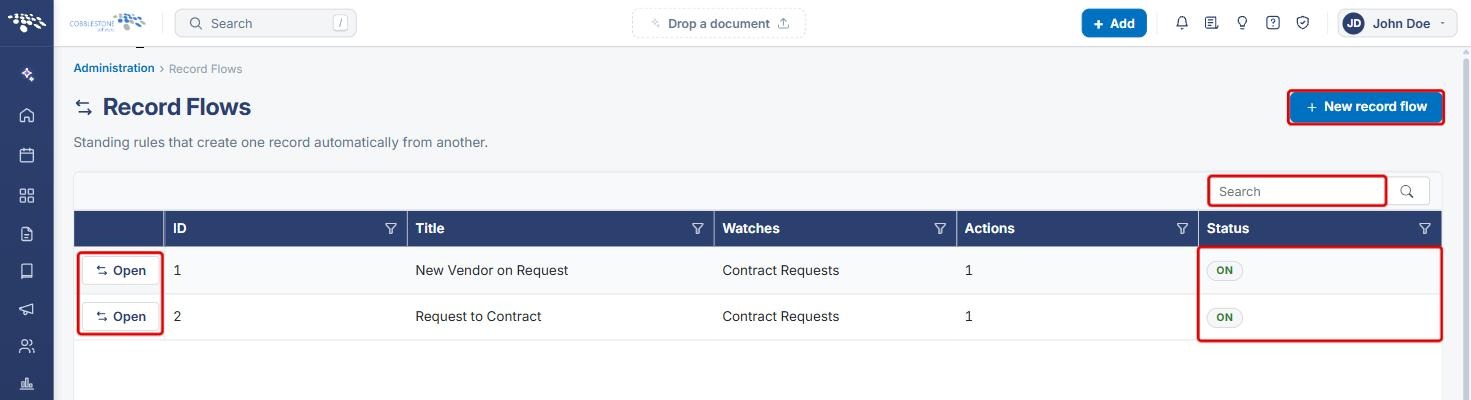
Administration › Record Flows is described in the app as "Standing rules that create one record automatically from another." It replaces the legacy Record Flow Template feature. The Record Flows list shows every configured flow with its ID, Title, Watches (the record type the flow monitors), Actions count and Status, plus a New record flow button.
Each flow has three parts: Settings (name, description, who to email when the flow is changed, and the Run this flow switch); When it runs (the fields the flow can test and the Conditions a record must match); and What it creates (the actions the flow takes, such as creating a Contract Details record). Which fields carry over to the new record is set on the field maps screen, the same mechanism used when creating a record by hand.
2. Key Elements
- Record Flows list: shows ID, Title, Watches, Actions and Status for each flow, with Open on each row, a Search box and a New record flow button.
- Settings: Name, Who to email when this flow is changed, Description, Run this flow and Save settings. Delete flow sits at the top right of the page.
- When it runs: Fields this flow can test (selected fields appear as tags), a Find a field search, and Conditions built from + Condition and + Group, saved with Save conditions. A flow runs on a new record, and whenever one of the selected fields changes and the record then matches.
- What it creates: lists the flow's actions (for example, Create a Contract Details), with + Add, Edit this action (pencil) and Remove this action (trash).
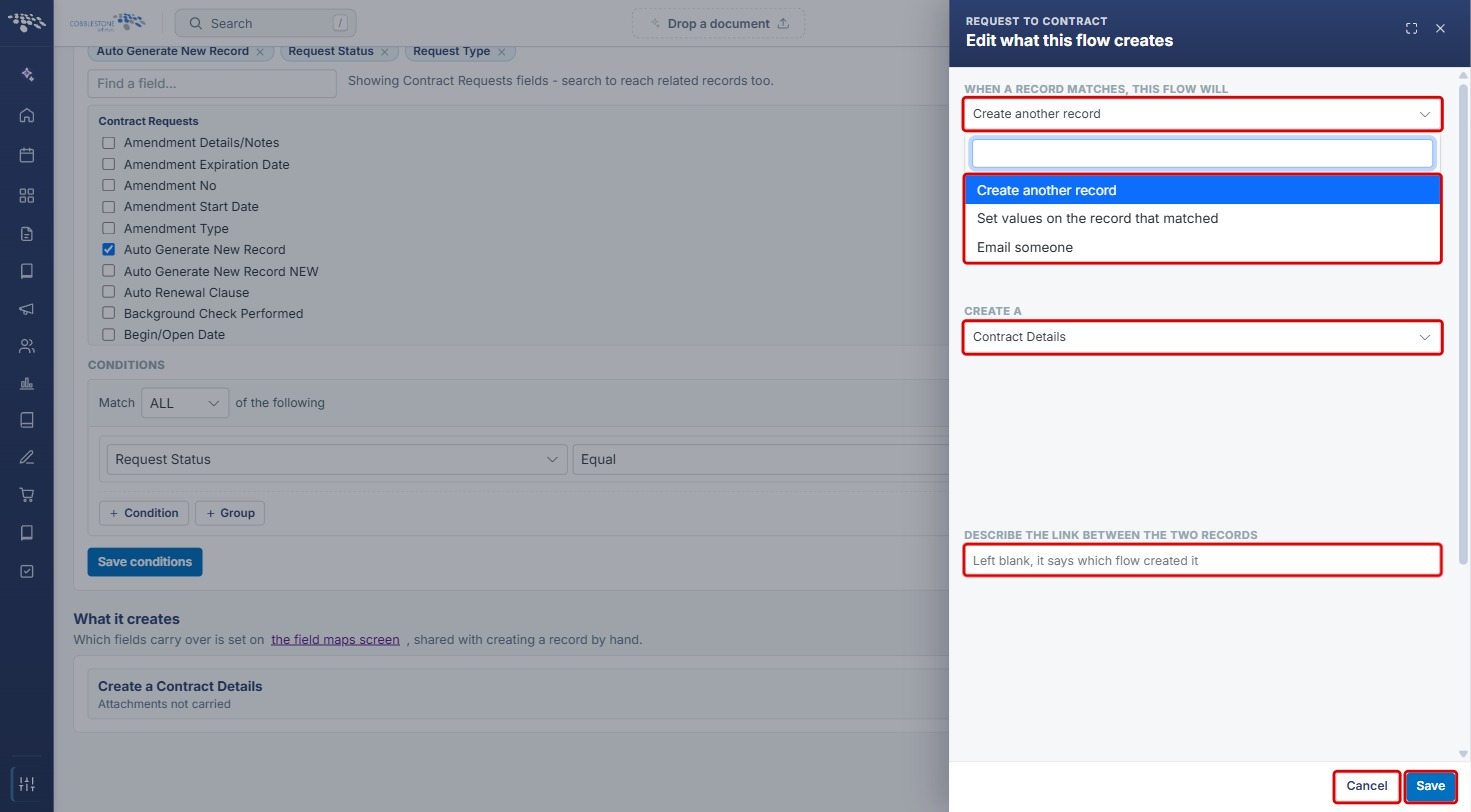
- Edit what this flow creates panel: the action type (Create another record, Set values on the record that matched or Email someone), the record type to create, a description of the link between the records, Carry the attachments over too, and Values always set on the new record.
3. Navigating to Record Flows
- From the Contract Insight homepage, click the Administration icon at the bottom of the left navigation bar.
.jpg)
- On the Administration page, scroll to Automation & Data and click Record Flows.
.jpg)
- The Record Flows list opens. Use Search to find a flow, check its Status, and click Open to view or change it.
4. Creating a New Record Flow
- On the Record Flows list, click New record flow.
- Enter a Name that says what the flow is for.
- From Watches, pick the record type the flow monitors: Requests, Contracts & Committals, Solicitations & Procurements or Vendors & Customers.
- Optionally, enter a Description of what the flow does.
- Click Create, or Cancel to close without saving.
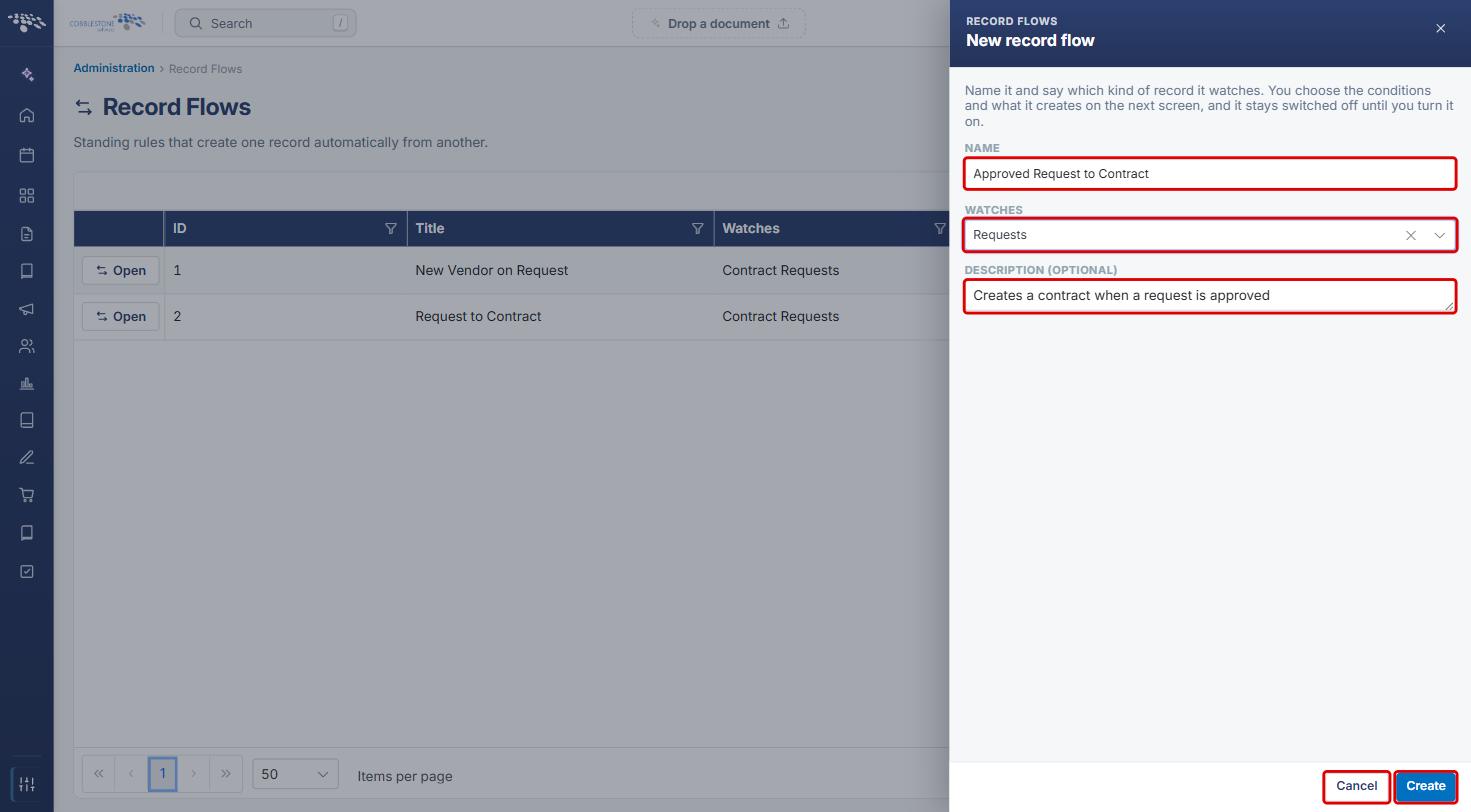
Note: You choose the conditions and what the flow creates on the next screen. A new flow stays switched off until you turn it on (see Section 5).
5. Configuring Flow Settings
- Open the flow from the Record Flows list. The page header shows the flow's name and status (for example, ON).
- Under Settings, update the Name and Description as needed.
- In Who to email when this flow is changed, enter one or more email addresses, separated with commas.
- Select Run this flow to turn the flow on, or clear it to turn the flow off.
- Click Save settings.
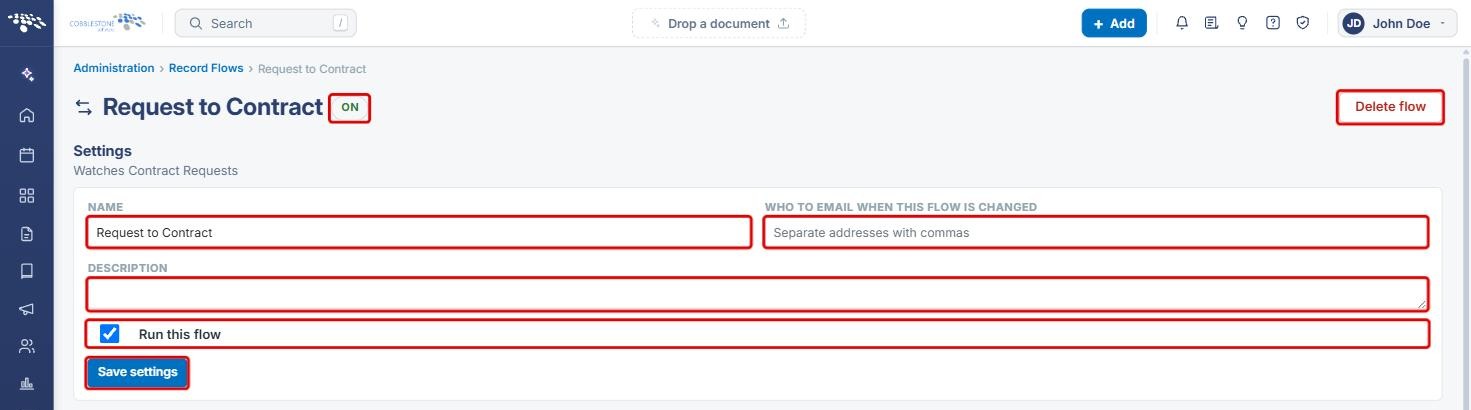
Note: To remove a flow completely, click Delete flow at the top right of the page.
6. Defining When the Flow Runs
- In When it runs, under Fields this flow can test, select the checkbox next to each field the flow should watch. Selected fields appear as tags above the list; click the x on a tag to remove it.
- Use Find a field to search the list. Searching also reaches fields on related records.
- Under Conditions, use the Match drop-down (for example, ALL) to choose how the conditions combine.
- For each condition, choose a field, an operator (for example, Equal) and a value. Click + Condition to add another condition, or + Group to add a nested group of conditions. Click the trash icon to remove a condition.
- Click Save conditions.
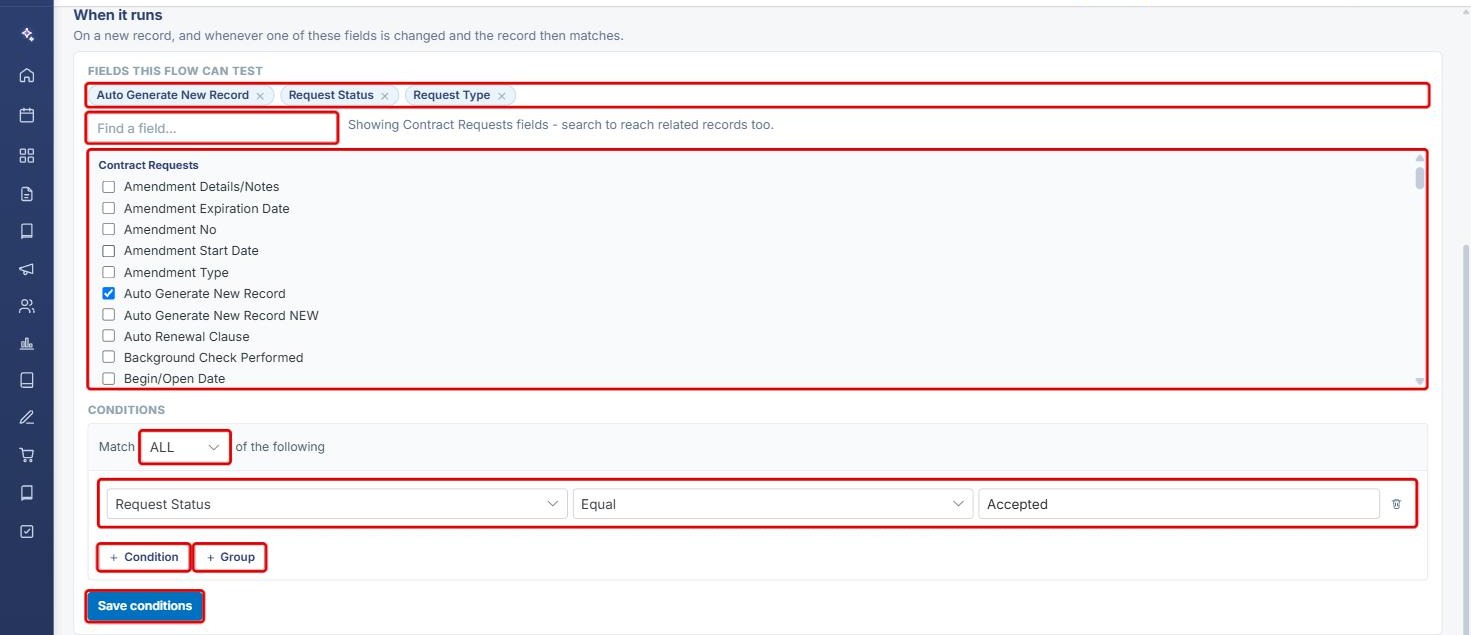
Note: The flow runs on a new record, and whenever one of the selected fields is changed and the record then matches the conditions. Flows built in the previous application may show their original conditions read-only, with an option to build a new set of conditions to replace them.
7. Defining What the Flow Creates
- Scroll to What it creates. Each action the flow takes is listed (for example, Create a Contract Details, with a note on whether attachments are carried).
- Click + Add to add an action, the Edit this action (pencil) icon to change one, or the Remove this action (trash) icon to delete one.
- To control which fields carry over to the new record, click the field maps screen link.

- In the Edit what this flow creates panel, choose what happens When a record matches: Create another record, Set values on the record that matched or Email someone.
- For Create another record, choose the record type in Create a (for example, Contract Details).
- Optionally, enter text in Describe the link between the two records. If left blank, the link says which flow created the record.
- Select Carry the attachments over too to copy the source record's attachments to the new record.
- Under Values always set on the new record, pick a field, enter a Value and click Add. Repeat for each value the new record should always start with.
- Click Save, or Cancel to close without changes.
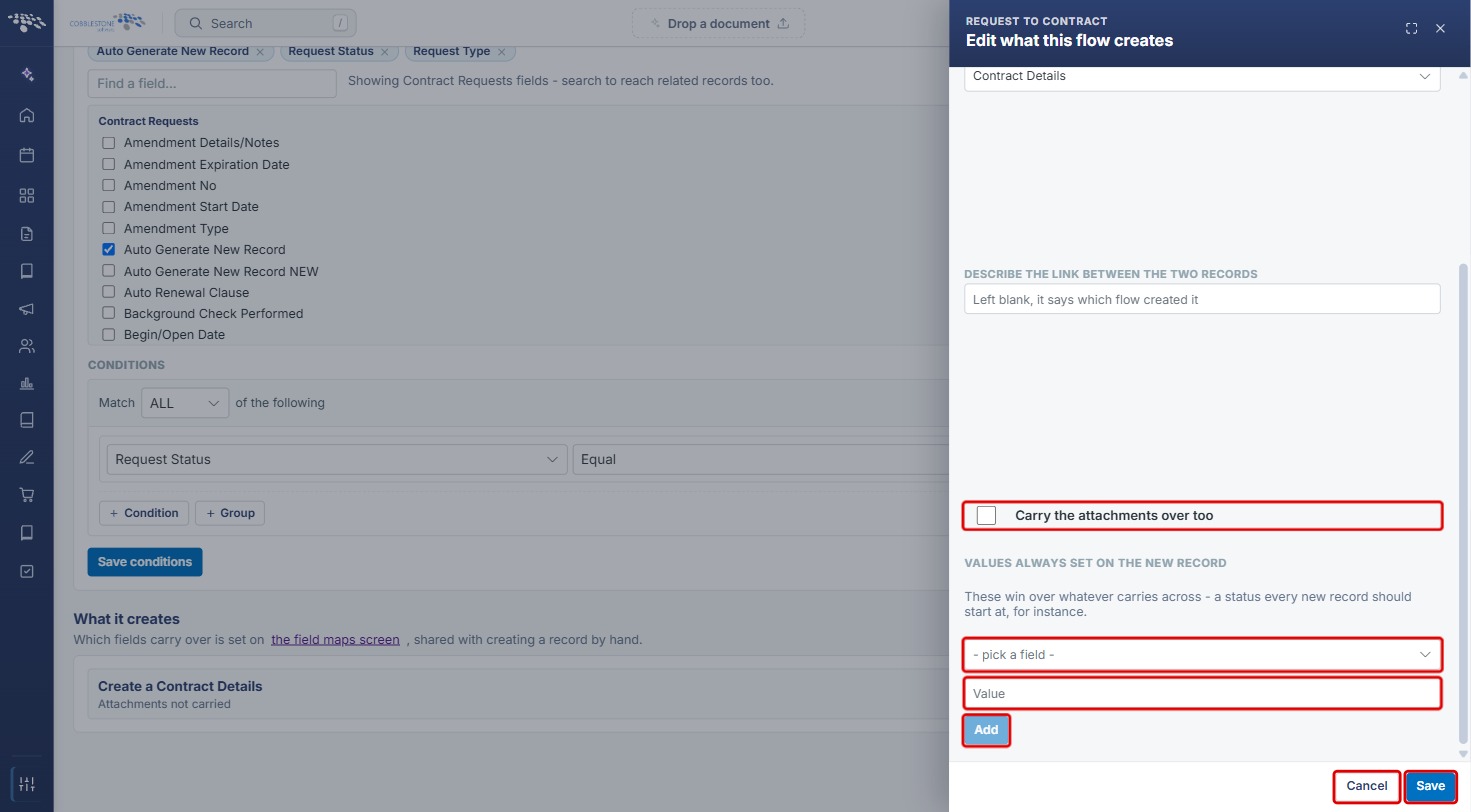
Note: Values always set on the new record take priority over values carried across by the field map. Use them for values every new record should start with, such as an initial status.
8. Quick Reference Summary
| Task | Where / How |
|---|---|
| Open Record Flows | Administration › Automation & Data › Record Flows |
| Create a flow | New record flow › Name, Watches, Description › Create |
| Turn a flow on or off | Open › Settings › Run this flow › Save settings |
| Get notified when a flow changes | Settings › Who to email when this flow is changed › Save settings |
| Set when the flow runs | When it runs › Fields this flow can test and Conditions › Save conditions |
| Set what the flow creates | What it creates › + Add or Edit this action › Save |
| Choose which fields carry over | What it creates › the field maps screen link |
| Delete a flow | Open › Delete flow |