COBBLESTONE SOFTWARE
Contract Insight — User Guide
5. Assign/Un-Assign Users to a Survey
12. Surveys & Decision Trees › 2. Surveys/Questionnaires › 5. Assign/Un-Assign Users to a Survey
Note: Each procedure in this guide begins at the Contract Insight homepage, so any section can be followed on its own. Custom fields are configurable, so the exact field list on a contract category record may vary between environments.
1. Overview
Who responds to a survey is set when the survey is attached. Attaching a survey to a single record (from that record's Actions → Attach Survey option) lets you choose the Respondent Type — Assigned Vendors or Internal Employees — and, for internal employees, exactly which employees receive it. Surveys → Bulk Surveys (“Merge a survey across many records at once”) assigns the same survey to many records in one operation, tracked as a process with a Created date, the user who ran it (By), and a live Completion count, plus a Dashboard for monitoring progress. Once responses come in, Surveys → Survey Results shows who has responded: each respondent appears as a named column in that survey's results grid.
2. Key Elements
- A survey is assigned to respondents at the point it is attached — either to a single record via Actions → Attach Survey, or in bulk via Surveys → Bulk Surveys.
- Respondent Type decides who receives the survey: Assigned Vendors or Internal Employees. For internal employees, Which internal employees? offers Employee Assigned, Additionally Assigned Employees, Employees Assigned to Record's Department(s) and Pick Specific.
- Un-assigning a user is done by clearing that user (or group) before clicking Add Survey. An assigned survey cannot be deleted once a respondent has begun it.
- A record's Ratings & Surveys tab lists its surveys with Participants, Complete, Date Due and Status; click Manage to see each respondent.
- Bulk Surveys merges one survey across many records at once, tracking each run as a process with a Created date, the user who ran it, and a live Completion count, with a Dashboard link for monitoring.
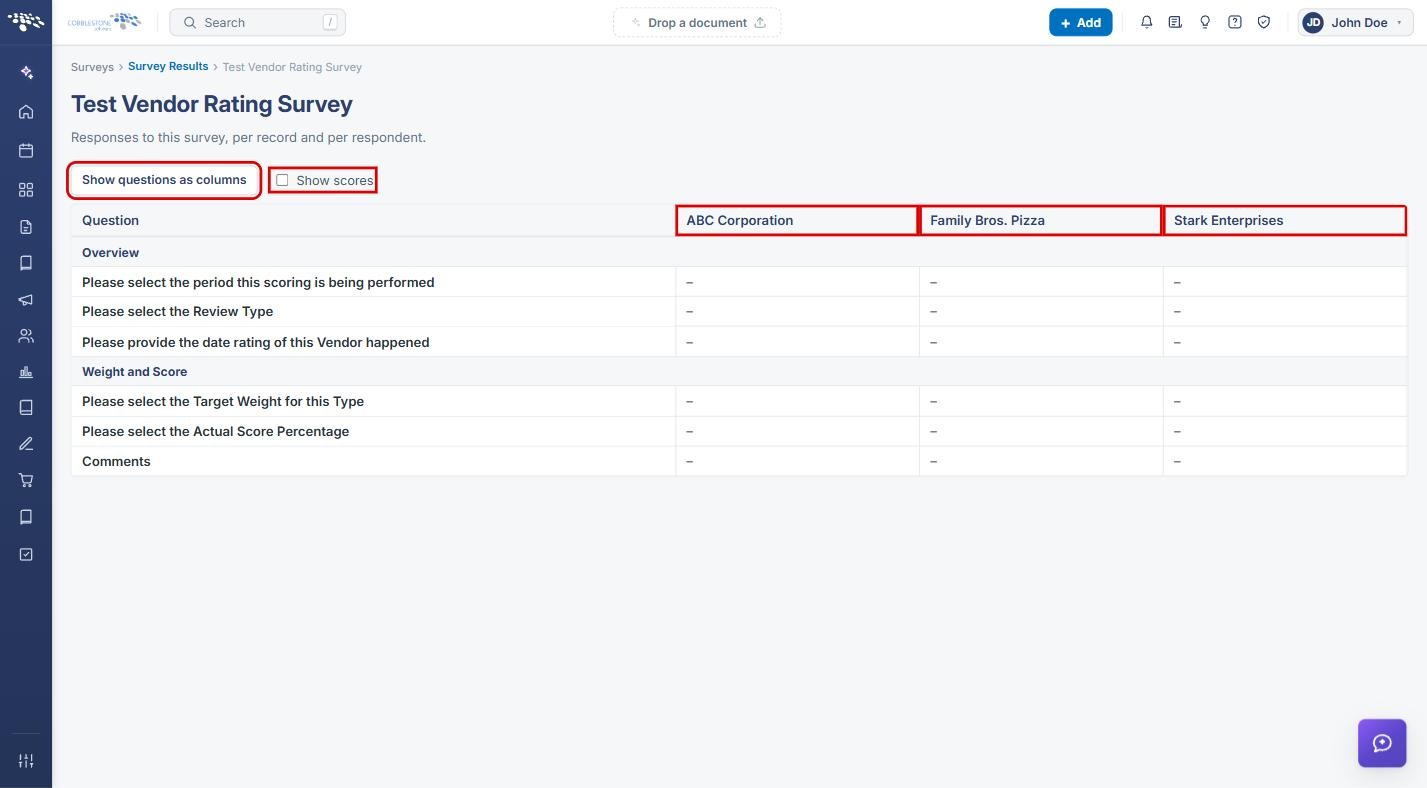
- Surveys → Survey Results lists every survey attached to records; View results shows each respondent as a named column, so you can see at a glance who has and hasn't responded.
3. Assigning Users When Attaching a Survey to a Record
- From the Contract Insight homepage, open the record (for example, a contract from Requests/Contracts → Contracts).
- Click Actions and select Attach Survey.
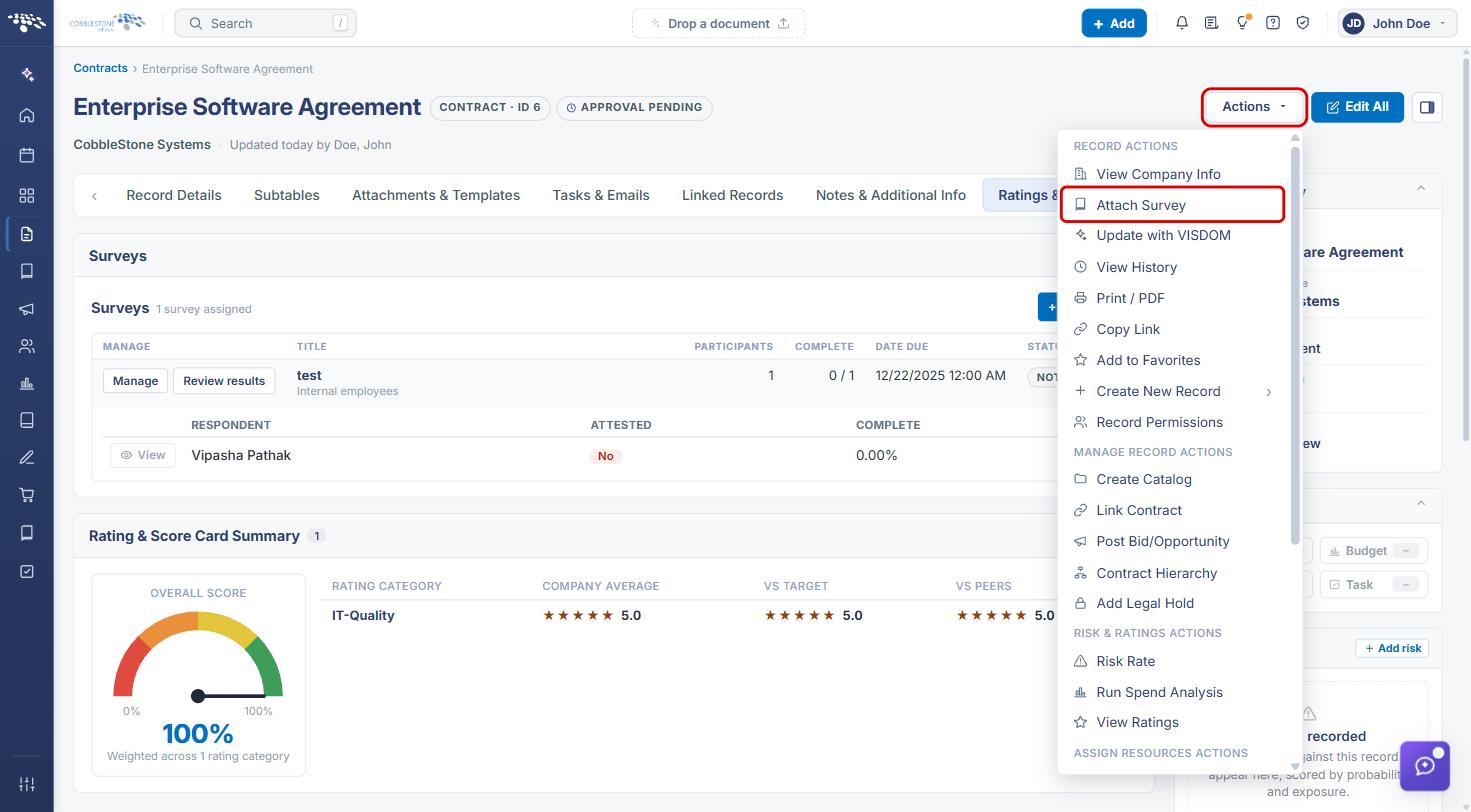
- On the Attach a Survey page, choose the survey template in Select a Survey, enter a Survey Title, and set the Response Due Date (leave Response Open Date blank to open it immediately).
- Select the Respondent Type: Assigned Vendors or Internal Employees.
- For Internal Employees, under Which internal employees?, check the groups to assign: Employee Assigned, Additionally Assigned Employees, Employees Assigned to Record's Department(s), and/or Pick Specific.
- If you checked Pick Specific, check each employee to assign in the Pick specific employees list. To un-assign someone, clear their checkbox (or clear the group they belong to).
- Choose whether to Allow Re-taking (Yes/No) and click Add Survey.
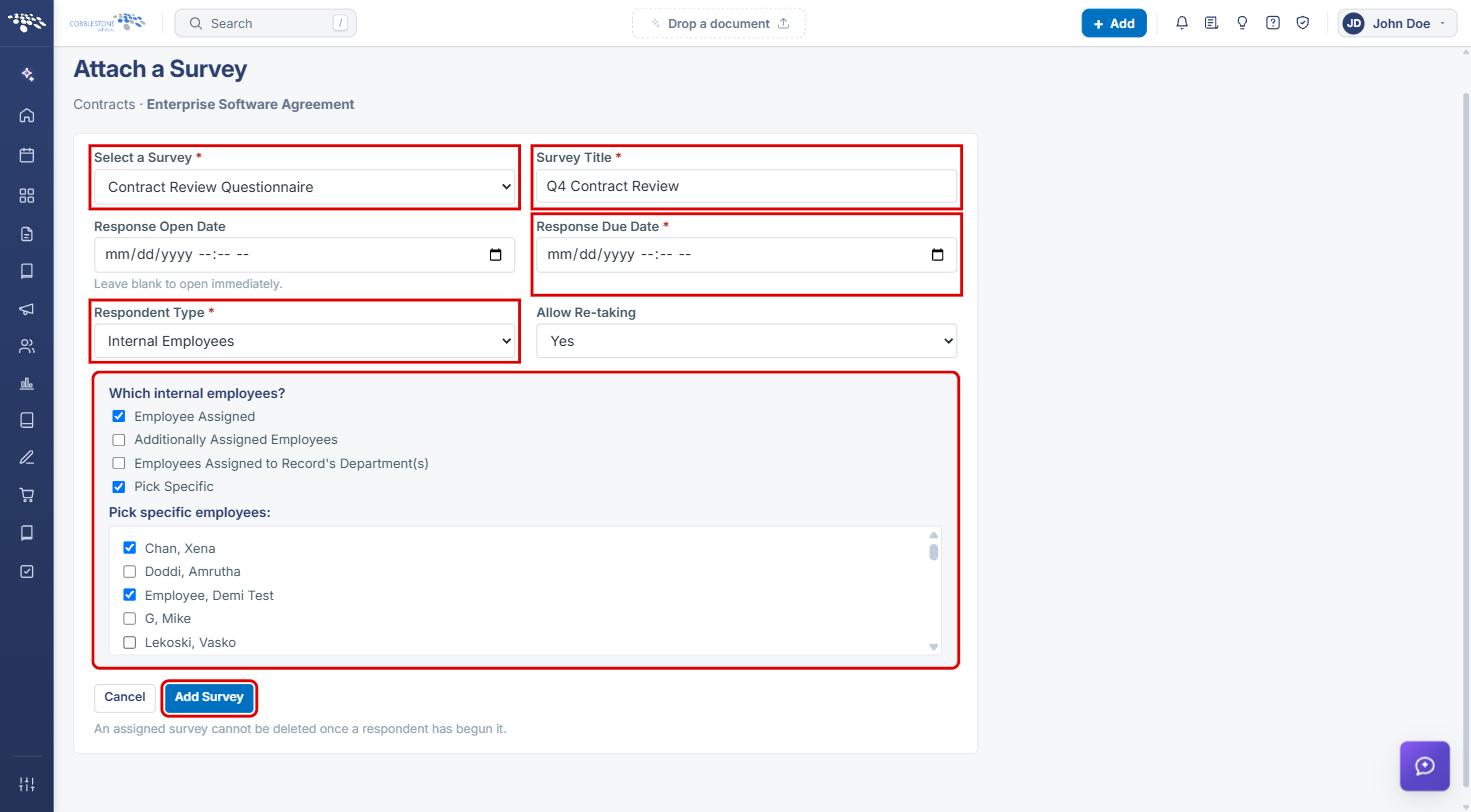
Note: An assigned survey cannot be deleted once a respondent has begun it, so confirm the respondent list before clicking Add Survey.
4. Reviewing Who Is Assigned on a Record
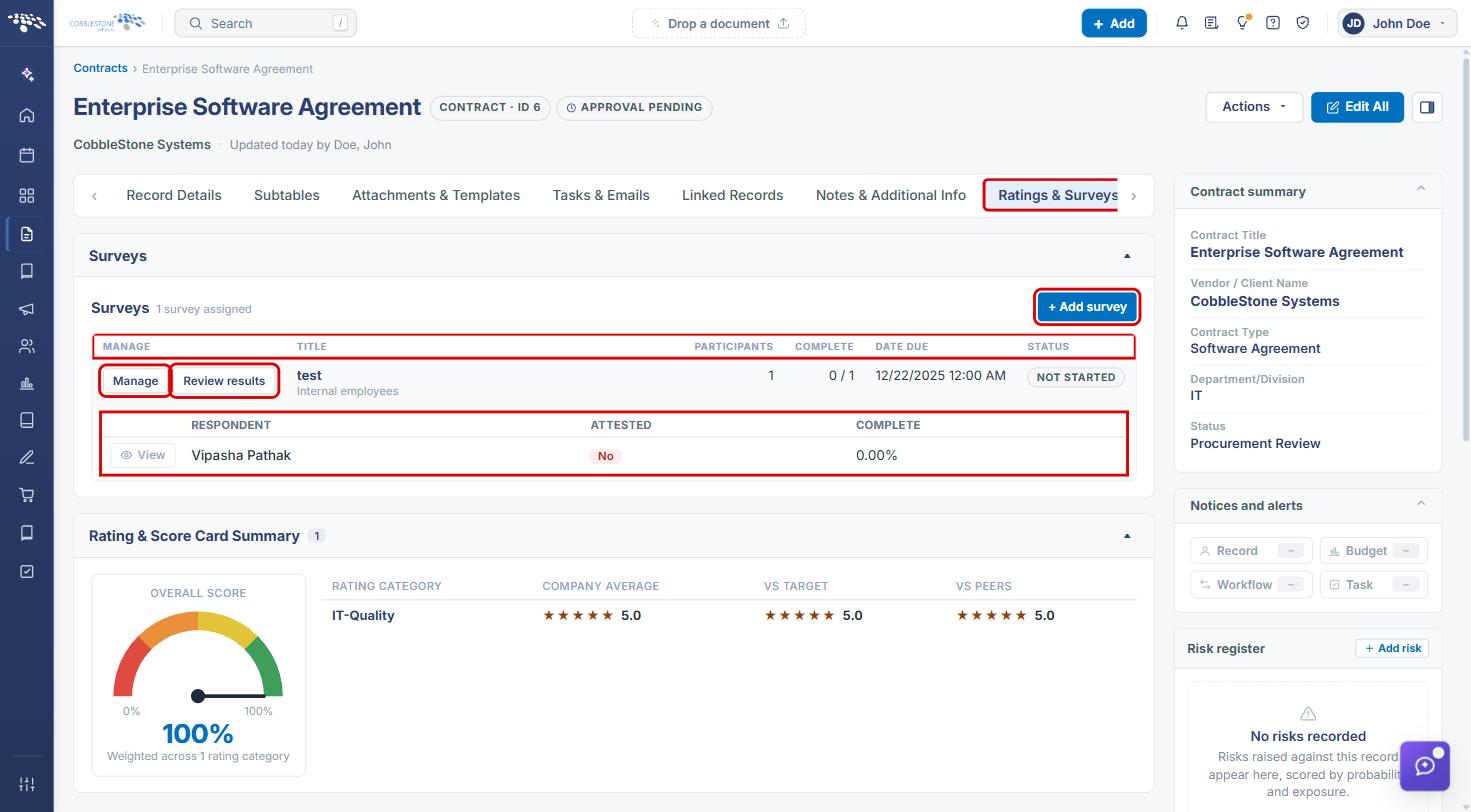
- Open the record and click the Ratings & Surveys tab.
- In the Surveys panel, review the Participants, Complete, Date Due and Status columns.
- Click Manage to expand the survey and see each Respondent, whether they have Attested, and their Complete percentage. Click + Add survey to attach another survey, or Review results to open the responses.
5. Assigning a Survey in Bulk
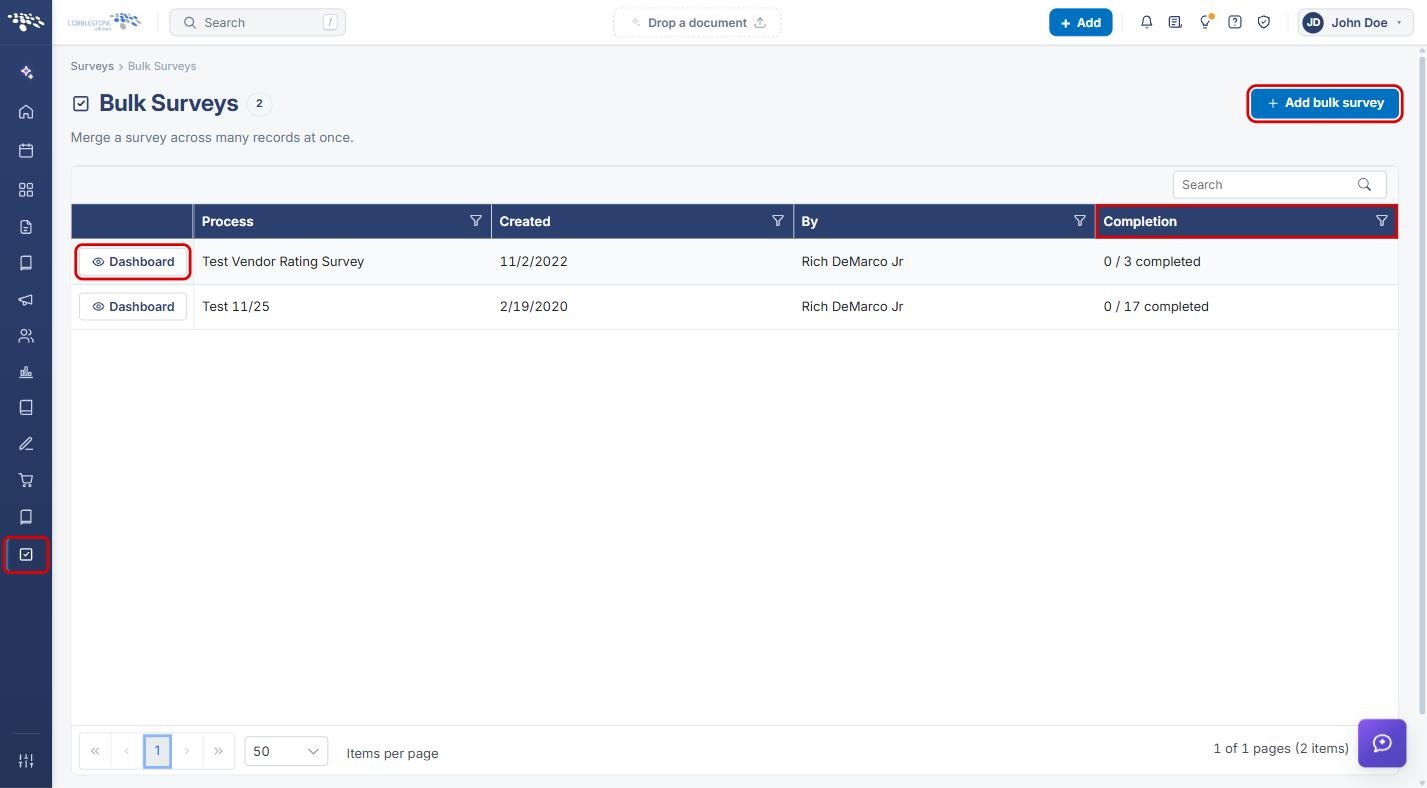
- From the Contract Insight homepage, click Surveys in the left navigation and select Bulk Surveys.
- Review existing processes (Process, Created, By, Completion); click Dashboard to monitor a process. Click Add bulk survey to start a new one.
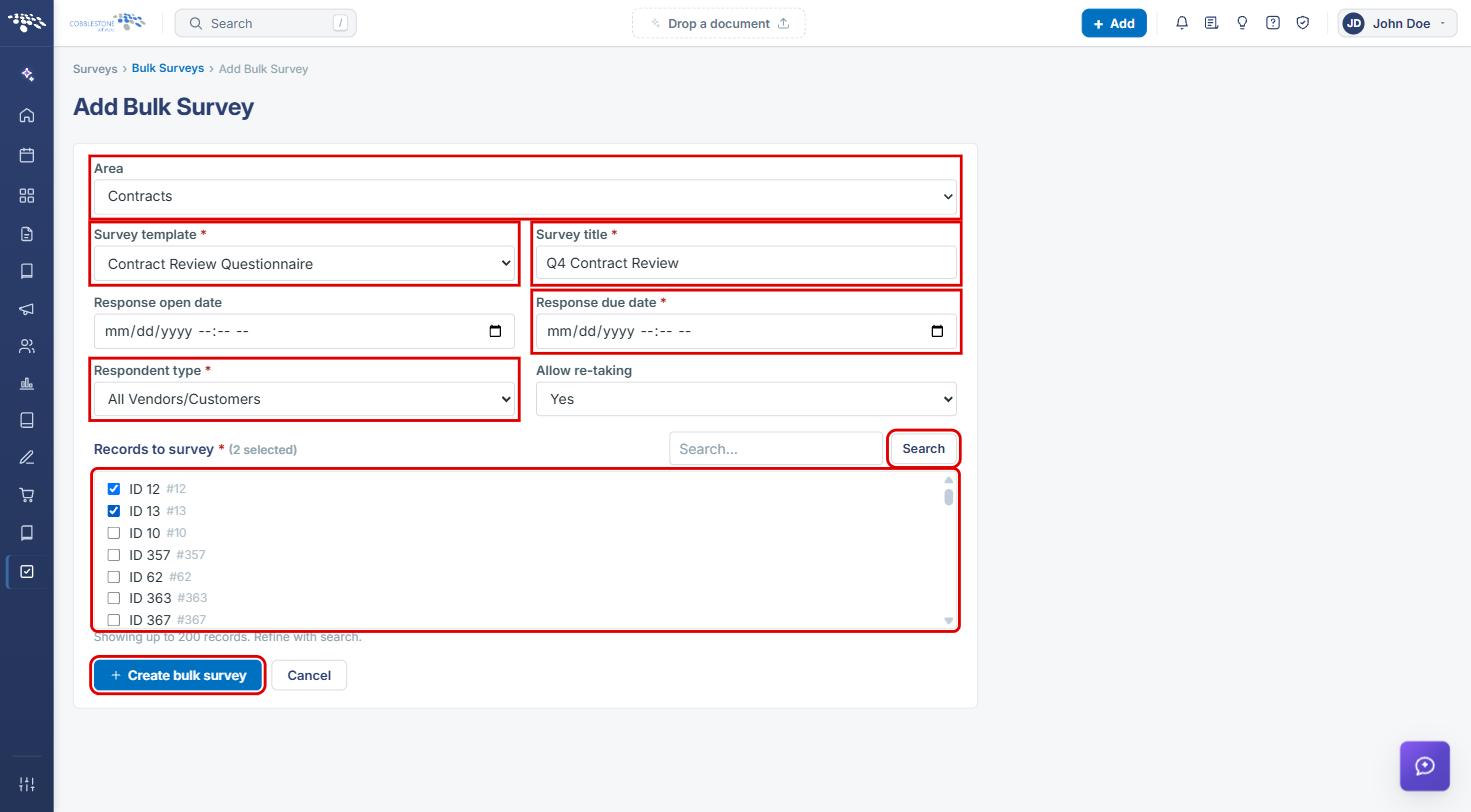
- On the Add Bulk Survey page, select the Area (e-Sourcing, Vendors/Customers, Contracts, Requests, Purchase Orders or Employees).
- Choose the Survey template, enter the Survey title, and set the Response open date and Response due date.
- Select the Respondent type (All Vendors/Customers or Assigned Employee) and whether to Allow re-taking.
- Under Records to survey, check each record to include (use Search to narrow the list; up to 200 records are shown at a time). Clear a record's checkbox to leave it out.
- Click Create bulk survey.
6. Checking Who Has Responded
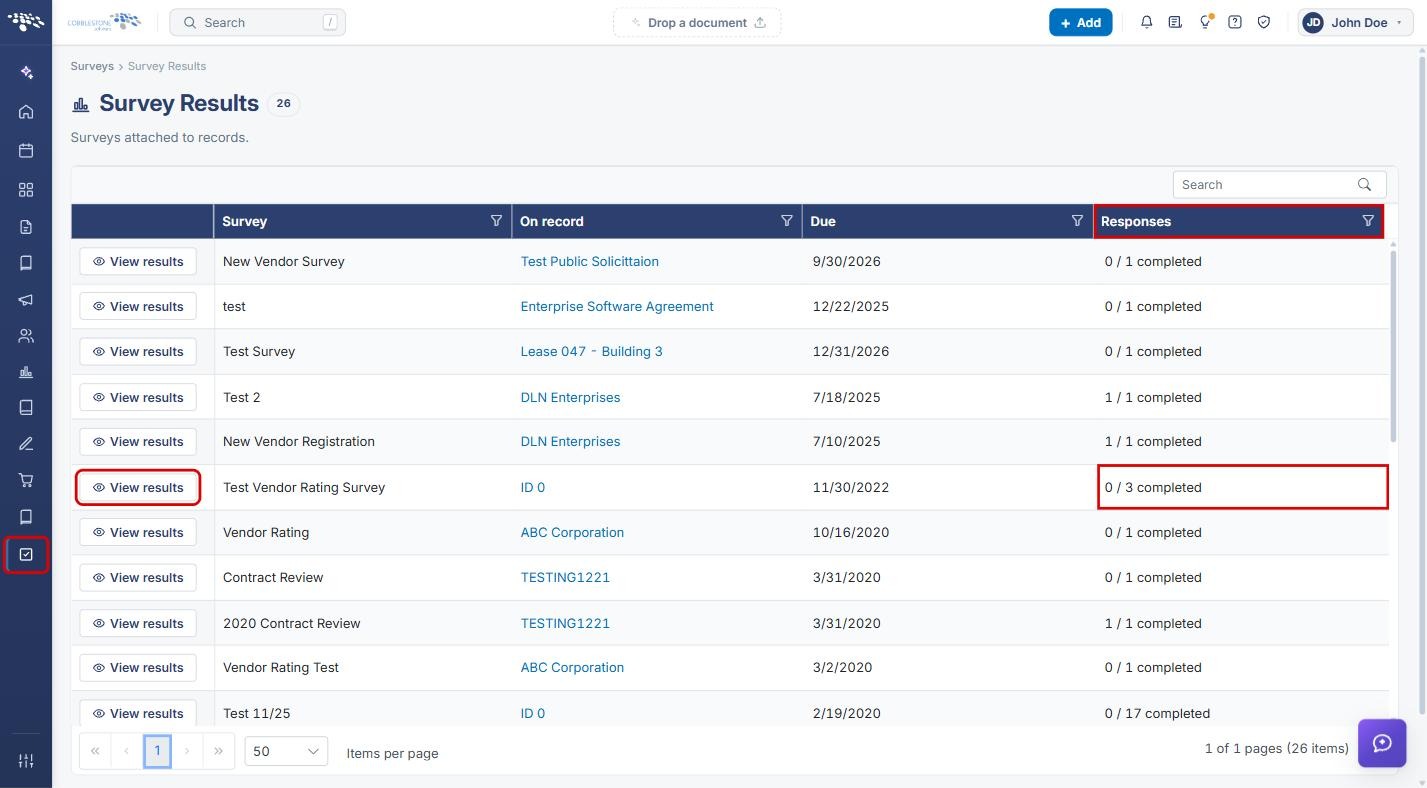
- From the Contract Insight homepage, click Surveys in the left navigation and select Survey Results.
- Find the survey (Survey, On record, Due, Responses) and click View results.
- Each respondent appears as a named column in the results grid; a dash (–) means no answer yet. Use Show questions as columns to switch the layout, and Show scores to show scoring.
7. Quick Reference Summary
| Task | How to Complete It |
|---|---|
| Attach a survey to one record | Open the record → Actions → Attach Survey. |
| Assign internal employees | Respondent Type = Internal Employees → check groups under Which internal employees? → Add Survey. |
| Assign specific employees | Which internal employees? → Pick Specific → check each employee → Add Survey. |
| Un-assign a user before sending | Clear the employee's (or group's) checkbox before clicking Add Survey. |
| See who is assigned on a record | Record → Ratings & Surveys tab → Surveys panel → Manage. |
| Assign a survey to many records | Surveys → Bulk Surveys → Add bulk survey → choose Area, template and Records to survey → Create bulk survey. |
| Monitor a bulk survey | Surveys → Bulk Surveys → Completion column or Dashboard. |
| See who has responded | Surveys → Survey Results → View results. |