COBBLESTONE SOFTWARE
Contract Insight — User Guide
01. Security: Permissions Overview
03. Admin User Manual › Employee/User Permissions › 01. Security: Permissions Overview
Note: Each procedure in this guide begins at the Contract Insight homepage, so any section can be followed on its own. Custom fields are configurable, so the exact field list on a contract category record may vary between environments.
1. Overview
This legacy topic was a general orientation to Contract Insight's permission model; in the redesigned application, that functionality is spread across a dedicated "Security & Access" category of twelve admin tools (Administration > Security & Access), most centrally Manage User Permissions, Security Groups, and Employee Permissions. Manage User Permissions is where individual permissions are defined and granted; Security Groups is where those permissions are bundled with a membership list into a reusable named group; and Employee Permissions is a per-person screen for reviewing or adjusting one employee's groups, permissions, and departments at once.
2. Key Elements
- The live equivalent of a single "permissions overview" page is the Security & Access section of Administration, which groups all twelve security-related admin tools together (Security Groups, Manage User Permissions, Roles, Employee Permissions, MFA, Session Manager, License & Session Usage, Temporary System Lockout, Single Sign-On, IP Restrictions, Legal Hold Configuration, and Cloud Drives).
- Manage User Permissions lists every grantable permission with its area (e.g. Contract Task Details, Employee Details), the action it allows (Create/Add, Update/Edit, Read/View), any rules narrowing it to specific records, who it's currently granted to, and whether it is available or not available to grant.
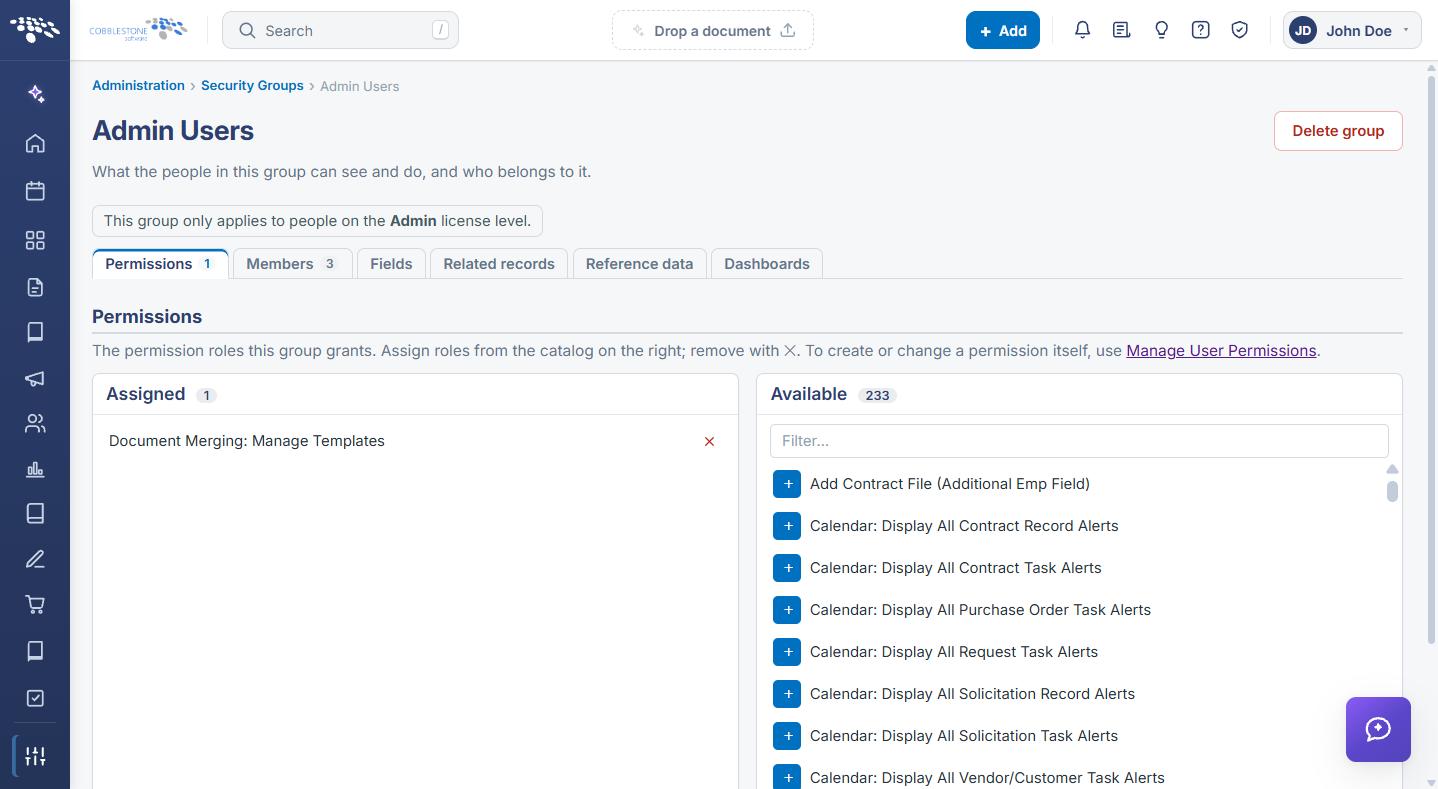
- Security Groups is the higher-level container: a named group bundles a set of permissions (via its own Permissions tab) with a list of member employees (via its Members tab), plus tabs for Fields, Related records, Reference data, and Dashboards scoped to that group.
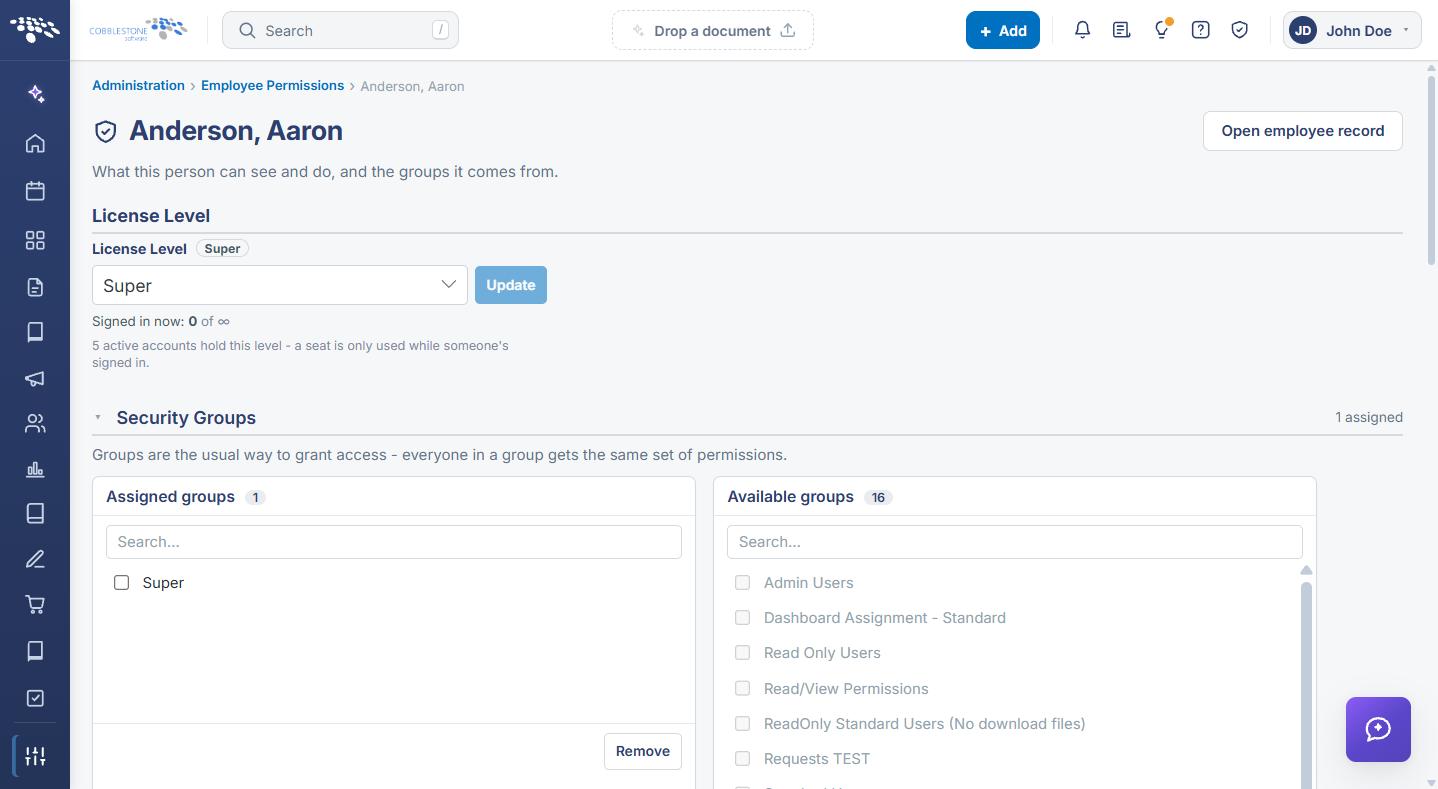
- Employee Permissions (Administration > Employee Permissions) is the fastest single-person view: search for one employee to review and adjust their groups, permissions, and departments together.
3. Granting Permissions Through a Security Group
Open Administration > Security Groups and click Manage on a group to see its scope. The group’s Permissions tab lists what it currently grants under Assigned, with every other definable permission in a searchable Available catalog next to it; click the + next to any available permission to add it to the group, or the × next to an assigned one to remove it. The same screen’s other tabs (Members, Fields, Related records, Reference data, Dashboards) round out everything else the group controls.
4. Reviewing or Adjusting One Employee's Access
Open Administration > Employee Permissions and search for a person by name, username, or email. Their page opens with the person’s License Level (with an Update control and a live count of active accounts at that level), followed by their Security Groups split into Assigned groups and Available groups so you can add or remove a group membership without leaving the page.
5. Quick Reference Summary
| Action | Where |
|---|---|
| Open the Security & Access tools | Administration → Security & Access section (12 tools) |
| Define or edit a grantable permission | Administration → Manage User Permissions |
| Bundle permissions with a membership list | Administration → Security Groups → Manage on a group |
| Assign or remove a permission from a group | Group’s Permissions tab → + (Available) or × (Assigned) |
| Add or remove a group member | Group’s Members tab |
| Review or change one employee’s access | Administration → Employee Permissions → search by name/username/email |
| Change a person’s license level | Employee Permissions → that person → License Level → Update |
| See who is signed in | Administration → Session Manager |
| Restrict sign-in by IP address | Administration → IP Restrictions |