COBBLESTONE SOFTWARE
Contract Insight — User Guide
02. Security: Management
03. Admin User Manual › Employee/User Permissions › 02. Security: Management
Note: Each procedure in this guide begins at the Contract Insight homepage, so any section can be followed on its own. Custom fields are configurable, so the exact field list on a contract category record may vary between environments.
1. Overview
This legacy topic was a management-focused companion to the general permissions overview; its live equivalent is the same Security & Access category of admin tools, viewed from the perspective of day-to-day administration rather than initial setup — reviewing who currently has access (Session Manager, License & Session Usage), adjusting one person's access (Employee Permissions), and maintaining the groups and rules that grant access at scale (Security Groups, Manage User Permissions, Roles).
2. Key Elements
- Ongoing access management is centered on Administration > Security & Access, which surfaces twelve tools together rather than splitting security management across separate legacy screens.
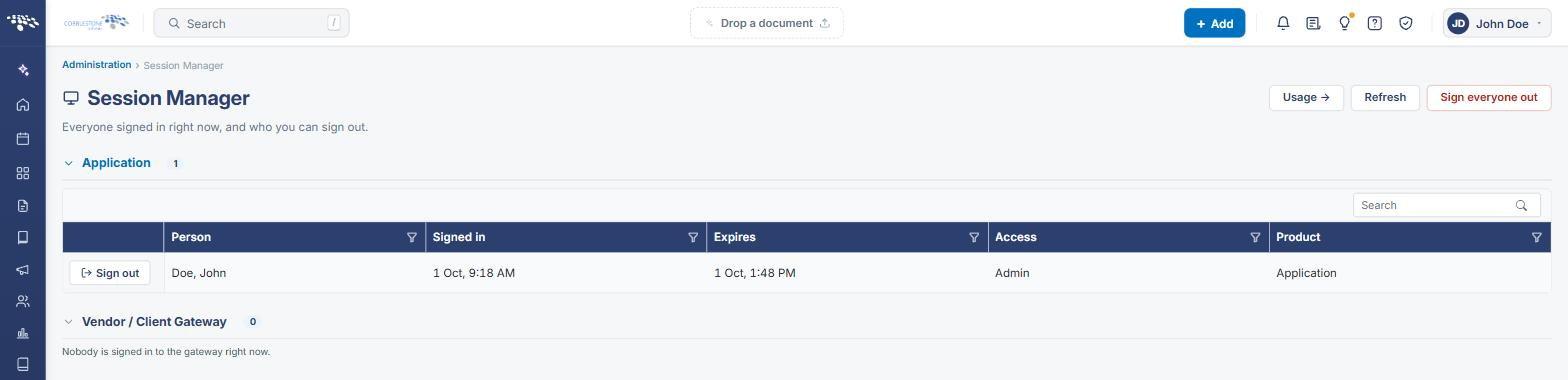
- Session Manager (Administration > Session Manager) shows everyone currently signed in across the application, their sign-in and expiry times, access level, and product, with per-person "Sign out" and a "Sign everyone out" action for the whole list.
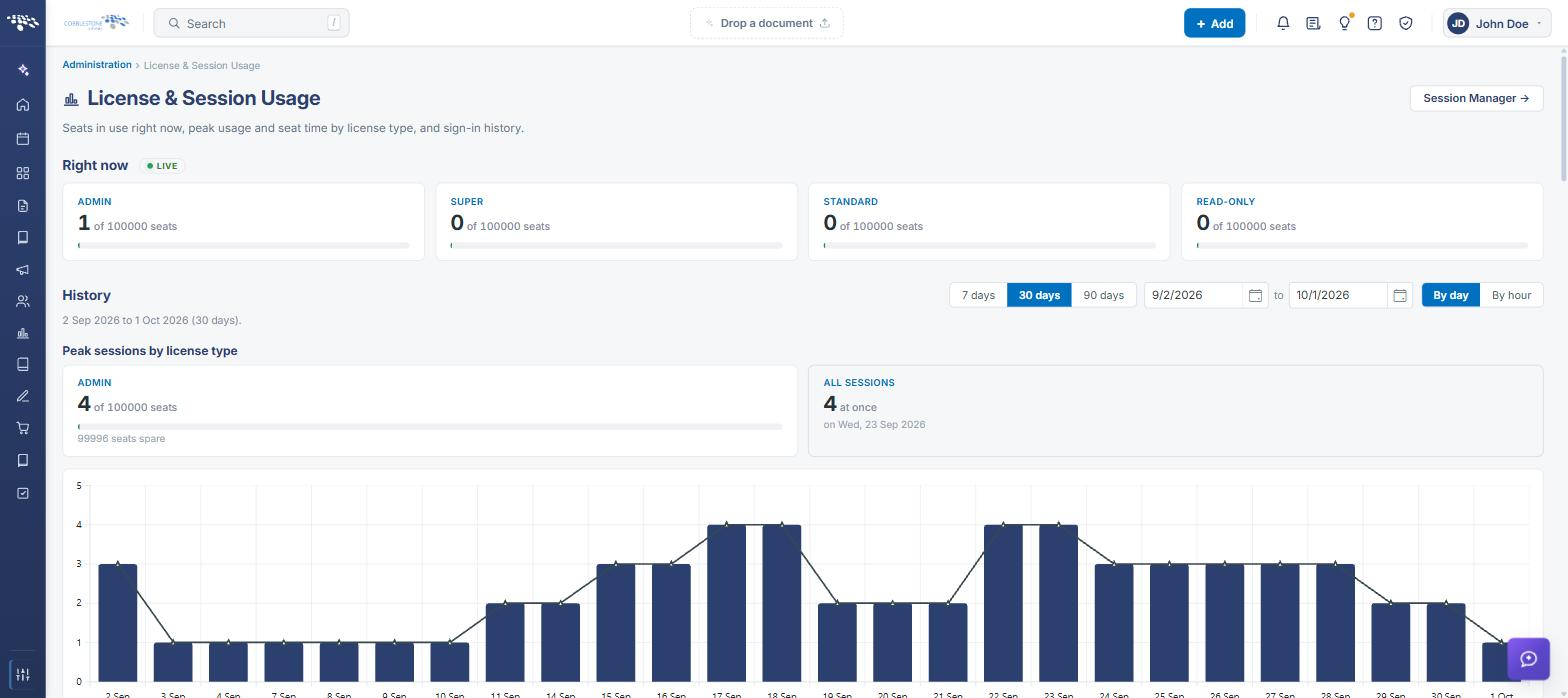
- License & Session Usage (linked from Session Manager via "Usage") tracks seat consumption over time by license level, useful for confirming the organization isn't approaching its licensed seat limits.
- Security Groups and Manage User Permissions remain the two tools for maintaining access at scale: Security Groups for named, reusable bundles of permissions plus membership, and Manage User Permissions for the individual permission definitions those groups draw on.
3. Opening the Security & Access Tools
All of the tools used to manage access day to day are grouped together in the Security & Access category of the Administration page.
- From the Contract Insight homepage, click the Administration icon at the bottom of the left navigation bar.
- Scroll to the Security & Access category, or type the tool's name into the Search administration… box at the top of the page.
- Click the tile for the tool you need (for example, Session Manager or Security Groups).

4. Reviewing Who Is Signed In (Session Manager)
Session Manager lists everyone signed in right now, grouped by product: Application for internal users and Vendor / Client Gateway for external gateway users.
- Go to Administration → Security & Access → Session Manager.
- Review each session's Person, Signed in and Expires times, Access level, and Product. Use the Search box or the column filters to narrow the list.
- To end one person's session, click Sign out on their row. To end every session at once, click Sign everyone out in the top-right corner.
- Click Refresh to reload the list, or Usage → to open License & Session Usage.
5. Monitoring License & Session Usage
License & Session Usage shows how many seats are in use right now and how usage has trended over time, so you can confirm the organization is staying within its licensed limits.
- Go to Administration → Security & Access → License & Session Usage (or click Usage → in Session Manager).
- Under Right now (marked LIVE), review the seats in use for each license level — Admin, Super, Standard, and Read-Only — against the licensed total.
- Under History, choose 7 days, 30 days, 90 days, or a custom date range, and switch between By day and By hour.
- Review Peak sessions by license type and the chart for the highest concurrent usage in the period. Use Export above the table to download the figures.
6. Adjusting One Employee's Access (Employee Permissions)
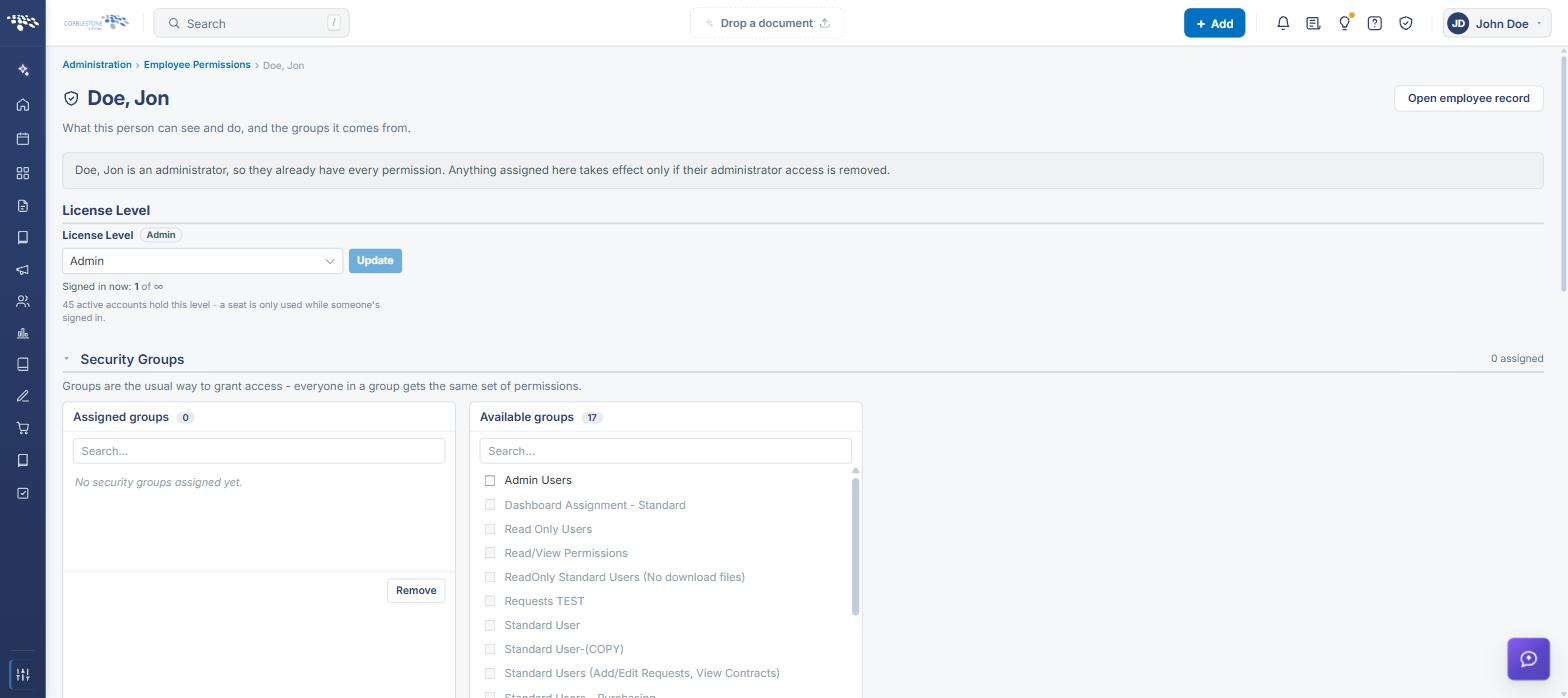
Employee Permissions shows everything one person can see and do, and where each permission comes from.
- Go to Administration → Security & Access → Employee Permissions.
- Search for the employee by name, username, or email, and select them from the results.
- Make changes in the relevant section:
- License Level — select a new level from the dropdown and click Update.
- Security Groups — check groups under Available groups and click Assign, or check groups under Assigned groups and click Remove.
- Individual Permissions and Additional Departments — assign or remove the same way.
- Review the What [employee] can do section at the bottom of the page to confirm the result. Click Open employee record to go to the full employee record.
Note: Employees on the Admin license level already have every permission. Anything assigned here only takes effect if their administrator access is removed.
7. Maintaining Security Groups
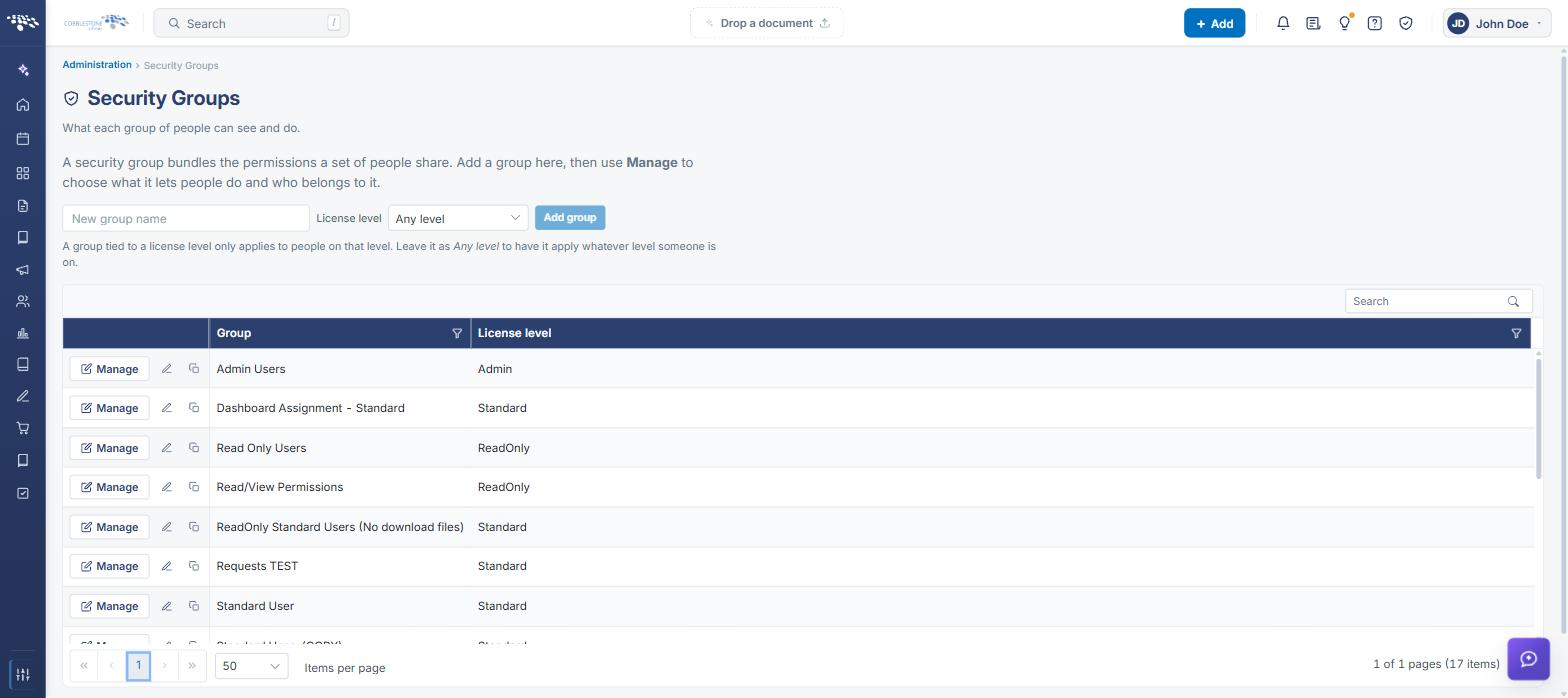
A security group bundles the permissions a set of people share. Groups are the usual way to grant access, since everyone in a group receives the same permissions.
- Go to Administration → Security & Access → Security Groups.
- To create a group, enter a New group name, optionally choose a License level, and click Add group. A group tied to a license level only applies to people on that level; leave it as Any level to apply it regardless of level.
- Click Manage on a group's row to choose what it lets people do and who belongs to it. Use the pencil and copy icons beside Manage to rename or duplicate a group.
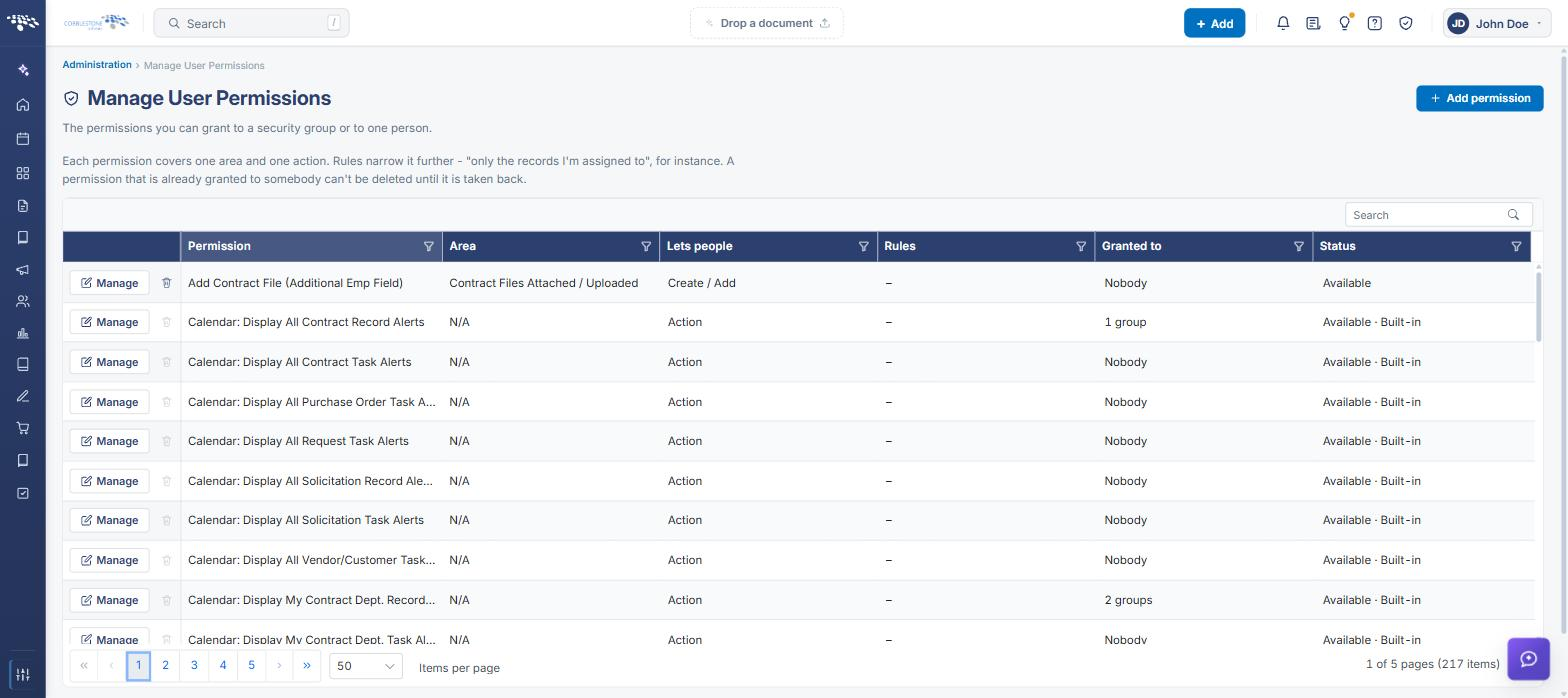
8. Maintaining Permission Definitions (Manage User Permissions)
Manage User Permissions lists the individual permissions that can be granted to a security group or to one person. Each permission covers one area and one action, and rules can narrow it further (for example, only the records a person is assigned to).
- Go to Administration → Security & Access → Manage User Permissions.
- Review each permission's Area, Lets people action, Rules, Granted to, and Status. Use the Search box or column filters to find a permission.
- Click + Add permission to create a new permission, or Manage on a row to edit an existing one.
Note: A permission that is already granted to somebody can't be deleted until it is taken back. Built-in permissions are labeled Built-in in the Status column.
9. Managing Roles
Roles are job-function groupings used to target work and alerts — for example, a workflow task assigned to a role goes to all of its members. Roles are separate from security groups and do not grant permissions.
- Go to Administration → Security & Access → Roles.
- Click a role to expand it and view or change its members. The member count is shown on the right of each row.
.png)
10. Quick Reference Summary
| Task | How to Complete It |
|---|---|
| See who is signed in right now | Administration → Security & Access → Session Manager. |
| Sign one person (or everyone) out | Session Manager → Sign out on the person's row, or Sign everyone out. |
| Check current and peak seat usage | Administration → Security & Access → License & Session Usage (or Usage → in Session Manager). |
| Change one employee's license level, groups, or permissions | Administration → Security & Access → Employee Permissions → search for the employee → update the relevant section. |
| Create or edit a security group | Administration → Security & Access → Security Groups → Add group, or Manage on an existing group. |
| Add or edit a permission definition | Administration → Security & Access → Manage User Permissions → + Add permission, or Manage on a row. |
| View or change role members | Administration → Security & Access → Roles → expand the role. |