COBBLESTONE SOFTWARE
Contract Insight — User Guide
Viewing the Vendor/Company Details Screen
10. End Users: Vendors/Companies › Vendor/Company Details › Viewing the Vendor/Company Details Screen
Note: Each procedure in this guide begins at the Contract Insight homepage, so any section can be followed on its own. Custom fields are configurable, so the exact field list on a contract category record may vary between environments.
1. Overview
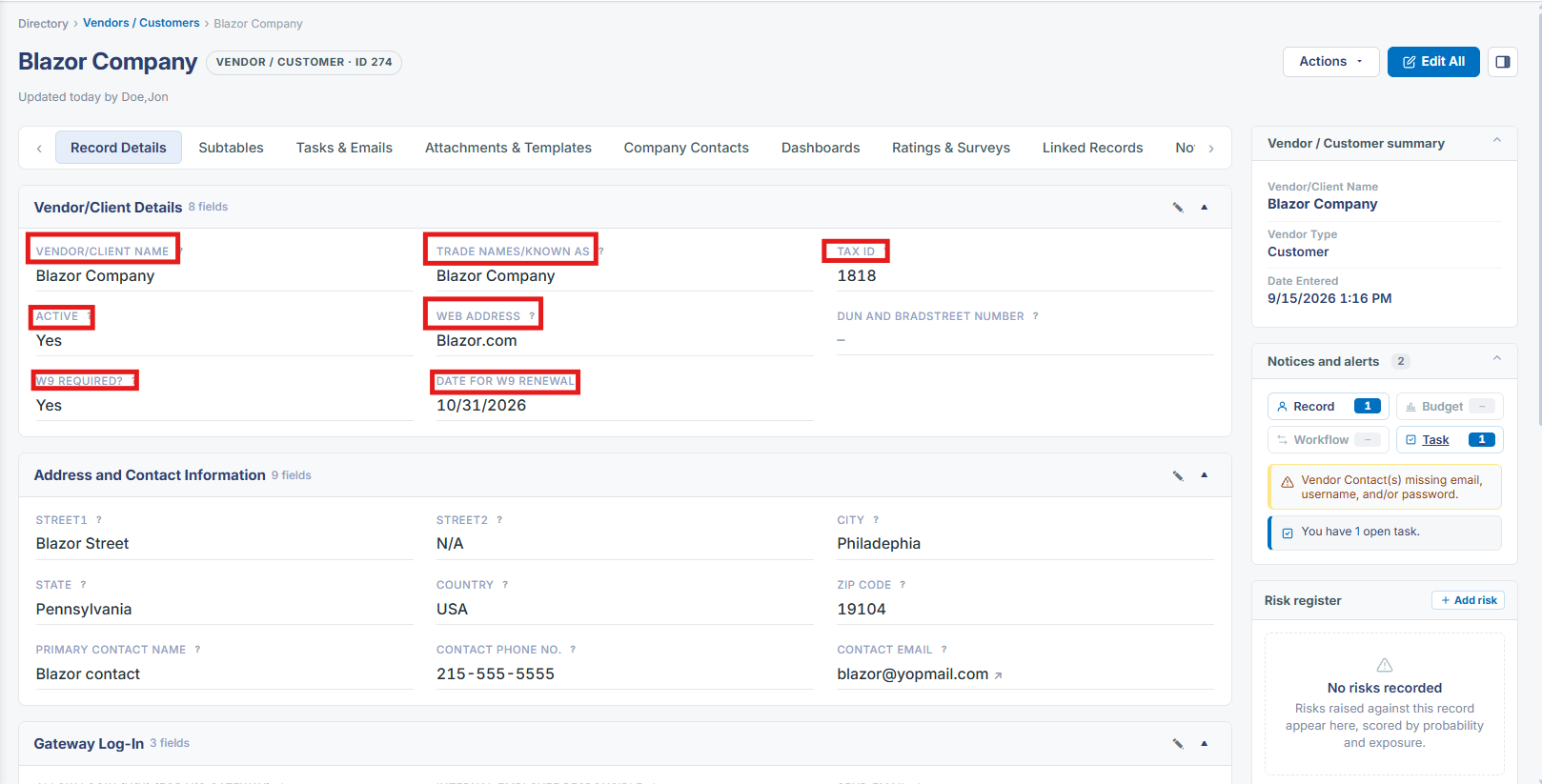
The Details panel on a company record's Record Details tab groups its core identity fields — Company Name, Company ID, Vendor Type, Active, Tax ID, Trade Names/Known As, Website, and lifetime value fields (Lifetime Contract Value Amount, Lifetime Revenue Amount, Lifetime Spend Amount) — with related information split into its own collapsible panels below.
2. Key Elements
- Details panel holds Company Name, Vendor Type, Active, Tax ID, and Website
- Lifetime Contract Value, Lifetime Revenue, and Lifetime Spend amounts appear as their own fields
- Contact Information, Location Information, Risk Management, Gateway Log-In, and Record Info are separate collapsible panels