The Core System provides Contract Insight’s core components and functionality for full lifecycle management of your organization’s contracts and committals.
CORE SYSTEM
ENHANCEMENTS
ENHANCEMENT: Enhanced Field Mask Formatting Support Preserving Display Values in Document Template Merges
Reference #: 260527.1157.25772
Enhancements have been made to Document Template merging to ensure fields configured with Field Masks retain their formatted display values in generated documents.
When merging templates, formatted values such as phone numbers, grouped numbers, and decimal formatting will now display consistently with how they appear within the CobbleStone interface. This functionality applies automatically during document generation and does not require any updates to existing templates.
Please note that spreadsheet-based output formats, such as Excel and CSV files, may not retain numeric formatting for Integer, Decimal, and Decimal4 field types due to formatting limitations inherent to spreadsheet applications. The underlying data will still merge successfully and can be formatted directly within the spreadsheet if needed.
ENHANCEMENT: Streamlined Document Template Configuration Workflow Improving Setup Efficiency and Usability
Reference #: 260527.1157.26764
Enhancements have been made to the Document Template configuration experience to provide a more streamlined and user-friendly workflow within the Core system.
Previously, users needed to navigate across multiple separate pages and panels to manage template fields, placeholders, and configuration settings. This update consolidates key setup actions into a more intuitive experience, reducing unnecessary navigation while preserving all existing functionality and system behavior.
These interface improvements are designed to help template creators work more efficiently, reduce setup complexity, and provide a smoother overall configuration experience ahead of the upcoming platform modernization efforts.
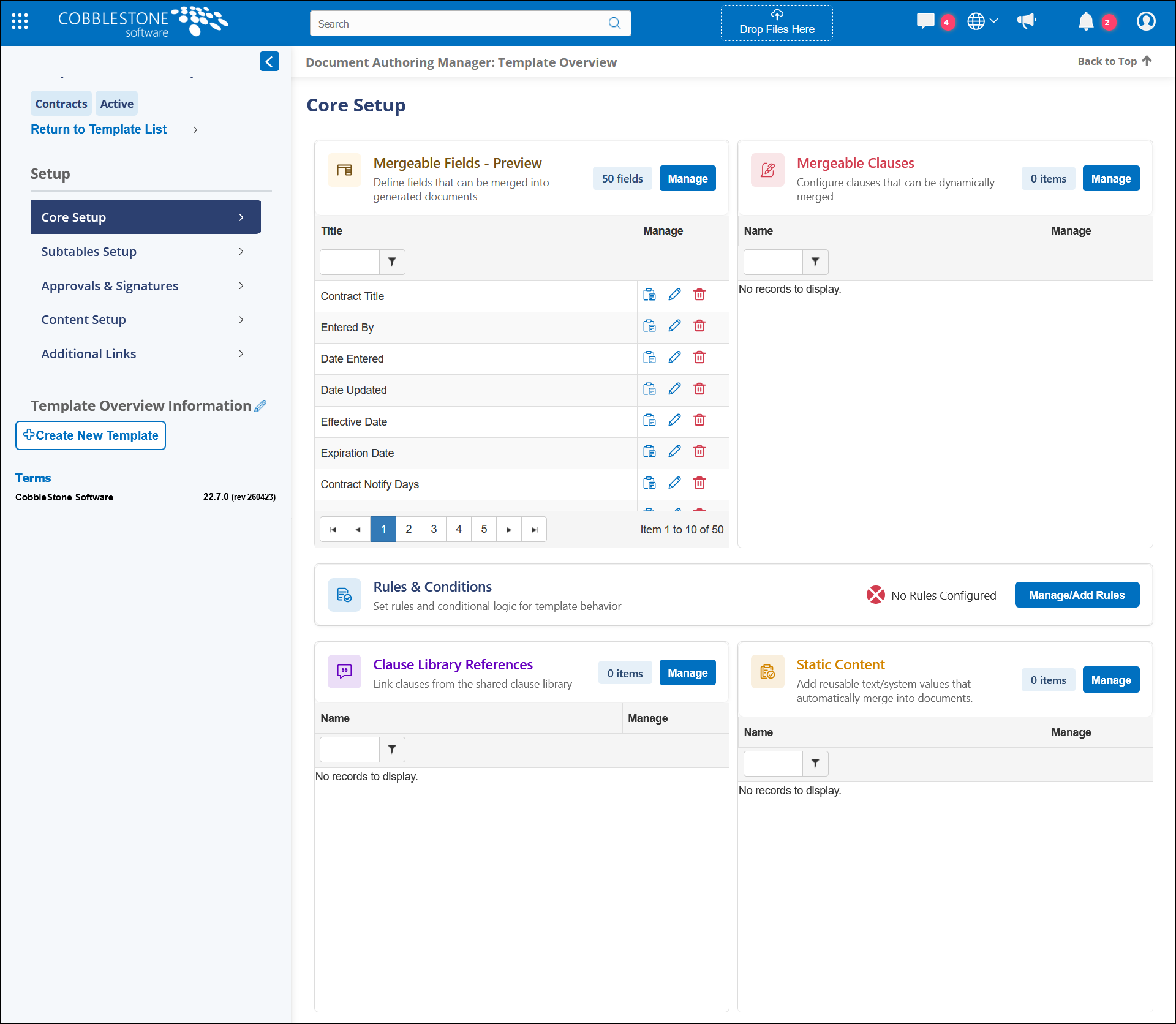 Core Setup
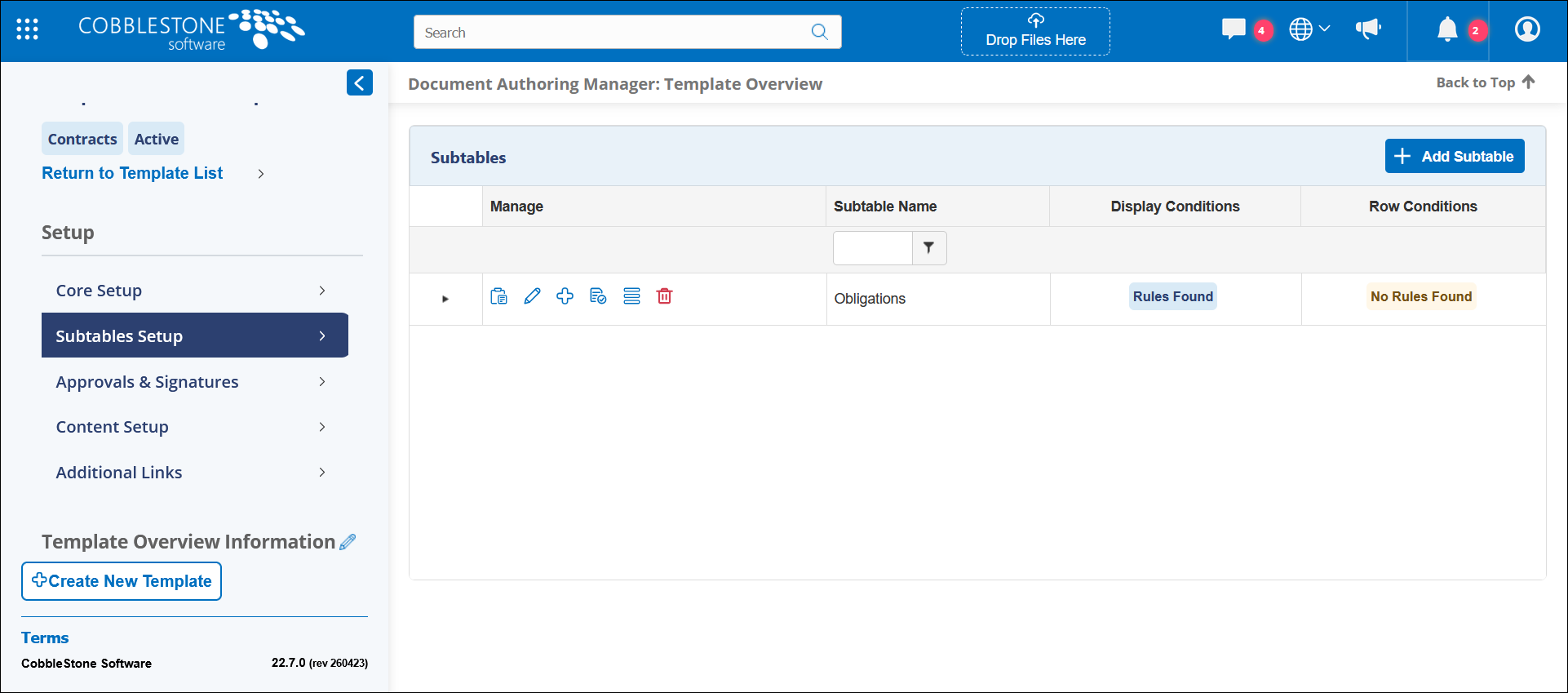 Subtable Setup
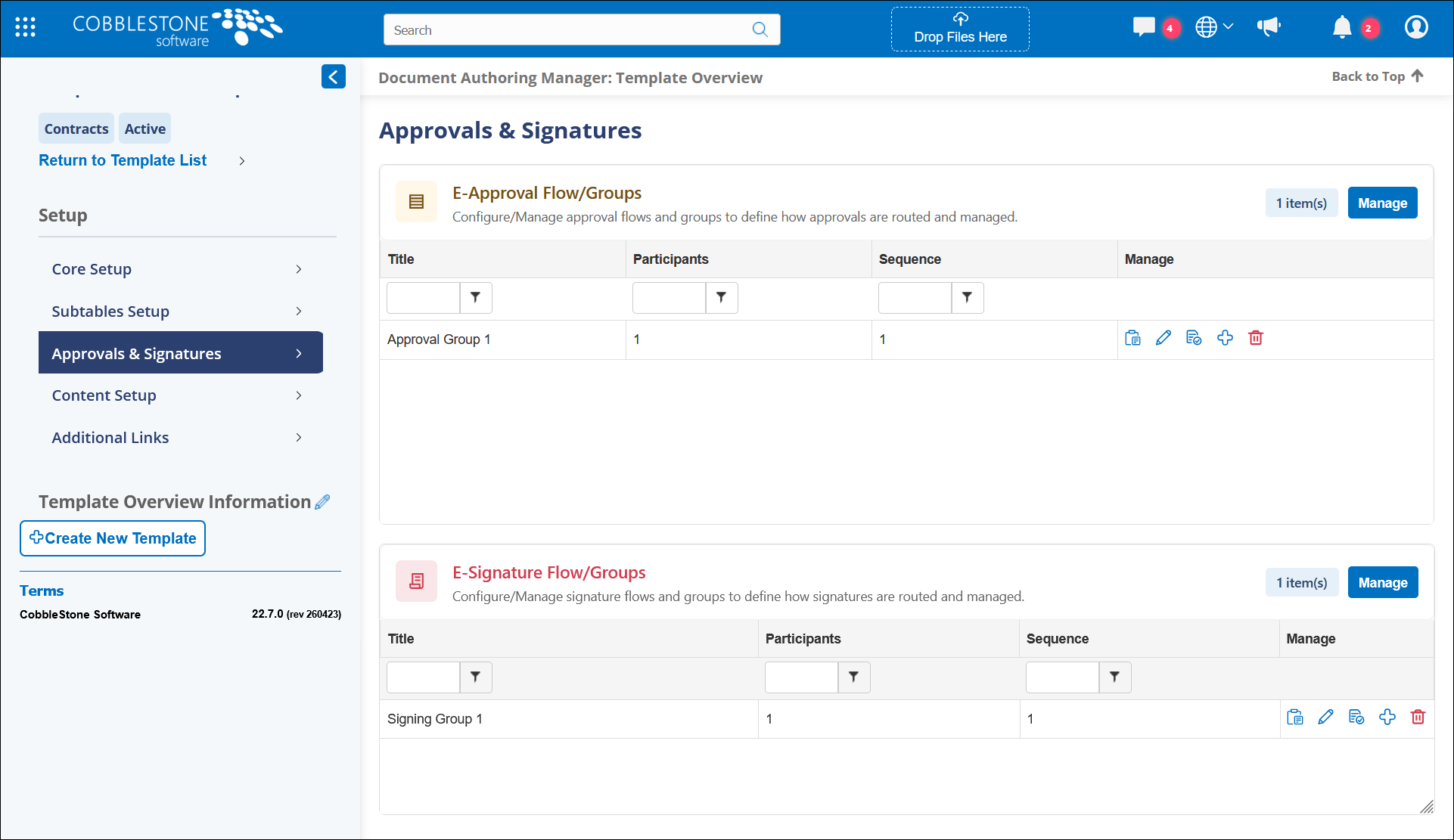 Approvals & Signatures
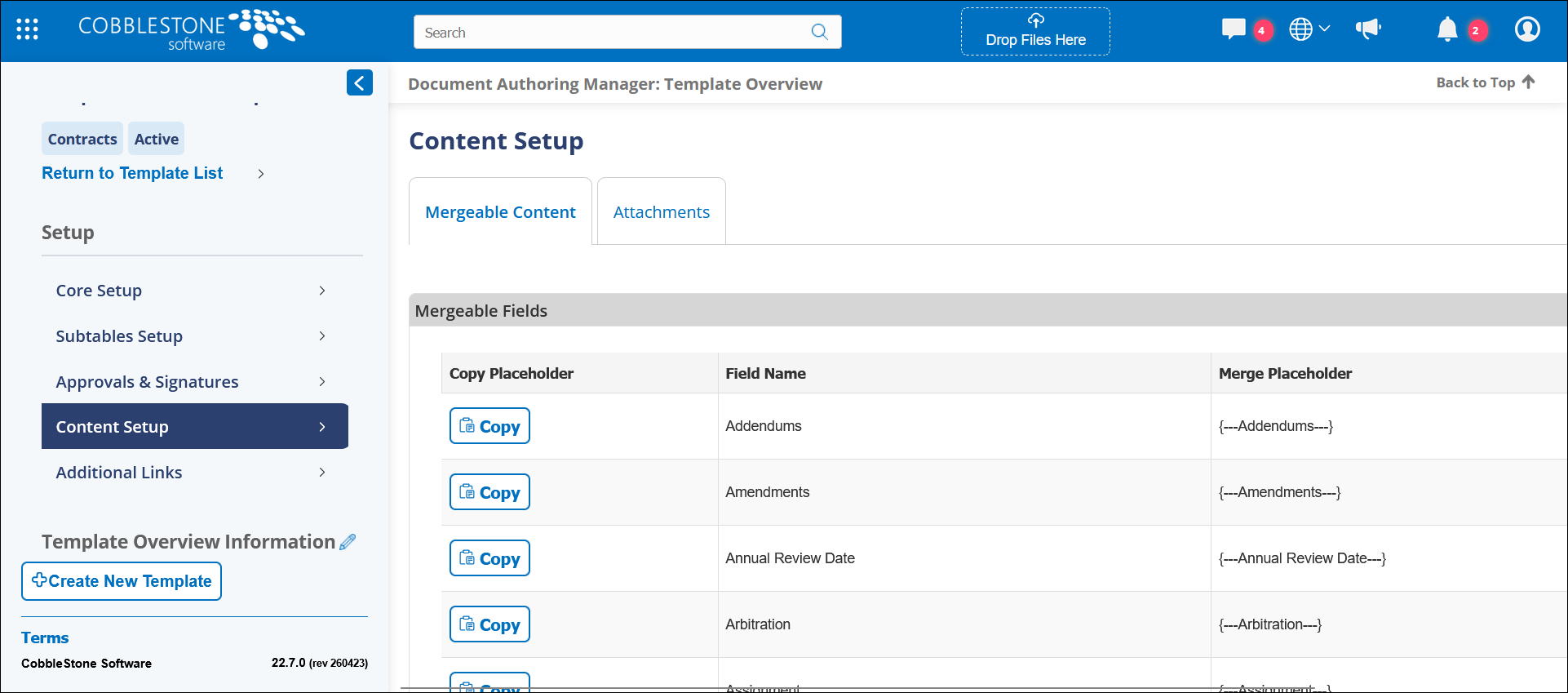 Content Setup - Mergeable Content
 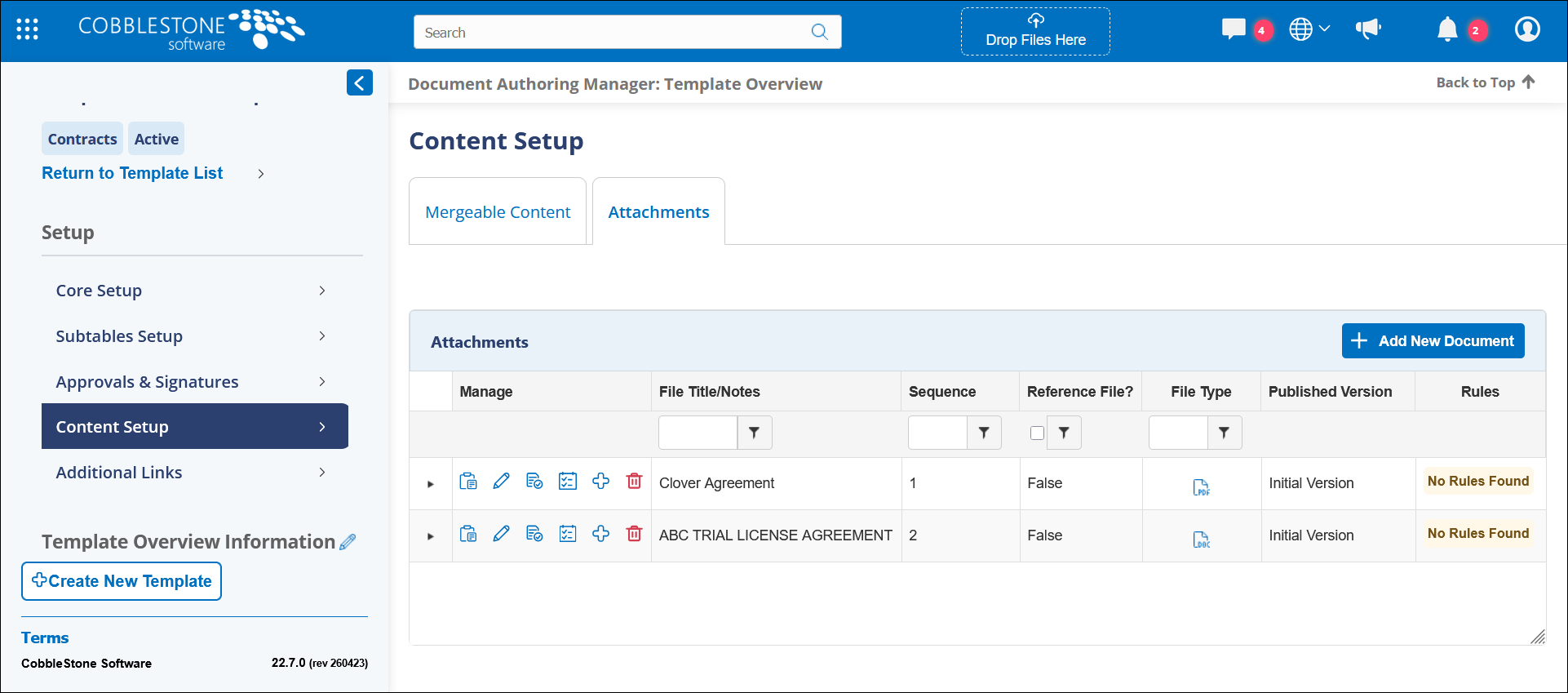 Content Setup - Attachments
CORE SYSTEM
RESOLUTIONS
RESOLUTION: Permission State Handling Causing Inconsistent Access to Collaborative Online Editor
Reference #: 260527.1203.26767
An issue was identified where certain users with elevated permissions could experience difficulties launching the Collaborative Online Editor, despite having the appropriate access rights assigned.
This was caused by permission settings not being consistently maintained during page refresh and validation events within the application. Updates were applied to properly reassert user permissions throughout the process, ensuring authorized users retain access as expected.
RESOLUTION: Deprecated Clause Search Function Causing VISDOM Processing Errors During Contract Creation
Reference #: 260527.1222.29417
An issue was identified where users attempting to create contracts through the VISDOM Drag and Drop process could receive an “Error Processing VISDOM” message across multiple contract types.
This was caused by the application relying on an outdated clause search function during document processing. Updates were applied to replace the deprecated functionality with the current supported process, restoring normal VISDOM operation.
RESOLUTION: Hidden Line Break Formatting Handling Causing Multi-Line Text Fields to Display as Single Paragraphs
Reference #: 260527.337.30703
An issue was identified where formatting within Multi-Line Text Box fields, such as line breaks and spacing, was not consistently displaying correctly in records and reports. In some cases, content appeared as a single paragraph even though formatting was preserved while editing the field.
This was caused by hidden line break formatting not being properly recognized during display and reporting processes. Updates were applied to improve formatting support for Multi-Line Text Box fields and ensure line breaks and spacing display correctly throughout the application.
RESOLUTION: Case-Sensitive Subtable Matching Causing Duplicate User-Defined Subtable Displays on Record Tabs
Reference #: 260527.337.33986
An issue was identified where certain user-defined subtables could appear more than once on record tabs when both individually assigned subtables and the “Display All User-Defined Subtables” option were enabled.
This occurred because the system was not consistently recognizing previously assigned subtables when comparing names with different capitalization. Updates were applied to improve the matching process and prevent duplicate subtable displays.
RESOLUTION: Incorrect Request Task Reference Causing Progress Indicators to Remain at Zero
Reference #: 260527.365.34083
An issue was identified where the task progress indicator within the Requests table did not update correctly as tasks were completed. In affected cases, the progress bar remained at “0” regardless of task activity.
This was caused by an incorrect reference being used when calculating Request task progress. Updates were applied to ensure progress information is now properly linked and displayed.
RESOLUTION: Incorrect Icon Preview Pathing Causing Broken Image Displays in Dashboard Button Tile Configuration
Reference #: 260527.365.34244
An issue was identified where icon preview images did not display correctly within the Tile Icon selection list when configuring Dashboard Button Tiles. Although the selected icons appeared properly after being applied, the preview images within the dropdown menu showed as broken links.
This was caused by incorrect image path handling within the icon preview list. Updates were applied to correct the preview pathing and restore proper image display during tile configuration.
RESOLUTION: Enhanced Field Editing Controls Improving Individual Record Updates on Details Screens
Reference #: 260527.337.34857
Enhancements have been made to restore and improve the ability to edit individual fields directly from record detail screens across the primary application areas.
Users can now choose to edit an entire field group at once or make updates to individual fields independently within a field group. Additional improvements were also made to support smoother edit, save, and cancel actions, as well as improved display handling for longer field group names.
RESOLUTION: UTC Date Conversion Handling Causing Date Fields to Shift Backward During Record Editing
Reference #: 260527.337.34943
An issue was identified where date fields within record detail groups could unexpectedly change to the previous day each time a user re-entered edit mode.
This was caused by how date values were being processed behind the scenes during editing, resulting in incorrect date conversion behavior. Updates were applied to ensure date values remain consistent and no longer shift backward when editing records multiple times.
RESOLUTION: Duplicate Dropdown Rendering Logic Causing Repeated Values Across Record Detail Forms
Reference #: 260527.365.35058
An issue was identified where certain dropdown fields displayed duplicate values across multiple areas of the system, including Employee Details, Vendor Details, and Contract Details.
This was caused by duplicate rendering logic within the field group control template, which resulted in some dropdown options being added more than once during display. Updates were applied to correct the rendering behavior and eliminate the duplicate entries.
RESOLUTION: Incorrect Unicode Text Handling Causing Quick Search Failures for Non-Latin Contract Titles
Reference #: 260527.337.35153
An issue was identified where contracts containing non-Latin characters in the title, such as Arabic, Chinese, Korean, or Japanese text, could not be found through Quick Search.
This was caused by the search process not consistently handling Unicode text formatting during the search operation. Updates were applied to ensure fields that accept non-Latin characters are processed correctly throughout the Quick Search experience.
RESOLUTION: Inverted Auto-Complete Task Visibility Logic Causing Hidden Tasks and Missing Display Controls
Reference #: 260527.337.35284
An issue was identified where the “Hide Auto Complete Tasks” configuration setting was not behaving as expected within task grids. In affected cases, enabling the setting could completely hide auto-complete tasks without providing users the option to display them when needed.
This was caused by incorrect visibility logic introduced during prior updates to the tabbed detail screen experience. Updates were applied to restore the intended behavior of the configuration setting and task visibility controls.
When the setting is enabled, auto-complete tasks will now remain hidden by default while providing users with the option to display them as needed. When the setting is disabled, all tasks will display automatically without additional filtering controls.