COBBLESTONE SOFTWARE
Contract Insight — User Guide
Calendar Overview & Navigation
05. End Users: Home Page Options › My Calendar › Calendar Overview & Navigation
Note: Each procedure in this guide begins at the Contract Insight homepage, so any section can be followed on its own. Custom fields are configurable, so the exact field list on a contract category record may vary between environments.
1. Overview
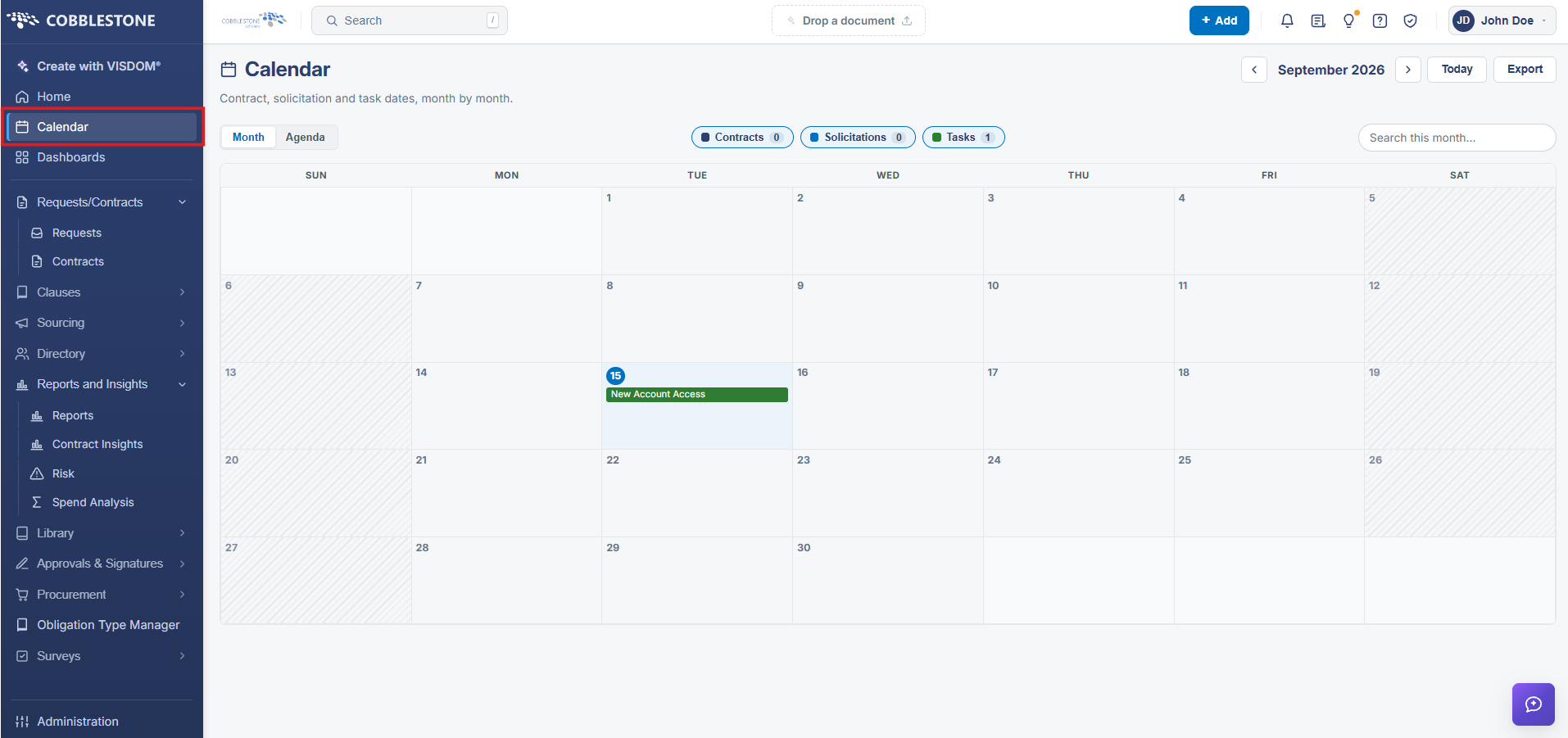
The Calendar screen gives a single view of contract, solicitation, and task dates. A Month/Agenda toggle switches between a full month grid and a day-by-day agenda list; previous/next arrows and a Today button move between months, and the current month/year is shown at the top (for example "August 2026"). An Export button downloads the calendar's data, and each event on the grid is color-coded by type and links directly to its underlying record or task when clicked. The Contracts/Solicitations/Tasks filter chips and the Search this month box (described under Calendar Filtering) sit in the same toolbar, so filtering and navigation are both available from one screen.
2. Key Elements
- Month/Agenda toggle, previous/next month arrows, and a Today button control navigation.
- Export downloads the calendar's current data; each event is color-coded by type and links to its record.
- Filter chips (Contracts/Solicitations/Tasks) and a Search this month box share the same toolbar.