Optional Add-On Module used to extend the functionality and collaboration scope of Contract Insight by providing a dedicated gateway portal for your vendors, suppliers, providers, clients, customers, respondents, etc. to view and interact with the contracts, solicitations, etc. you have with them.
VENDOR/CLIENT COLLABORATION GATEWAY
NEW FEATURES
NEW FEATURE: Customizable Record Detail Tags on Vendor/Client Gateway
Reference #: 251212.1203.20845
We’ve added flexibility to how record details are displayed on the Vendor/Client Gateway.
What’s New?
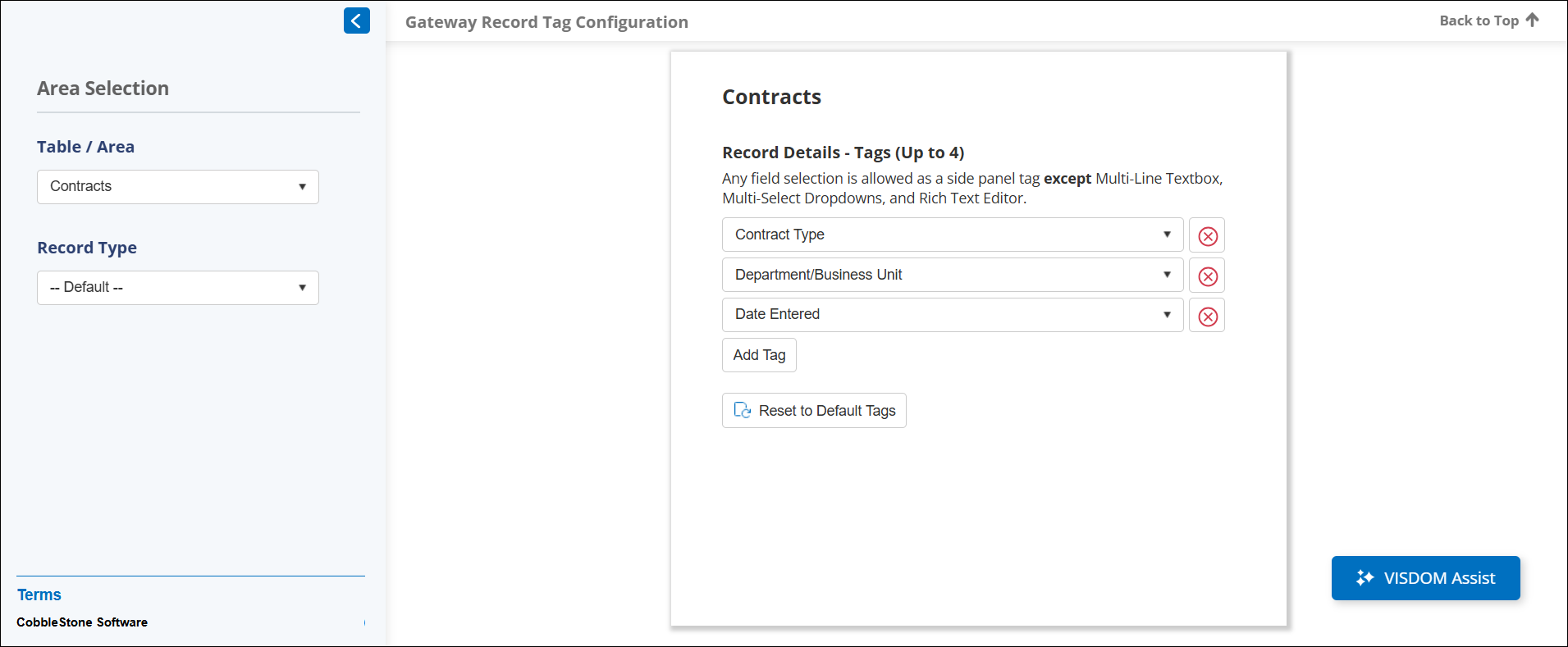
Permissioned users can now configure which tags appear on record detail pages for each record type. This configuration is available under:
Manage/Setup → Field Manager → Vendor/Client Gateway Configuration → Gateway Record Tag Configuration
From this page, you can:
- Select a table/area and a record type (or leave as default).
- Click Add Tag to choose which fields to display as tags.
- NOTE: Certain field types (e.g., MultiSelect, MultiSelect List Box, MultiLine Text Box, Rich Text Editor) are not available for tag configuration.
Why This Matters:
This enhancement gives you full control over what information is visible to vendors and clients, helping you tailor the experience to your organization’s needs and maintain data privacy.
NEW FEATURE: Sub-Table Support on Request Add Screen
Reference #: 251212.1203.19416
We’ve enhanced the Vendor/Client Gateway to make submitting Requests more flexible and efficient.
What’s New?
Users can now add sub-table information or upload Excel/CSV files directly from the initial Request submission screen. This functionality uses the familiar Bulk Add feature for easy data entry.
When enabled by your administrator, sub-tables will appear on the Request Add screen. Users can:
- Click Add to enter data into sub-table fields.
- Upload Excel/CSV files for bulk entry.
After editing, click outside the table to exit edit mode, then Save to include your data in the Request.
Why This Matters:
This update streamlines the Request submission process, reduces manual entry, and improves efficiency for managing complex record structures.
NEW FEATURE: SAM.gov Integration for Easier Vendor Registration
Reference #: 251212.1171.9806
We’ve streamlined the vendor registration process on the Vendor/Client Gateway for clients with a SAM.gov license.
What’s New?
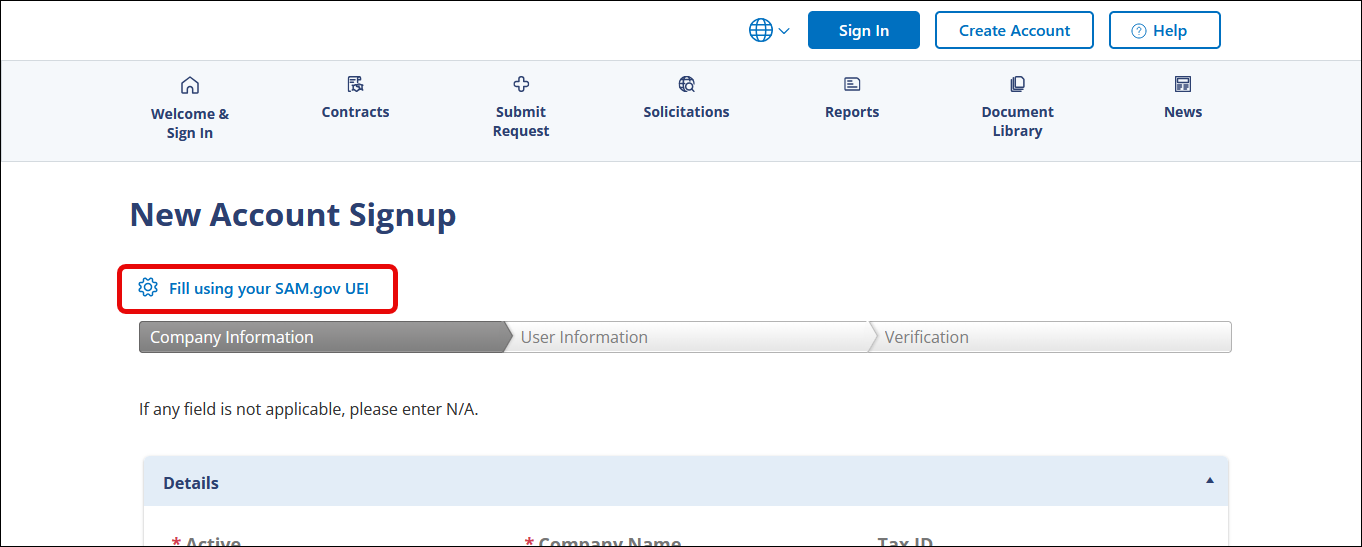
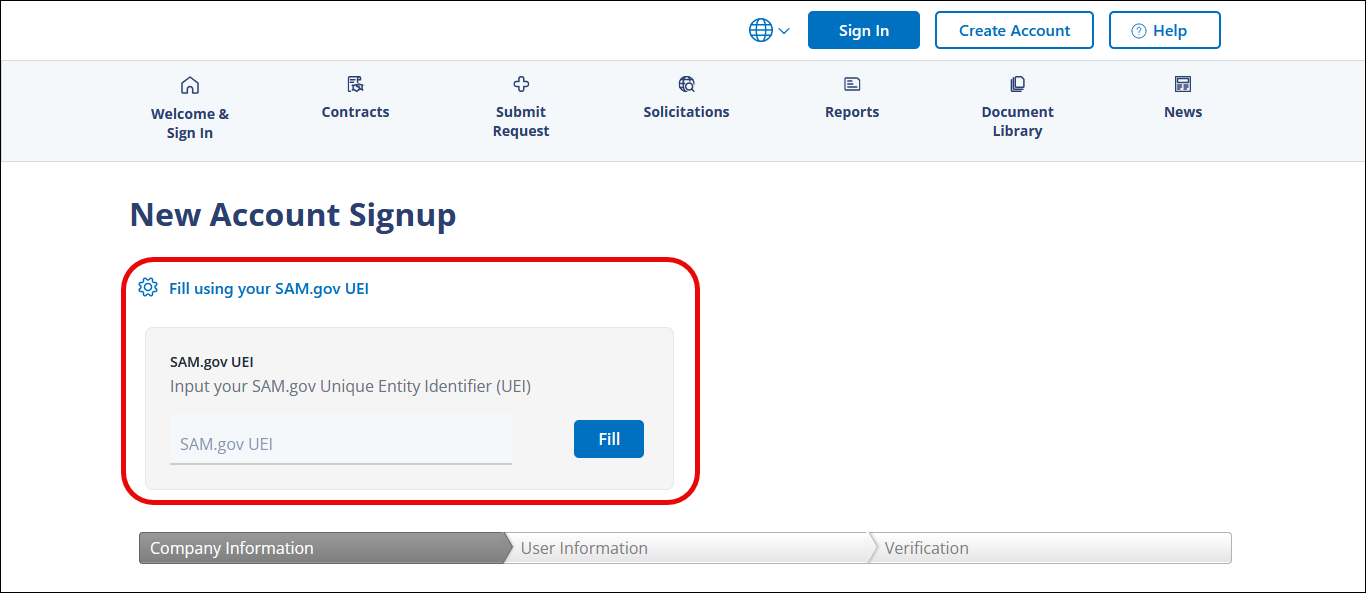
Vendors can now search SAM.gov directly from the registration page by entering their vendor name. Matching SAM entities will appear, allowing vendors to select their record and auto-populate key fields such as company name and location. Alternatively, vendors can enter their UEI code to instantly fill in company details.
Why This Matters:
This enhancement simplifies vendor onboarding, reduces manual data entry, and ensures accurate information—helping you stay competitive with a faster, more user-friendly registration process.
VENDOR/CLIENT COLLABORATION GATEWAY
ENHANCEMENTS
ENHANCEMENT: Dynamic Translations for Gateway Form Labels
Reference #: 251212.1203.17745
We’ve improved the vendor/client gateway experience by introducing dynamic translation capabilities for form field labels.
What’s New?
Form labels now include additional data attributes that enable dynamic translations. Users with translation access can seamlessly translate field labels based on field ID, field table, and tab column attributes. This enhancement ensures consistent and accurate translations across the gateway for both vendors and clients.
Why This Matters:
Dynamic translations make it easier to work in multiple languages, improving accessibility and usability for global teams.
ENHANCEMENT: Enhanced Help Page for Vendor/Client Gateway
Reference #: 251212.1203.18898
We’ve improved the Help Page on the Vendor/Client Gateway to provide better support and guidance for vendors and clients.
What’s New?
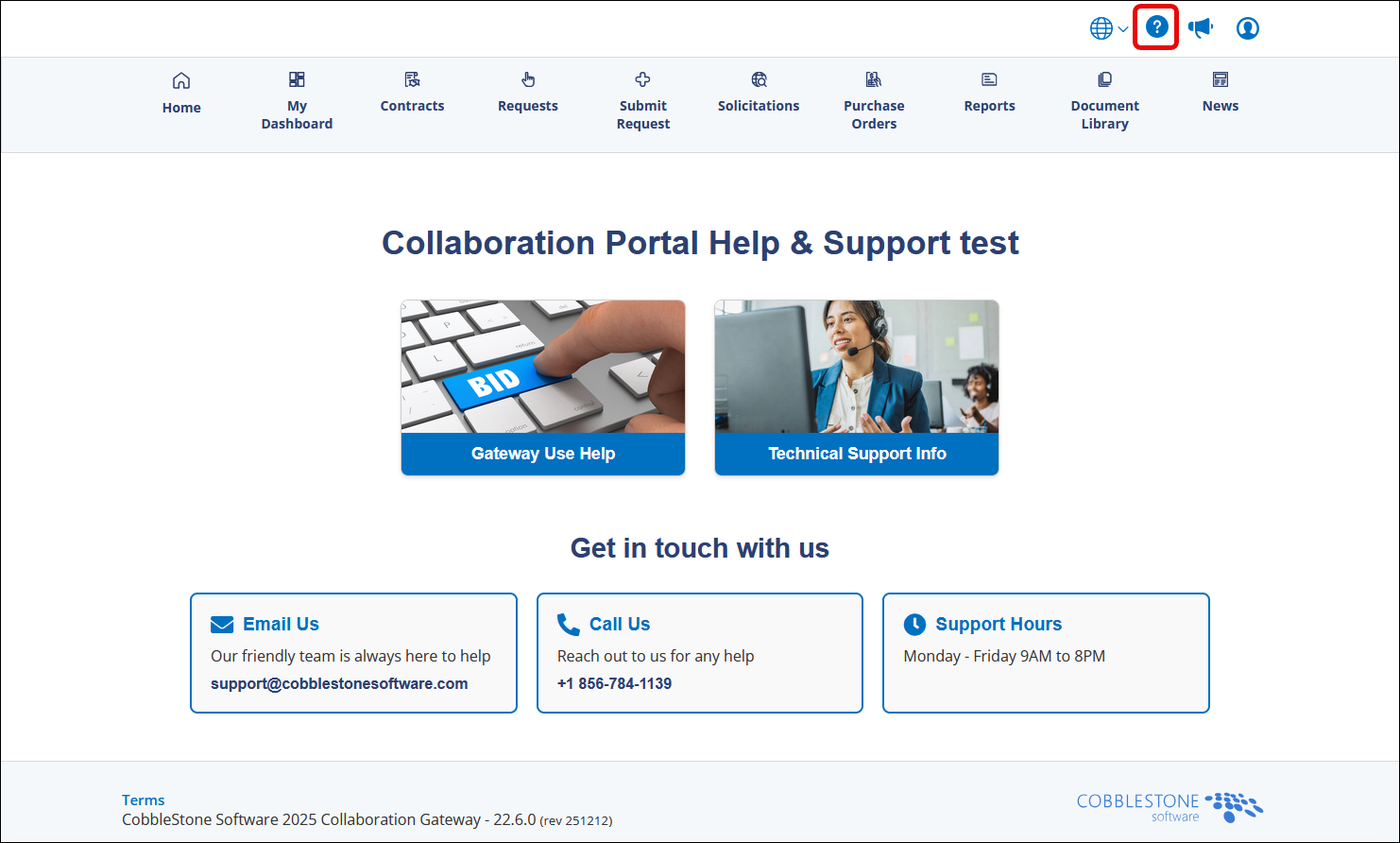
- Updated UI: A cleaner, more user-friendly design for easier navigation.
- Quick Access to Support: CobbleStone phone number, email, and support hours are now prominently displayed.
- Gateway Use Help: Click Gateway Use Help to view configurable help content for using the portal.
- Technical Support Info: Click Technical Support Info to access our wiki page with detailed technical guidance.
- Email Support Option: Click Email Us to open a pre-filled email window with the support address and subject line, making it faster to get help.
Why This Matters:
These enhancements make it easier for vendors and clients to find answers, access technical resources, and reach support quickly—helping you stay competitive and reduce bid loss.
ENHANCEMENT: Status Filter Removed from Search Pages
Reference #: 251212.1171.20983
We’ve simplified the search experience on the Vendor/Client Gateway based on client feedback.
What’s New?
The Status filter dropdown has been removed from both Contracts and Requests record search pages. This change eliminates unnecessary options and streamlines the search process for a cleaner, more intuitive user experience.
Why This Matters:
By removing this filter, we’ve addressed client concerns and improved usability, making it easier to find the records you need without extra steps.
VENDOR/CLIENT COLLABORATION GATEWAY
RESOLUTIONS
RESOLUTION: [TITLE]
Reference #: [REF #]
[DESCRIPTION]
RESOLUTION: [TITLE]
Reference #: [REF #]
[DESCRIPTION]
RESOLUTION: Public Solicitation View Showing Both Open and Closed Solicitations
Reference #: 251212.1171.21301
Clients reported that when viewing Public Solicitations on the Vendor/Client Gateway, the list displayed both open and closed solicitations. In the previous gateway version, searching Public Solicitations via the Main Menu only showed Open Solicitations, which caused confusion in the new version.
We updated the logic for the Solicitation Status dropdown on the Vendor/Client Gateway. Users can now filter solicitations more effectively, whether logged in or accessing the gateway publicly. This ensures that you can easily view only the solicitations you need—such as open opportunities.
RESOLUTION: Download All Button Logic for Solicitations and Contracts
Reference #: 251212.1203.22269
We have resolved an issue where the Download All button on the Vendor/Client Gateway was automatically disabled for solicitation records. The logic has now been updated to ensure proper functionality:
- Not Logged In: Users can download all public files.
- Logged In: Users can download public files as well as any files uploaded by the vendor.
This updated logic has also been applied to contract records, ensuring consistent behavior across both record types. Users can now reliably use the Download All button to access the appropriate files.
RESOLUTION: “View Request” Option Not Navigating for External Users on VCG in Older Versions of Contract Insight
Reference #: 251212.1203.22578
We resolved an issue where external users on the Vendor/Client Gateway (VCG) were unable to access request records using the View Request option. Instead of navigating to the request, the page would reload and remain on the same screen. This affected certain users on older versions of Contract Insight.
The system logic has been updated to prevent this issue in the future. External users can now successfully navigate to request records using the View Request option.
RESOLUTION: Errors When Using Old Vendor/Client Gateway Links
Reference #: 251212.1203.19541
Clients reported that accessing the Vendor/Client Gateway (VCG) through hyperlinks containing outdated page names resulted in an error. These links were often from older emails or bookmarked URLs and did not redirect to the correct page.
We implemented the following updates to ensure smooth navigation:
- Updated the code to reset the GatewayURL field to the correct page.
- Added redirects for multiple deprecated pages, automatically sending users to their new equivalents.
RESOLUTION: Section Navigation in Vendor/Client Gateway Surveys
Reference #: 251212.1203.20805
Clients reported that when completing surveys with multiple sections in the Vendor/Client Gateway, the section drop down did not work. Selecting a different section did nothing, making it difficult to navigate through the survey.
We’ve corrected the page handling logic so that the drop down selection is properly processed. Now, when selecting a different section, the survey will update and display the chosen section as expected.
RESOLUTION: Incorrect Gateway Links in E-Sourcing Emails
Reference #: 251212.1203.21154
Clients reported that vendors receiving E-Sourcing emails through the Vendor/Client Gateway encountered errors when clicking the provided link. The URL in these emails included the word “Public”, which caused the link to fail and prevented vendors from accessing the E-Sourcing record as intended.
We updated the embedded Gateway links to ensure:
- Old E-Sourcing detail page links now point to the correct URL.
- Old login page links have been corrected for consistency.
Combined with recent updates for automatic page redirects on the Vendor/Client Gateway site, these changes ensure that all E-Sourcing links work properly.
RESOLUTION: Field Displaying in Vendor/Client Gateway
Reference #: 251212.1203.21969
Clients reported that certain fields were displaying in the Vendor/Client Gateway, even though they were deselected as Show on Search within the Core system. For example, the Description field continued to appear in the E-Sourcing list despite being deselected.
This has been resolved to ensures that field and their mappings are pulled only for existing types, preventing unwanted fields from appearing in the Vendor/Client Gateway.
RESOLUTION: Some Users Unable to Create Account on the Vendor/Client Gateway
Reference #: 251212.1286.22146
Some users experienced an issue when creating accounts through the Vendor/Client Gateway using a Self-Registration Wizard. This occurred because the Registration Form was missing required configuration for user information fields.
Two updates were made:
- When configuring a Self-Registration Wizard, a message appears at the top of the screen:
_Please be sure to add and configure fields for the Vendor/Customer and Vendor/Customer Contact tables. If these tables are not included, the Wizard will not show in the Self Registration drop down menu on the Vendor/Client Gateway._ - And, on the Vendor/Client Gateway, only Self-Registration Wizards correctly configured will show as options in the drop down menu.
This update improves reliability and reduces setup errors, making the self-registration process smoother and more consistent for your users.
RESOLUTION: Vendor/Client Gateway Option in Menu Management
Reference #: 251212.1286.19539
Previously, when navigating to Manage/Setup > Application Configuration > Manage Main Menu and selecting Manage Menu Items, the drop down list included Vendor/Client Gateway as an option. However, this menu is no longer configurable through this screen, which caused confusion.
The Vendor/Client Gateway option has been removed from the Manage Menu Items for: drop down. This ensures that only valid, configurable menu options are displayed.